7 pages
6.1 MySQL architecture
Layers
Architecture describes the components of a computer system and the relationships between components. This section describes MySQL architecture. Other relational databases have similar components, but component details and relationships vary greatly.
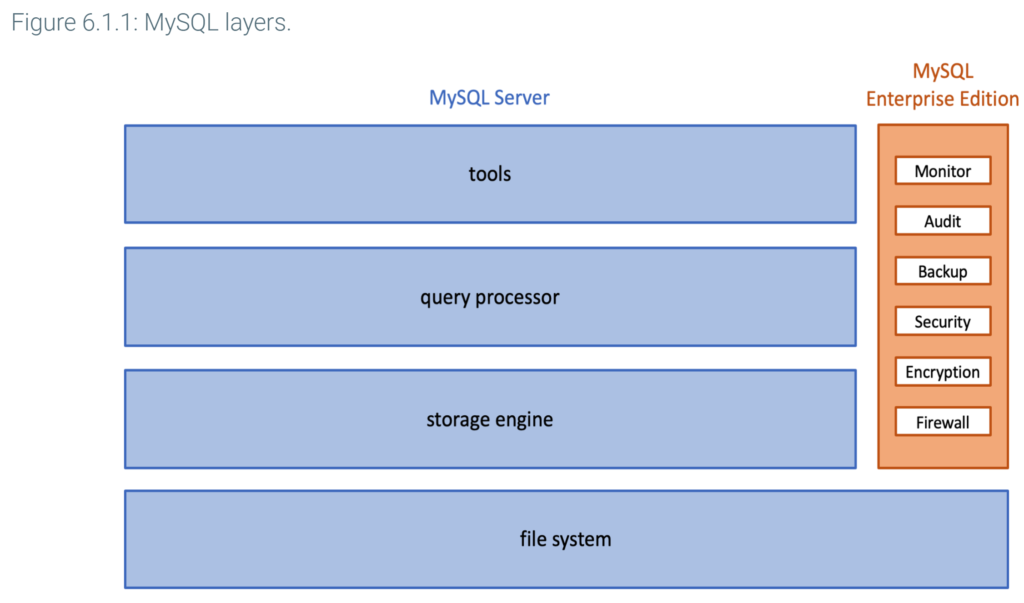
MySQL components are organized in four layers:
- Tools interact directly with database users and administrators, and send queries to the query processor.
- The query processor manages connections from multiple users and compiles queries into low-level instructions for the storage engine.
- The storage engine executes instructions, manages indexes, and interacts with the file system. Some storage engines support database transactions, described elsewhere in this material.
- The file system contains system and user data, such as log files, tables, and indexes.
MySQL is available in a free version, called MySQL Server, and a paid version, called MySQL Enterprise Edition. The Enterprise Edition includes MySQL Server and components for high-end commercial installations, such as:
- Monitor collects and displays information on CPU, memory, and index utilization, as well as queries and results. Database administrators use Enterprise Monitor to manage and tune large databases with many users.
- Audit keeps track of all database changes. For each change, Audit tracks the time of change and who made the change. Audit supports government and business audit requirements for sensitive databases such as financial, medical, and defense.
Additional Enterprise Edition components provide advanced support for backup, security, encryption, and firewall. Enterprise Edition components are intended for database administrators, not users.
Tools
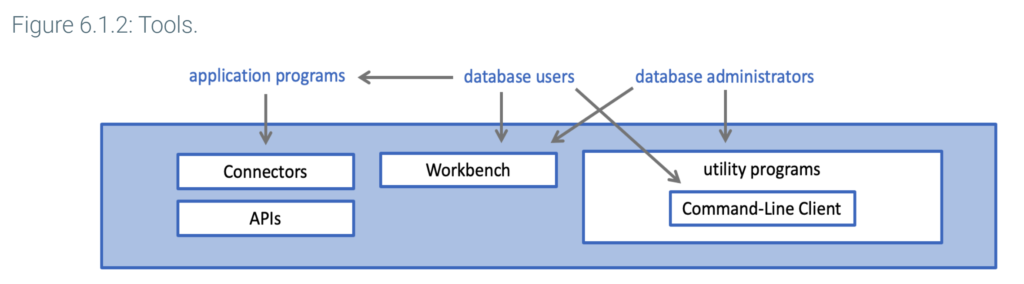
The tools layer includes Connectors and APIs, Workbench, and utility programs.
Connectors and APIs are groups of application programming interfaces, linking applications to the query processor layer. Connectors are newer and developed by Oracle, which sponsors MySQL. APIs are older and, with the exception of the C API, developed by other organizations. Most programmers use Connectors, but system programmers may write specialized utilities in C with the C API.
Workbench is a desktop application to manage and use databases. Workbench is designed for both database administrators and users.
Utility programs include approximately 30 tools, grouped in five categories: installation, client, administrative, developer, and miscellaneous tools. Most utility programs are intended for database administrators or programmers. Example functions include:
- Upgrade existing databases to a new MySQL release
- Backup databases
- Import data to databases
- Inspect log files
- Administer database servers
The Command-Line Client is a particularly important utility program, commonly used by both database administrators and users. The Command-Line Client displays the mysql> prompt and processes individual SQL queries interactively.
Connectors, Workbench, and the Command-Line Client are described elsewhere in this material.
Query processor
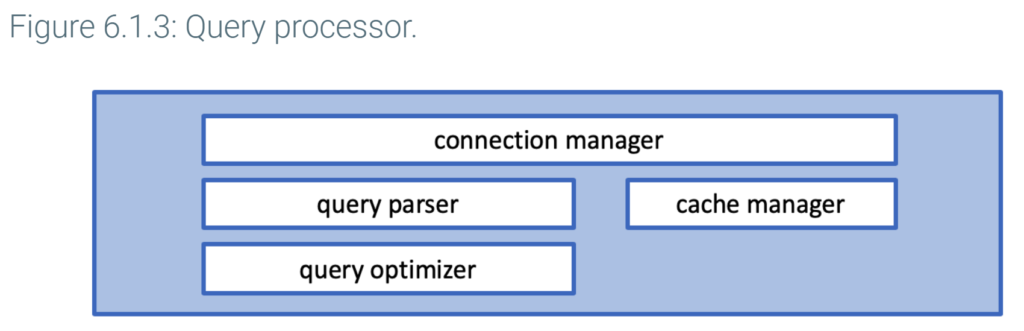
The query processor layer has two main functions: manage connections and compile queries.
A connection is a link between tools and the query processor. Each connection specifies a database name, server address, logon name, and password. The connection manager creates connections and manages communications between tools and the query parser.
Query compilation generates a query execution plan. An execution plan is a detailed, low-level sequence of steps that specify exactly how to process a query.
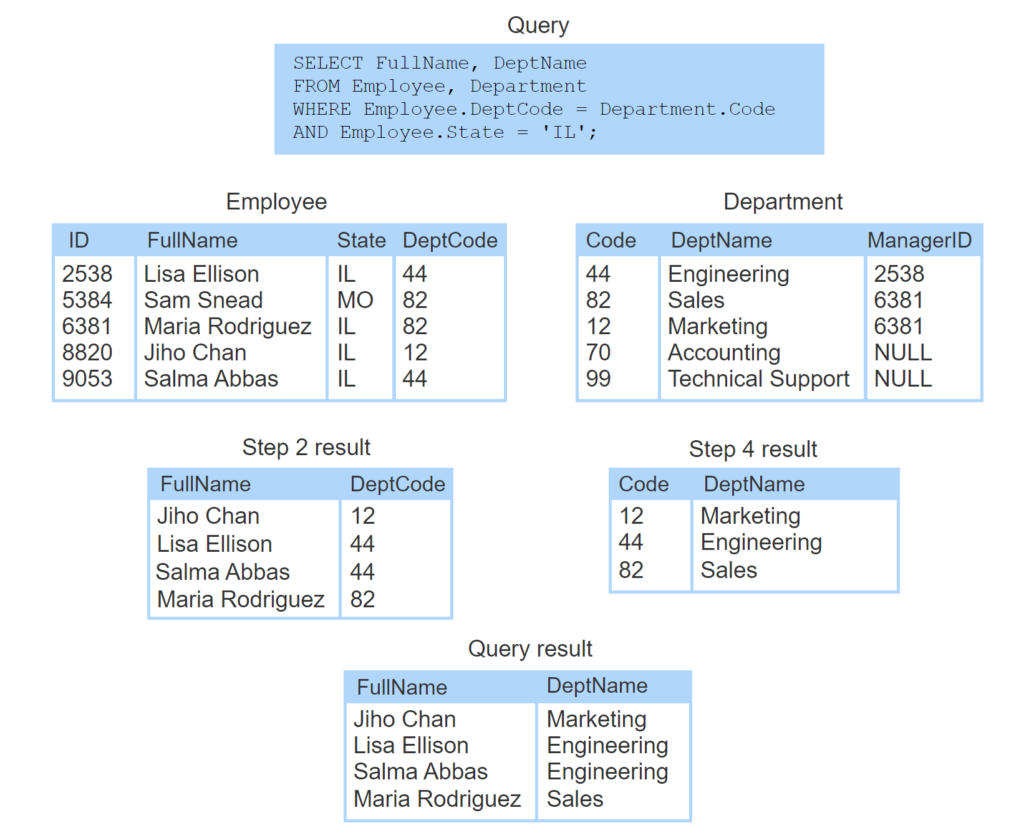
- The query selects employee name and department name for employees that work in Illinois.
- Step 1: The plan retrieves Illinois employees using an index on State.
- Step 2: The plan sorts selected employees by DeptCode.
- Step 3: The plan retrieves matching departments using a table scan.
- Step 4: The plan sorts the selected departments by Code.
- Step 5: The plan merges the two result tables using the join technique called ‘sort-merge’.
The query processor generates an execution plan in two steps:
- The query parser checks each query for syntax errors and converts valid queries to an internal representation.
- The query optimizer reads the internal representation, generates alternative execution plans, estimates execution times, and selects the fastest plan. Estimates are based on heuristics and statistics about data, like the number of rows in each table and the number of values in each column. These statistics are maintained in the data dictionary, described below.
For optimal performance, the query processor layer has a cache manager that stores reusable information in main memory. Ex: The cache manager retains execution plans for queries that are submitted multiple times. If data used in repeated queries does not change, the cache manager may also save query results.
Storage engine
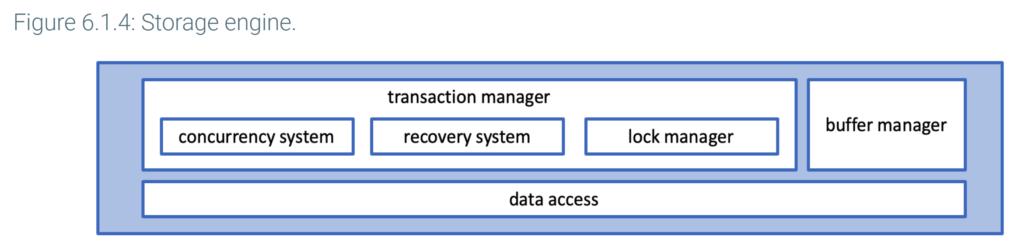
The storage engine layer has two main functions: transaction management and data access.
Transaction management includes the concurrency system, recovery system, and lock manager. These components ensure all transactions are atomic, consistent, isolated, and durable, as explained elsewhere in this material.
The data access component communicates with the file system and translates table, column, and index reads into block addresses.
To reduce data access time, the buffer manager retains data blocks from the file system for possible reuse. The data blocks are retained in an area of main memory called the buffer. Ex: If queries frequently access department data, the buffer manager may retain some or all blocks of the Department table. The buffer manager is similar to the cache manager of the query processor layer.
The buffer manager has a fixed amount of memory. As the database processes queries and reads blocks, an algorithm determines which blocks to retain and which to discard. The InnoDB buffer manager uses a least recently used or LRU algorithm. The LRU algorithm tracks the time each block was last used and, when space is needed, discards ‘stale’ blocks. If data in a block has been updated, discarded blocks are first saved on disk.
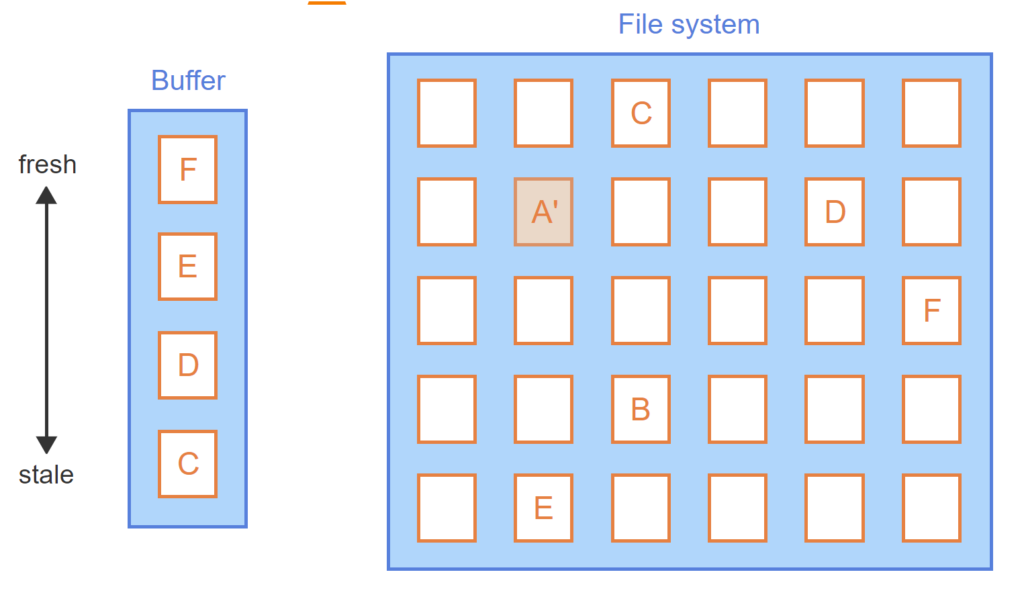
- Data in the file system is organized into blocks.
- The database reads blocks from the file system and stores blocks in the buffer.
- As the database reads new blocks, prior blocks become ‘stale’.
- Data block A becomes ‘fresh’ when read or updated.
- Eventually, the buffer fills up.
- To make space for block E, stale block B is deleted from the buffer.
- Block A has been updated and must be saved to the file system before deletion from the buffer.
MySQL supports nine storage engines, including InnoDB, MyISAM, CSV, and MEMORY. Each storage engine is optimized for a specific application, such as transaction management or analytics. The database administrator can assign a different storage engine to each table in a database. InnoDB is the default and most commonly used storage engine. InnoDB supports transactions, but many other storage engines do not.
Most databases do not offer configurable storage engines and use the term storage manager instead of storage engine.
File system
The file system layer consists of data stored on storage media and organized in files. The file system contains three types of data for each database: user data, log files, and a data dictionary.
User data includes tables and indexes. Specific storage structures for tables and indexes are described elsewhere in this material.
Log files contain a detailed, sequential record of each change applied to a database. The recovery system uses log files to restore data in the event of a transaction, system, or storage media failure.
A catalog, also known as a data dictionary, is a directory of tables, columns, keys, indexes, and other objects in a relational database. All relational databases contain a catalog. Query processors and storage managers use catalog information when queries are processed and executed.
MySQL uses the term ‘data dictionary’. The MySQL data dictionary contains roughly 30 tables, including:
tablesdescribes all tablestable_statscontains table statistics, such as the number of rows in each tablecolumnsdescribes all columnsforeign_keysdescribes all foreign keysindexesdescribes all indexesroutinesdescribes all stored procedures and stored functionstriggersdescribes all triggers
Data dictionary tables cannot be accessed directly with SELECT, INSERT, UPDATE, and DELETE queries. However, the table contents can be accessed indirectly. The SHOW query is compiled as a SELECT query against dictionary tables. Ex: SHOW COLUMNS generates a SELECT query against the columns table. CREATE generates an INSERT, ALTER generates an UPDATE, and DROP generates a DELETE against dictionary tables.

6.2 Cloud databases
Multi-tier architecture
Multiple computers linked by a network are often grouped in layers, called tiers, and arranged in a hierarchy.Prior to 1990, most software ran in a single-tier architecture, consisting of a personal or corporate computer connected directly to monitors. Although computers often communicated with each other, the dependencies between applications running on different computers were limited.
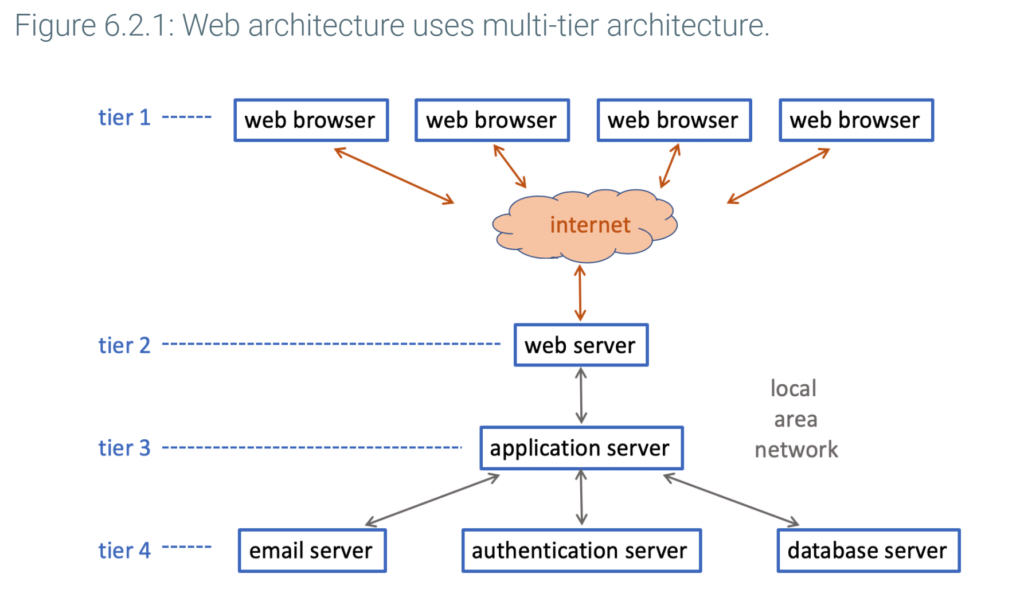
Since 1990, complex corporate and government applications have increasingly been implemented in a multi-tier architecture:
- The top tier consists of computers interacting directly with end-users.
- The bottom tier consists of servers managing resources like databases and email.
- One or more middle tiers execute a variety of functions, such as user authorization, business logic, and communication with other computers.
Typically, application programs run on a middle tier and implement business logic. Since user interaction and data are managed in the top and bottom tiers, applications are easier to write and maintain in a multi-tier architecture.
Web architecture is a multi-tier architecture consisting of web browsers and web servers communicating over the internet:
- Web browsers, on the top tier, manage user interaction.
- Web servers, on a middle tier, generate web pages for display on web browsers and transmit user requests to services running on lower tiers.
- Application servers run application software, process user requests, and communicate with databases and other services.
- Services, such as database and authentication, comprise the bottom tier.
Web architecture proliferated as internet use grew rapidly during the 1990s and is now a dominant architecture.
Terminology
The term tier refers to either a software or hardware layer. In this material, tier refers to a hardware layer.
Cloud databases
Prior to 2000, most commercial software was on-premise, or installed and run on customer computers. Since 2000, cloud services have increasingly replaced on-premise software. With cloud services, a vendor such as Amazon, Microsoft, or Google implements computer services on lower tiers of a web architecture. For a fee, cloud services are made available over the internet to customers.
Cloud services fall into three broad categories:
- Infrastructure-as-a-service, or IaaS, provides computer processing, memory, and storage media, as if the customer were renting a computer. Ex: Elastic Compute Cloud, or EC2, from Amazon Web Services offers infrastructure-as-a-service.
- Platform-as-a-service, or PaaS, provides tools and services, such as databases, application development tools, and messaging services. Ex: Azure is Microsoft’s cloud services environment, offering the SQL Database service.
- Software-as-a-service, or SaaS, provides complete applications, usually through web browsers on customer machines. Ex: Salesforce offers sales management software, and Google offers document processing applications like Docs, Sheets, and Pages.
Usually cloud services are offered on virtual machines. A virtual machine, or VM, is a software layer that emulates a complete, independent computing environment. Multiple virtual machines can run on one computer , enabling cloud providers to support many customers on the same machine.
A cloud database is a database offered as a PaaS cloud service. Most databases are now available either on-premise or as a cloud service, but cloud database use is growing rapidly.
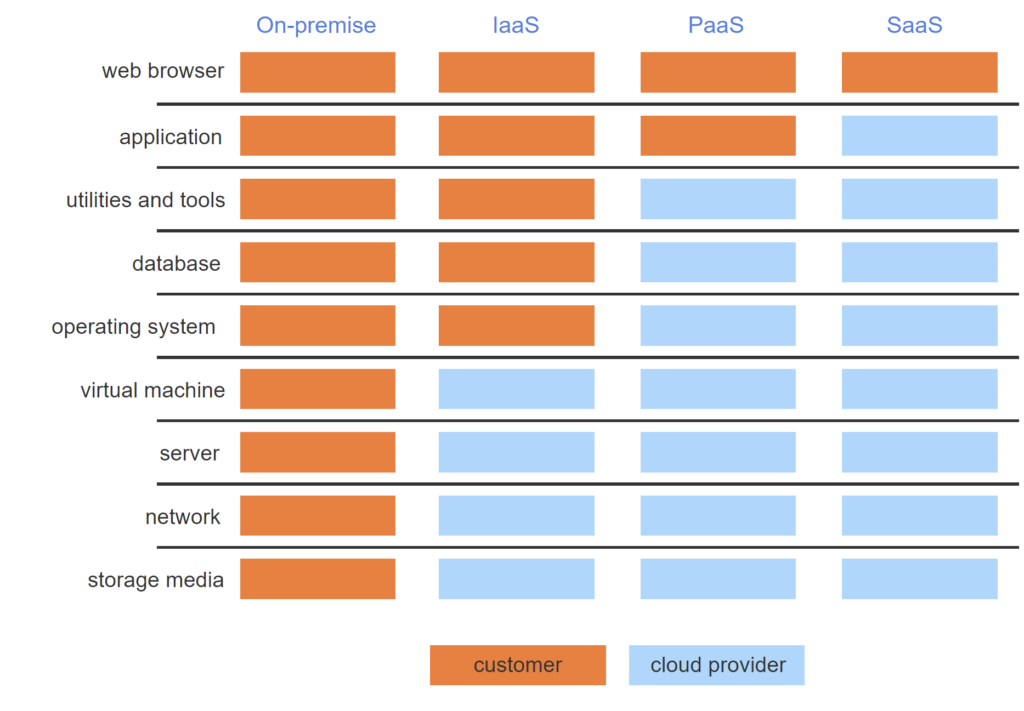
- Computer systems consist of multiple software layers.
- With on-premise software, all layers are installed, administered, and run on customer computers.
- With IaaS, cloud providers offer virtual machines to their customers.
- With PaaS, cloud providers offer computer services and tools running within virtual machines.
- With SaaS, cloud providers offer complete applications to customers. Usually, customers access applications via a web browser.
Benefits and risks
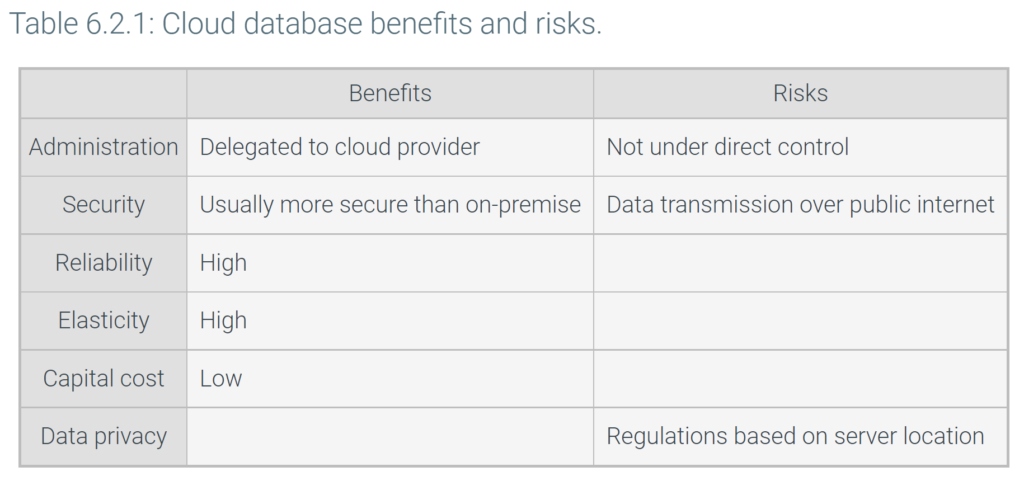
Cloud databases have a number of compelling benefits:
- Administration. Installing, managing, upgrading, and backing up database systems is time-consuming and complex. With cloud databases, consumers delegate administrative activities to cloud providers.
- Security. Cloud providers are large companies with extensive resources. Cloud providers can invest heavily in security professionals and infrastructure, providing better security than most cloud customers.
- Reliability. Cloud providers provide redundant computing systems with little or no down-time.
- Elasticity. Many organizations struggle with daily, monthly, or seasonal fluctuations in processing workload. By averaging fluctuations over many customers, cloud providers provide flexible database resources on demand.
- Capital cost. Cloud providers absorb all initial, or capital, costs of computers and facilities. Capital cost is recovered by cloud service fees.
Cloud databases raise data privacy questions. Companies entrust data to cloud providers, which may store data on servers located in countries with different privacy regulations. Ex: The European Union has adopted comprehensive data privacy regulations. In the United States, data privacy is governed by limited regulations in specific areas, such as medical and financial. As a result, a European company may avoid servers located in the United States.
Data privacy is a concern primarily for sensitive data, such as financial and medical applications. For organizations that do not manage sensitive data, cloud databases offer convincing benefits and have been widely adopted.
6.3 Distributed databases
Parallel computers and clusters
A parallel computer consists of multiple processors managed by a single operating system instance. Parallel computers achieve faster processing speeds by processing multiple instructions concurrently.
Parallel computers fall into three categories:
- In a shared memory computer, processors share the same memory and storage media.
- In a shared storage computer, processors share storage media only. Each processor has private memory.
- In a shared nothing computer, processors share neither memory nor storage media.
Shared memory is optimal for parallel processing against a common data set in a single memory space. However, shared storage and shared nothing scale to more processors, since processors do not contend for the same memory.
Multiple computers can communicate via a local or wide area network:
- A local area network consists of cables extending over a small area, typically within one facility. Local area networks usually use the Ethernet communication protocol.
- A wide area network spans multiple facilities in different geographic locations, separated by many miles. Wide area networks may communicate via cables, satellite, or telephone lines, often using internet communication protocols.
A node is one of a group of computers connected by either a local or wide area network. A cluster is a group of nodes connected by a local area network, managed by separate operating system instances, and coordinated by specialized cluster management software.
A cluster is similar to a parallel computer. Both can execute program instructions in parallel on multiple processors. Both can share storage or share nothing. Computers in a cluster cannot share memory, however, since local area networks are too slow to support memory access.
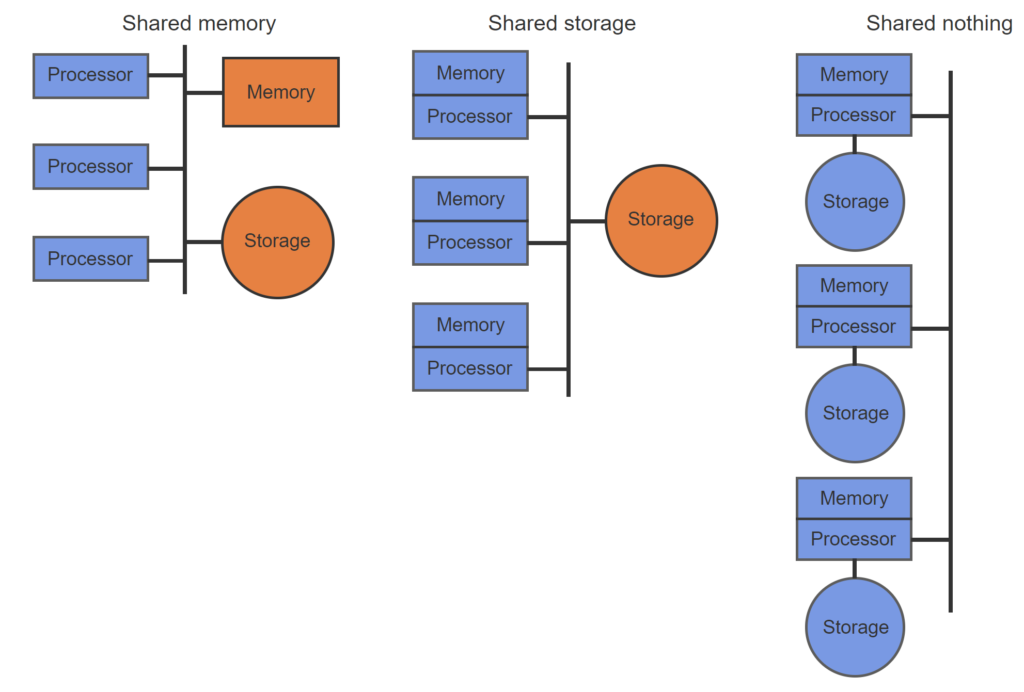
- In a shared memory system, multiple processors share both memory and storage.
- In a shared storage system, multiple processors share storage only.
- In a shared nothing system, each processor has private memory and storage.
Parallel and distributed databases
Queries can often be decomposed into parts that run concurrently and execute faster on parallel computers or clusters. Ex: If a query joins tables stored on different disk drives, different processors can read and sort each table in parallel.
Parallel and distributed databases exploit multiple processors for faster query execution:
- A parallel database runs on a parallel computer or cluster.
- A distributed database runs on multiple computers connected by a wide area network.
Both parallel and distributed databases present a unified view of data to database users and programmers. The physical location of data on storage media is visible to database administrators only.
Internally, parallel and distributed databases behave differently. In a parallel database, data location has limited impact on query processing since local area networks are relatively fast and reliable. In a distributed database, data location is significant since wide area networks are relatively slow and unreliable. Wide area networks create technical challenges with distributed transactions, described below.
Despite technical challenges, distributed databases offer compelling benefits for databases with users in many locations. Ex: A company has employees in a dozen locations worldwide. Data for each employee is stored on a local node. Queries about local employees are fast. Queries about remote employees are slower, since both query and results must traverse a wide area network. Typically, queries about remote employees are submitted less often, so slower response is acceptable. All queries are easy to write since data location is invisible to users and programmers.
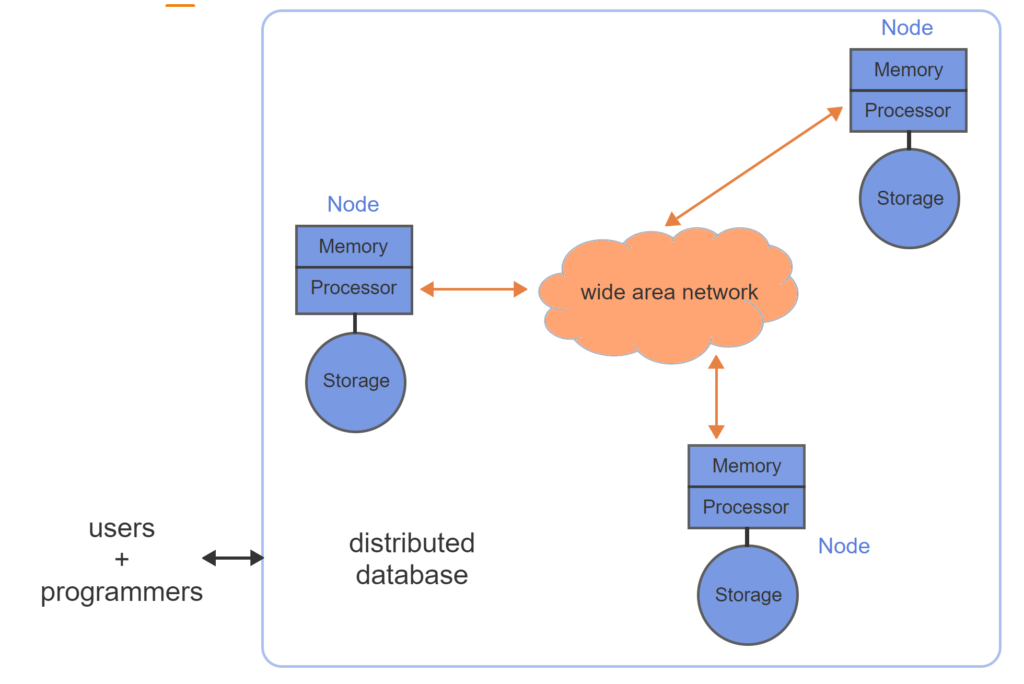
- A node is a single processor with associated memory and storage.
- A distributed database consists of nodes connected by a wide area network.
- From the perspective of database users and programmers, individual nodes of a distributed database are not visible.
Distributed transactions
A distributed transaction updates data on multiple nodes of a distributed database. In a distributed transaction, either all nodes or no nodes must be successfully updated. Databases commonly implement distributed transactions with a technique called two-phase commit. The two-phase commit has four steps:
- In phase 1, a central transaction coordinator notifies all participating nodes of the required updates.
- Participating nodes receive the notification, store the update in a local log, and send a confirmation message to the transaction coordinator. Participating nodes do not yet commit the update to the database.
- Phase 2 begins when the transaction coordinator receives confirmation from all participating nodes. The transaction coordinator now instructs all nodes to commit.
- Participating nodes receive the commit message, commit the update to the database, and notify the transaction coordinator of success.
The two-phase commit must account for the following failure scenarios:
- In step 2, if the transaction coordinator does not receive confirmation from all nodes within a fixed time period, the transaction coordinator instructs participating nodes to roll back the update.
- In step 4, if a node becomes unavailable and fails to notify the transaction coordinator of success, the transaction coordinator resends the commit message until the node responds.
The two-phase commit ensures updates are applied to either all nodes or no nodes. In the first failure scenario, the transaction rolls back, and no updates are applied. In the second failure scenario, the transaction commits, and all updates are applied.
Terminology Two-phase commit and two-phase locking are different procedures. Two-phase commit governs commit and rollback at the end of distributed transactions only. Two-phase locking, described elsewhere in this material, governs acquisition and release of locks during either local or distributed transactions.
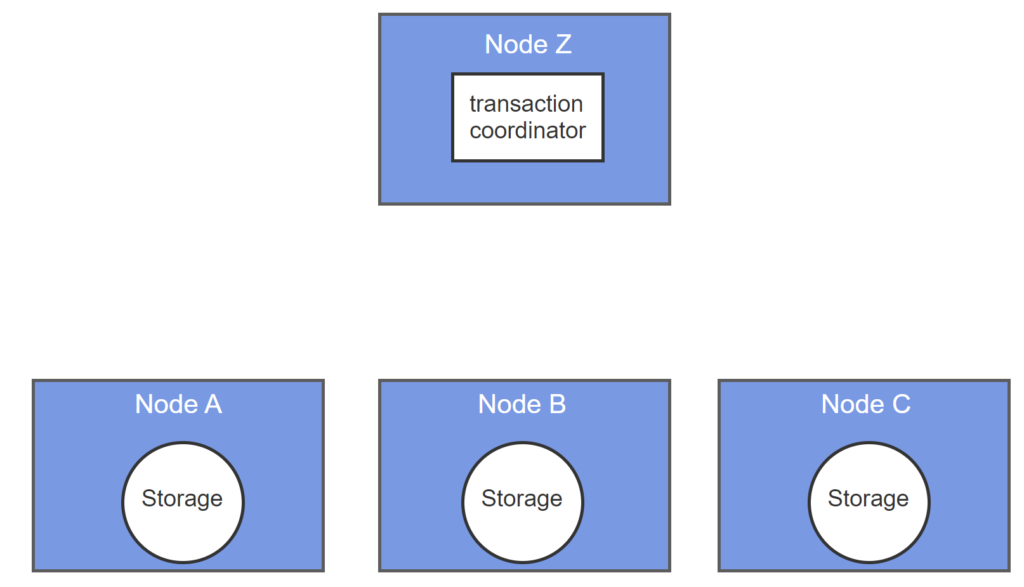
- A transaction coordinator manages updates to distributed nodes. The transaction coordinator may run on any node.
- In phase 1, the transaction coordinator notifies all nodes of updates.
- Nodes receive updates and send confirmation to the transaction coordinator.
- In phase 2, the transaction coordinator receives all confirmations and instructs nodes to commit.
- Nodes receive commit messages, save updates to storage, and notify the transaction coordinator of success.
Local transactions
A local transaction updates data on a single node of a distributed database.
Distributed transactions are relatively slow, as multiple nodes must respond before the transaction commits. As a faster alternative, multiple nodes can be updated independently with local transactions:
- The transaction coordinator notifies participating nodes of required updates.
- Nodes commit immediately and confirm with the transaction coordinator.
- If a node is unavailable, the transaction coordinator repeats the update message until confirmation is received.
Local transactions create temporary inconsistency, as nodes are updated at different times. The choice of local or distributed transactions depends on performance and consistency requirements. Ex:
- In many financial databases, all nodes must be consistent at all times. Distributed transactions are necessary.
- In databases that log website activity, temporary inconsistency may be acceptable. Local transactions might be used to process updates quickly and support a high volume of web clicks.
Updates in a distributed transaction are synchronous, since the updates occur at the same time from the perspective of the database user. Updates in separate local transactions are asynchronous.
Databases that use local rather than distributed transactions are called eventually consistent.
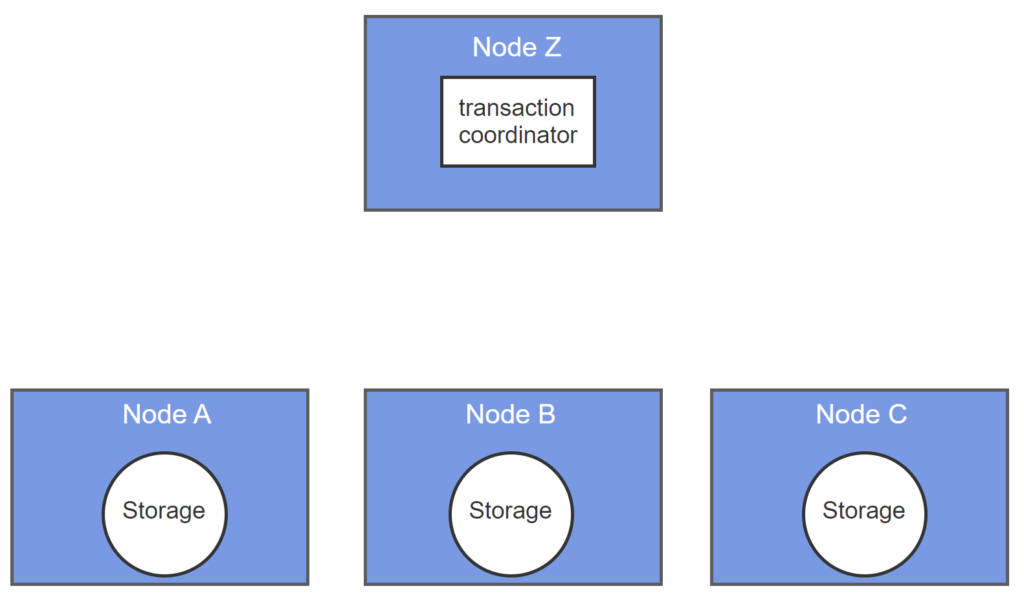
- Node B fails prior to transactions.
- A transaction coordinator notifies all nodes of updates.
- Nodes A and C commit updates and confirm transactions.
- Transaction coordinator does not receive confirmation from node B and resends update.
- Node B eventually becomes available, commits update, and confirms transaction.
CAP theorem
A consistent database conforms to all rules at all times. In a distributed database, a rule may govern data on multiple nodes. Ex: Foreign key values on one node must match primary key values on another node. Ex: Copies of data on multiple nodes must be identical.
In an available database, ‘live’ nodes must respond to queries at all times. A ‘dead’ node may be unresponsive, but ‘live’ nodes must respond regardless of the state of other nodes.
A network partition forms when a network error prevents nodes from communicating. A distributed database occasionally experiences network partitions since nodes are connected by wide area networks that occasionally fail. A partition-tolerant database continues to function when a network partition occurs.
The CAP theorem states that a distributed database cannot simultaneously be Consistent, Available, and Partition-tolerant. A distributed database can guarantee any two, but not all three, of these properties.
As a practical matter, most distributed databases must always function and are therefore partition-tolerant. Consequently, most distributed databases guarantee either consistency or availability, but not both.
The tradeoff between consistency and availability is relative, not absolute. Since wide area networks are relatively slow, the time to propagate an update from one node to another is significant. If a query accesses updated data before all nodes are updated, the database must either return inconsistent data or not respond immediately. Rather than choose between consistency and availability, a database must choose how long to wait to provide a consistent response.
Terminology
Availability commonly means the percentage of time a database is responsive to users and programs. In the context of the CAP theorem, however, availability is the response of individual nodes rather than the entire database system.
In the context of networks, a partition is a subset of nodes. In the context of data storage, a partition is a subset of table data.\
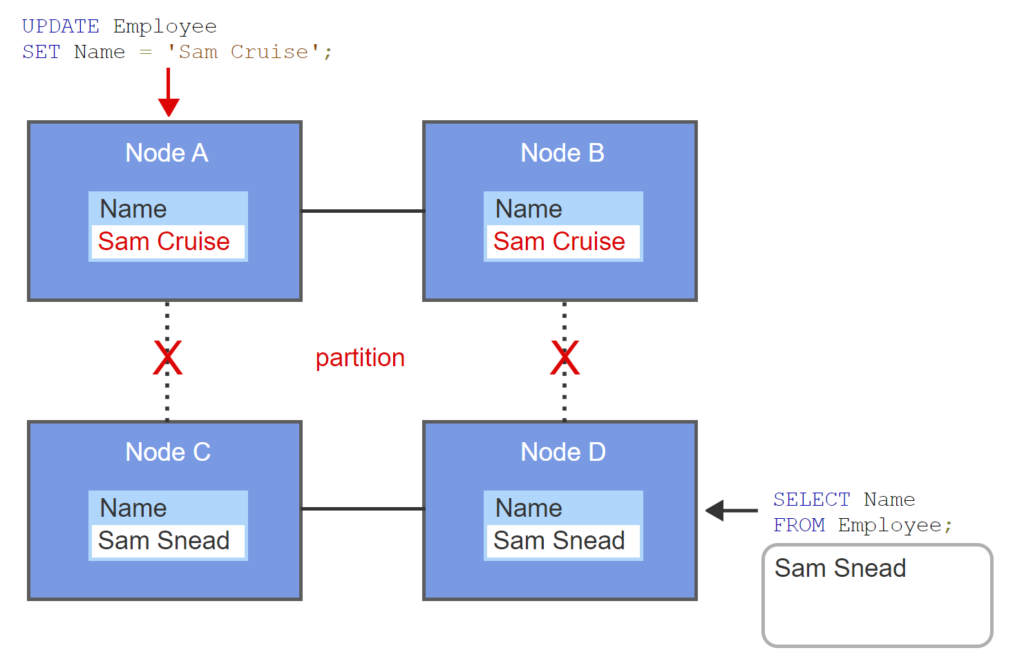
- A distributed database has four nodes. Each node contains a copy of the Employee table.
- The wide area network fails, creating a partition. Nodes A and B cannot communicate with nodes C and D.
- Nodes A and B are updated with local transactions. The partition prevents updates to nodes C and D.
- Node D receives an Employee query.
- If node responds, the result is inconsistent. If node does not respond, the database is unavailable.
6.4 Replicated databases
Replicas
A replica is a copy of an entire database, a table, or a subset of table data. A replicated database maintains two or more replicas on separate storage devices. Data can be replicated in any database with multiple storage devices, such as parallel and distributed databases.
Replicated databases have several major advantages:
- High availability. If one storage device fails, the database routes queries to a replica on another storage device. In general, if a database maintains N replicas, the database can survive simultaneous failure of N-1 storage devices.
- Fast concurrent reads. Concurrent queries can read separate replicas without interfering with each other. One large query can be decomposed into smaller queries that read separate replicas in parallel.
- Local reads. In a distributed database, reads can be executed locally, eliminating network delays and outages.
Replicated databases have one major disadvantage:
- Slow or inconsistent updates. Updates must be applied to all replicas on multiple storage devices. If all replicas on different nodes are updated with a distributed transaction, the update is relatively slow. If replicas on different nodes are updated with local transactions, updates are relatively fast but replicas are temporarily inconsistent.
Replication simplifies some database administration activities but makes others more complex:
- Simple backup. One replica can be backed up while transactions execute against other replicas.
- Enhanced security. Updates can be restricted to one replica, accessible only to trusted database users. Updates are propagated to read-only replicas, accessible to a broader user group.
- Complex server administration. Database administrators must determine how to propagate updates across replicas.
Replication is commonly used in parallel and distributed databases, particularly when reads are frequent, updates are infrequent, and temporary inconsistency is acceptable.
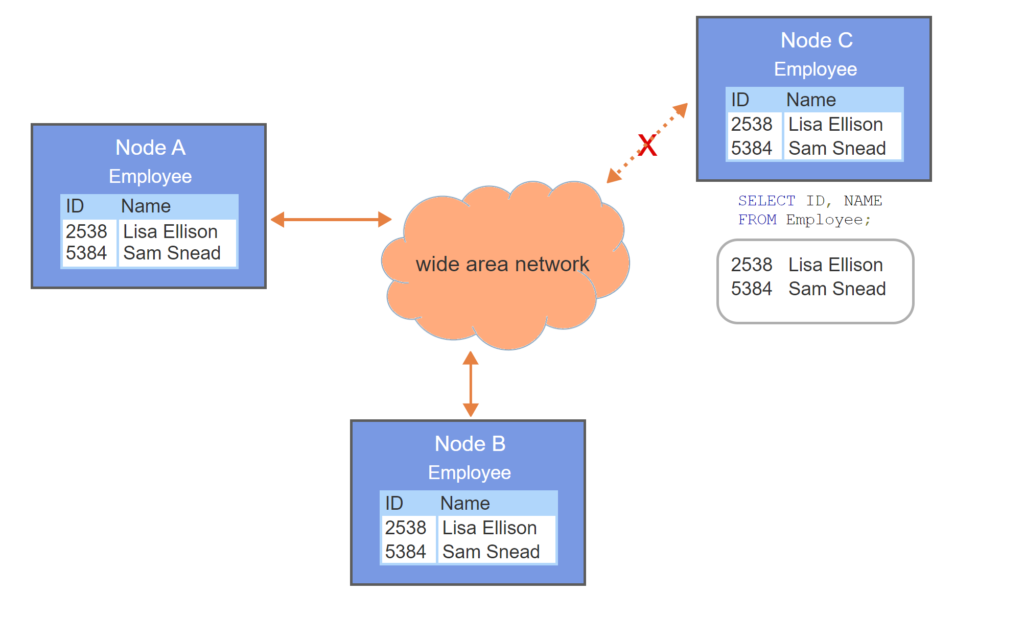
- The Employee table is stored on node A of a distributed database and not replicated.
- An Employee query at node C generates a round-trip over the wide area network. The query is relatively slow.
- If a network partition occurs, the query cannot be processed.
- If the Employee table is replicated, the query is local, relatively fast, and immune to a network partition.
Updating replicas
Updating replicated data in a database running on a single node is straightforward. Some storage devices, called storage arrays, manage replicas internally, without database intervention. Alternatively, the database can update all replicas within a single local transaction. Either way, synchronizing replicas does not require special database capabilities.
Updating replicated data in a distributed database is more complex. Updating all replicas in a distributed transaction guarantees consistency but is relatively slow and fails when any replica is unavailable. Two alternative techniques are commonly used:
- The primary/secondary technique designates one node as primary. All updates are first applied to the primary node in local transactions. Secondary nodes are updated after the primary node commits, with independent local transactions. If the primary node fails, the database automatically designates a new primary node to ensure continued availability.
- The group replication technique applies updates to any node in a group. Prior to committing, a node broadcasts transaction information to other nodes, which look for conflicts with concurrent transactions. If any node detects a conflict, an algorithm determines which transaction commits and which rolls back. This algorithm may be simple, such as the transaction that commits first wins, or complex. If a network partition occurs and nodes cannot communicate, processing is temporarily suspended.
Support for these techniques varies across relational databases. MySQL with the InnoDB storage engine supports both techniques as well as distributed transactions.
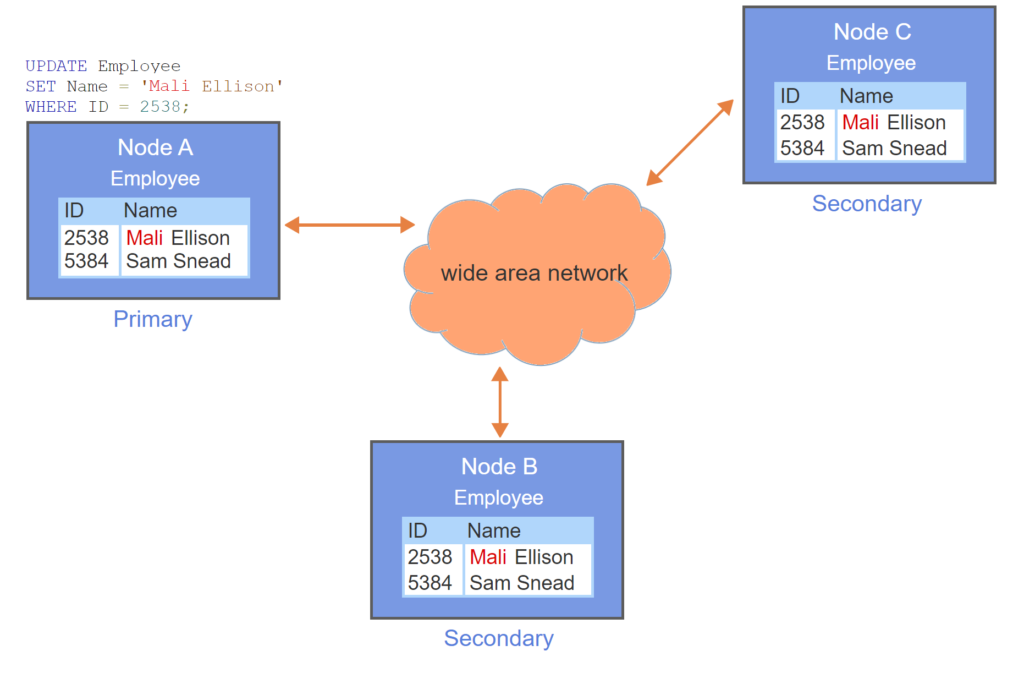
- The Employee table is replicated on three nodes.
- Node A is primary.
- Updates are applied to the primary node only, so the database is temporarily inconsistent.
- After update commits on primary node, secondary nodes are updated in local transactions.
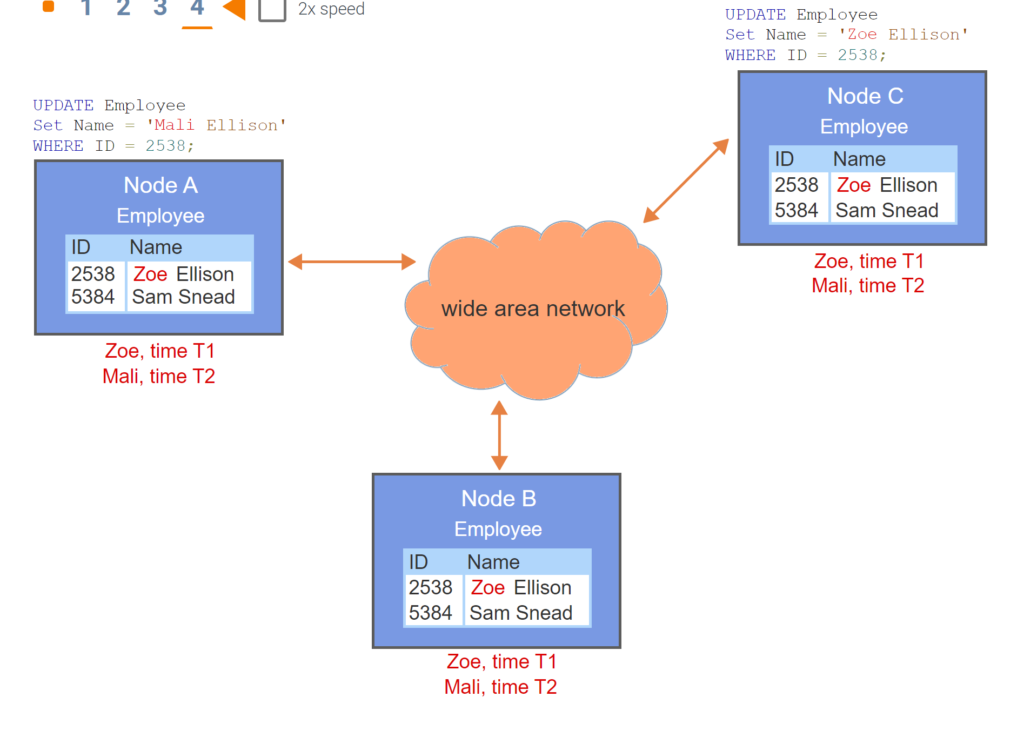
- The Employee table is replicated on three nodes.
- Any node in the group can be updated.
- Prior to commit, the updated node sends transaction information to all other nodes.
- All nodes detect a conflict. Since Zoe update committed prior to Mali update, Zoe wins.
Replicated catalogs
A catalog is a directory of information describing database objects such as tables, columns, keys, and indexes. Catalog information is necessary to process queries and access data. Each node in a distributed database can process queries and therefore requires access to the catalog.
In a distributed database, the catalog can be structured in two ways:
- In a central catalog, the entire catalog resides on a single node. Storing the catalog on a single node is relatively easy to manage. However, query processing at remote nodes must access the catalog via a wide area network, which may be slow or unreliable. Furthermore, query processing at all nodes interact with the central catalog, which may become a bottleneck.
- In a replicated catalog, a copy of the catalog resides on each node. Most queries are fast and reliable since all catalog data is available locally. However, statements that update the catalog, such as CREATE, ALTER, and DROP, must update all replicas. Updating replicas generates increased network traffic and, if executed in a distributed transaction, fails when any replica is unavailable.
Since catalog updates are infrequent compared to other database queries, many distributed databases use a replicated catalog. To improve performance of catalog updates, many databases use a variation of the primary/secondary technique. Updates are first applied to the replica on the node containing the affected data object and then propagated to other replicas.
When catalog replicas are updated with local transactions, some replicas are momentarily out of date. If a query cannot be processed due to an out-of-date replica, the database might display an error and advise the user to resubmit the query. This rarely occurs, however, since catalog updates are infrequent and the delay between replica updates is short.
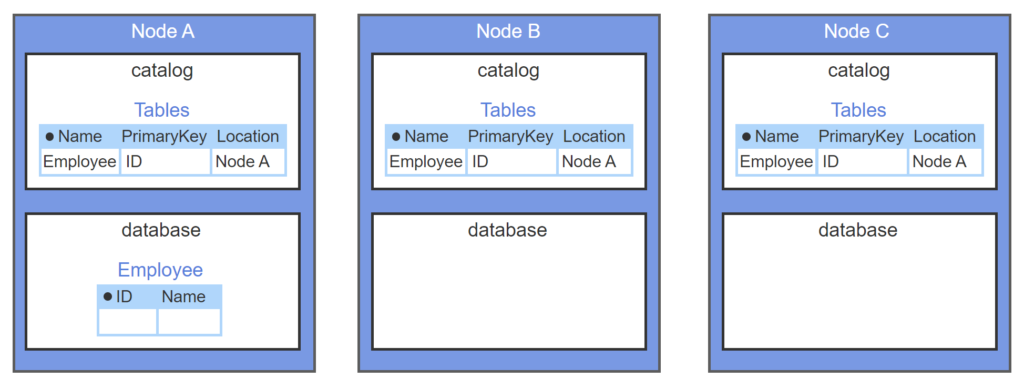
- A replicated catalog is stored in each node of a distributed database.
- The catalog contains a table called ‘Tables’, with one row describing each table in the database.
- The administrator creates a table on node A. The syntax for assigning tables to nodes varies and is not shown.
- A transaction on node A creates the table and inserts a row into Tables.
- After node A transaction commits, separate transactions update node B and C catalogs.
6.5 Data warehouses
Operational and analytic data
Organizations use operational data to conduct daily business functions. Ex: Sales invoices, student test scores, and driving violation records are operational data. Organizations use analytic data to understand, manage, and plan the business. Ex: Sales totals by region, average student grades over time, and driving violation counts by ZIP code are analytic data. Analytic data is sometimes called reporting data or decision support data.
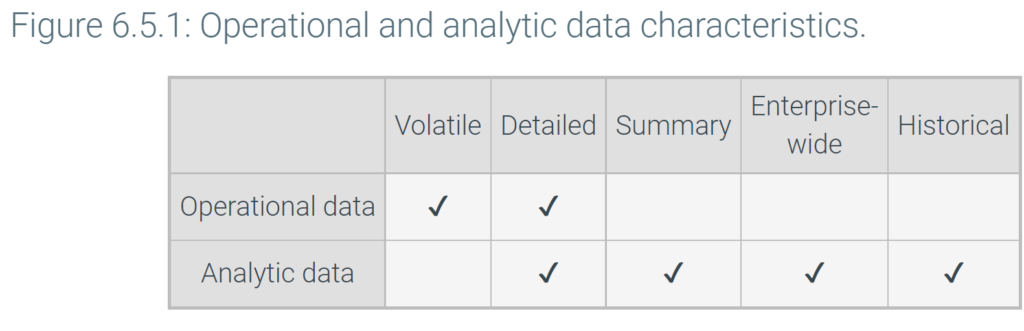
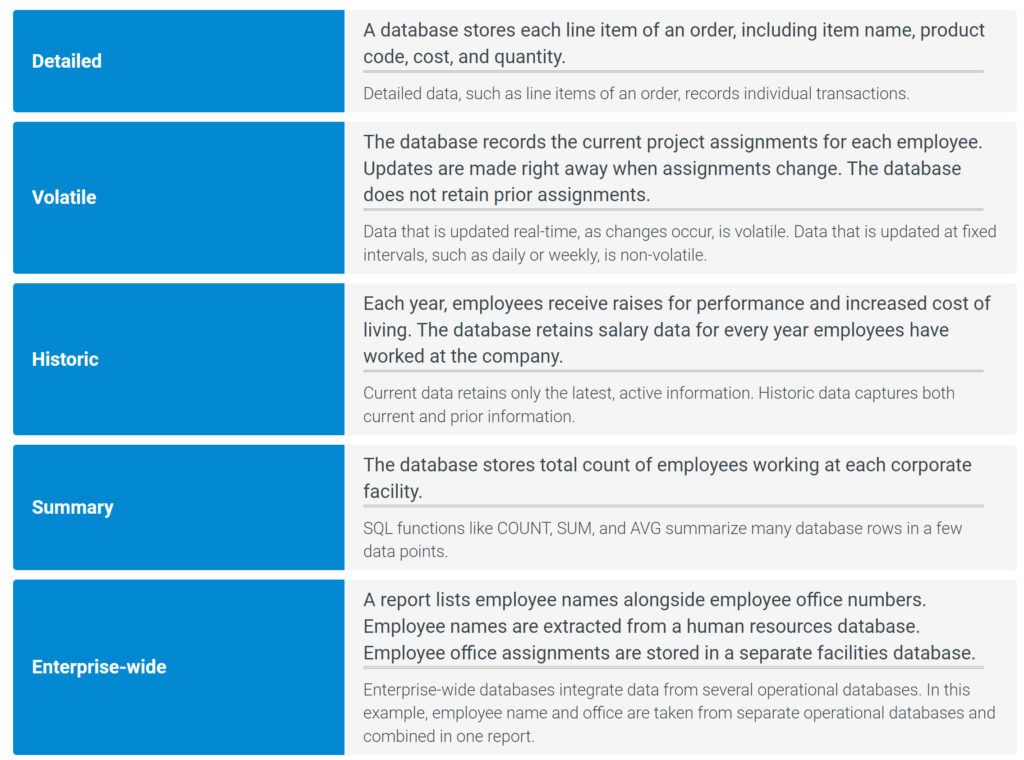
Operational and analytic data differ in several ways:
- Volatility. Operational data changes in real time as business functions are executed. Analytic data is updated at fixed intervals, often daily or weekly, so that reports and summaries always refer to a known time.
- Detail. Most operational data is detailed, reflecting individual transactions. Analytic data is often summarized by time period, business unit, geography, and other business dimensions.
- Scope. Most operational databases are designed for a specific business function. Consequently, operational databases supporting different business functions are often incompatible. Analytic databases combine data from many business functions in an integrated, enterprise-wide view of data, with standard formats, data types, and keys across all tables.
- History. Many operational databases are concerned primarily with current data. Analytic databases often track trends over time and therefore usually contain current and historic data. Ex: Operational data may include active employees only. Analytic data may include past employees and illustrate changes in total employment by month.
Because of the above differences, operational and analytic data are often maintained in separate databases with different designs.
Data warehouses
Storing operational and analytic data in the same database creates several problems:
- Database design. Since operational data is volatile, operational databases are typically optimized for updates, with most tables in third normal form. Third normal form minimizes redundancy but generates many tables and is not optimal for analytic queries. Analytic queries often combine columns from many third normal form tables, resulting in complex joins that are difficult to write and slow to run.
- Interference. Analytic queries often summarize large volumes of data. When executed against an operational database, analytic queries compete with operational queries, degrade query response time, and interfere with business operations.
- Reference time. Analytic queries usually reference a specific point in time, such as sales totals as of midnight on the last day of the month. Since operational data is volatile, results depend on the precise time a query is submitted. Analytic queries against operational databases thus have an uncertain reference time and may be misleading.
A data warehouse is a separate database optimized for analytics rather than operations. A data warehouse consists of data extracted from operational databases and restructured to support analytic queries. Data is usually extracted periodically, at a fixed time, so that data in the warehouse has a known reference time. Data is extracted during times of low database use to minimize impact on operational queries.
Data warehouses integrate data from multiple business functions for use by the entire organization. A data mart is a data warehouse designed for a specific business area, such as sales, human resources, or product development. Since data marts have smaller scope than a data warehouse, data marts are easier to build and maintain. A data mart can be derived directly from operational databases or indirectly from a data warehouse.
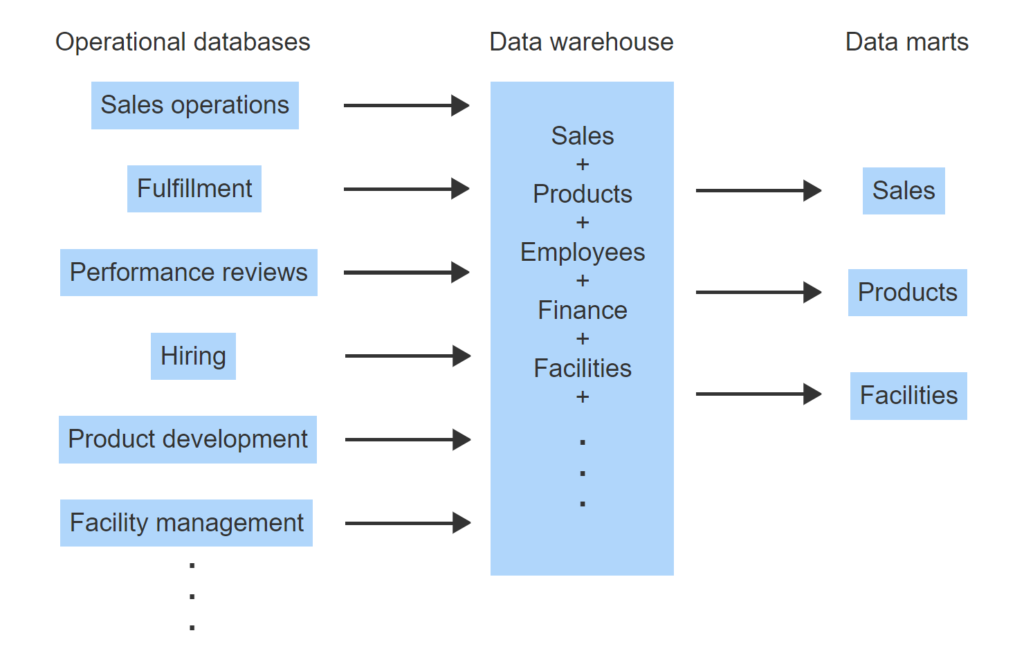
- Different business functions use separate operational databases with incompatible keys and data formats.
- Periodically, data is extracted from operational databases, restructured, and loaded into a data warehouse.
- Data in the warehouse is integrated, with compatible keys and a standard format.
- Data marts support specific areas of data and can be derived from the data warehouse.
- Alternatively, data marts can be derived directly from operational databases.
Extract, transform, load
Data warehouses are refreshed periodically with a five-step process:
- Extract data from operational databases into a temporary database, called a ‘staging area’. Since the data warehouse already contains data from the prior period, only data that has changed since the prior period is extracted.
- Cleanse data to eliminate errors, unusual spellings and incorrect data. Ex: Apply standard abbreviations to addresses, such as RD for road and AVE for avenue. Ex: Abbreviate middle name to the first initial.
- Integrate data into a uniform structure. Ex: Convert all length data to the metric system. Ex: Replace incompatible primary and foreign keys with consistent values.
- Restructure data into a design optimized for analytic queries.
- Load data to the data warehouse.
The five-step process is commonly referred to as the extract-transform-load, or ETL, process. Since the ETL process is time-consuming and difficult to automate, many organizations use special software products, called ETL tools, to minimize programming. Dozens of commercial and open source ETL tools are available, such as:
- PowerCenter from Informatica is a high-end ETL product intended to manage large extracts for complex organizations.
- SQL Server Integration Services from Microsoft is designed for SQL Server data warehouses.
- Oracle Data Integrator supports many data sources but is optimized to load Oracle database products.
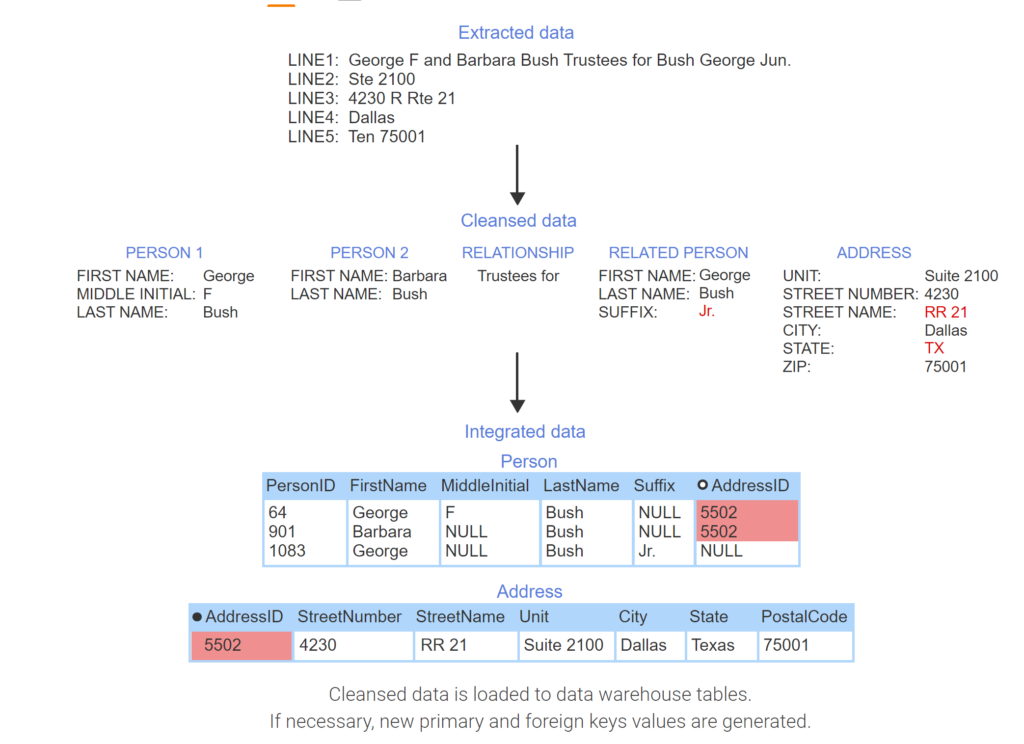
- Data is extracted from an operational database containing mailing addresses consisting of five lines of text. LINE5 contains an error – the state should be Texas.
- Data is unpacked into separate fields.
- When cleansing data, standard abbreviations replace source data.
- Postal code 75001 and city Dallas are in Texas, not Tennessee.
- Cleansed data is loaded to data warehouse tables. If necessary, new primary and foreign keys values are generated.
6.6 Data warehouse design
Dimensional design
To simplify analytic queries, data warehouses commonly use a dimensional design. A dimensional design, also called a star schema, consists of fact and dimension tables:
- A fact table contains numeric data used to measure business performance, such as sales revenue or number of employees. Each row in a fact table consists of numeric fact columns and foreign keys that reference dimension tables.
- A dimension table contains textual data that describes the fact data, such as product line, organizational unit, and geographical region.
The primary key of a fact table is the composite of all foreign keys referencing dimension tables.
The primary key of a dimension table is a small, meaningless integer. This reduces the size of fact tables, which often contain millions of rows and many foreign keys referencing dimension tables. Since meaningless primary keys never change, the corresponding foreign keys also never change, and the fact table is easy to maintain.
Most data warehouses have many fact tables. Ex: A data warehouse may have a sales revenue fact table and an employee compensation fact table. Usually, different fact tables reference common dimensions, like Date and Location, as well as different dimensions, like Product and Employee.
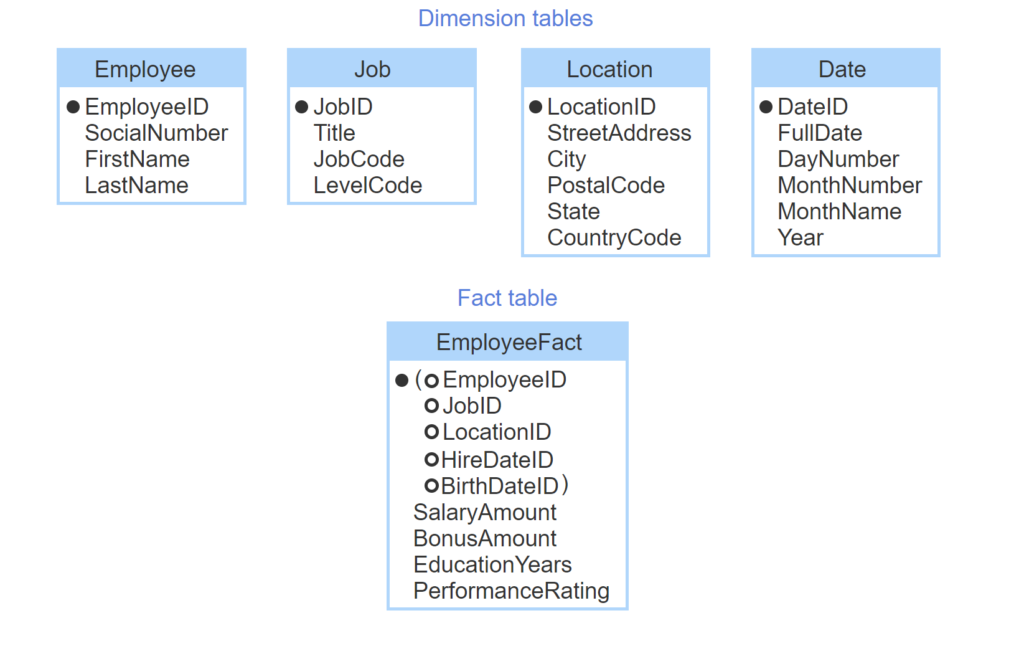
- The Employee dimension table includes text that describes employees. SocialNumber contains numeric data but is not quantitative.
- Additional dimension tables describe corporate jobs, office locations, and dates.
- Primary keys of dimension tables are meaningless integers.
- The EmployeeFact table contains numeric data about employees.
- Foreign keys in EmployeeFact reference dimension tables.
- A dimension foreign key can appear multiple times in a fact table, with different meanings.
- The EmployeeFact primary key is the composite of all foreign keys.
Hierarchies
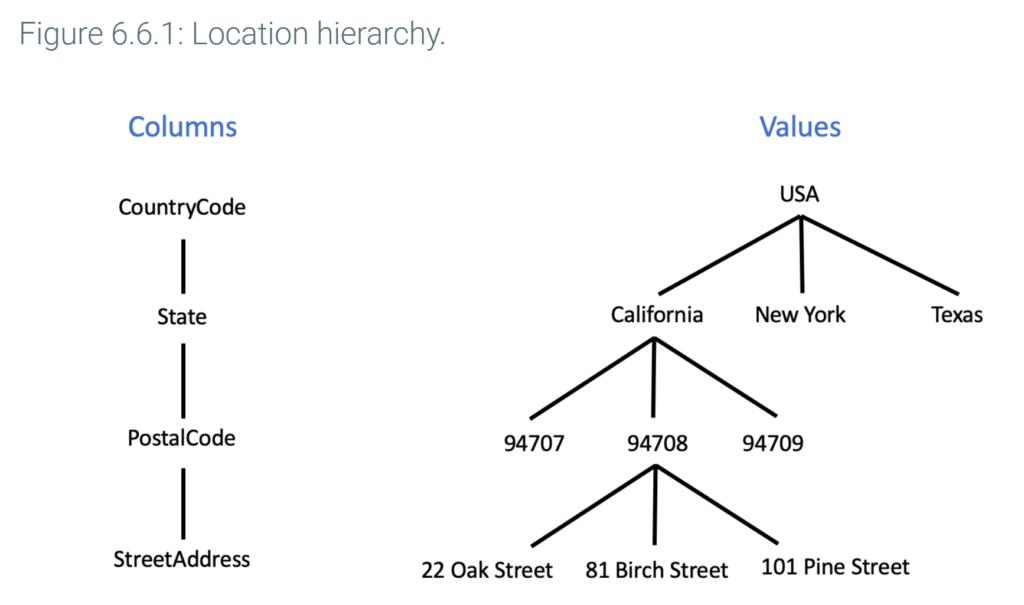
A dimension hierarchy is a sequence of columns in which each column has a one-many relationship to the next column. A dimension table usually contains one or more column hierarchies. Ex: The Location table contains CountryCode, State, and PostalCode columns. Each country contains many states, and each state contains many postal codes, so these columns form a hierarchy.
In some cases, several columns are at the same level of a hierarchy. Ex: City and postal code boundaries overlap. Most cities have many postal codes, and some postal codes span multiple cities. City and PostalCode are at the same level of the Location dimension.
Analytic queries usually summarize data at one level of one hierarchy from each dimension. Ex: A query may summarize sales revenue by State (Location dimension), MonthName (Date dimension), and ProductLine (Product dimension). For fast execution, frequently used summary data may be computed in advance and stored in a data warehouse.
Date and time dimensions
Since data warehouses track historical data, dimensional designs usually have date and time dimension tables:
- Each row of the date dimension table corresponds to a day. If an organization tracks data for 100 years, the date dimension contains 36,500 rows (100 years × 365 days per year).
- Each row of the time dimension table corresponds to a minute of the day. The time dimension contains 1,440 rows (24 hours × 60 minutes per hour).
Fact tables contain foreign keys referencing date, time, or both dimensions, to establish the time of a fact. Ex: The SalesFact table might include a date foreign key to establish date of sale. If an organization tracks time of sale, SalesFact would also include a time foreign key.
The date and time dimensions provide an elegant way to track historical data. Foreign keys StartDateID and EndDateID are added to the fact table and indicate the effective dates of each row. Current rows have an end date in the distant future, such as December 31, 2999. If a fact changes to a new value on date X, the end date of the current row is set to X and a new row is inserted with these values:
- The fact column is the new value.
- StartDateID refers to date X.
- EndDateID refers to December 31, 2999.
- Other columns are identical to the prior row.
The time dimension is handled in the same way, by adding StartTimeID and EndTimeID foreign keys to the fact table.
Adding start and end foreign keys to the fact table is called type 2 design for slowly changing dimensions. Historical data can be tracked with other designs, but type 2 design is simple, effective, and commonly used.
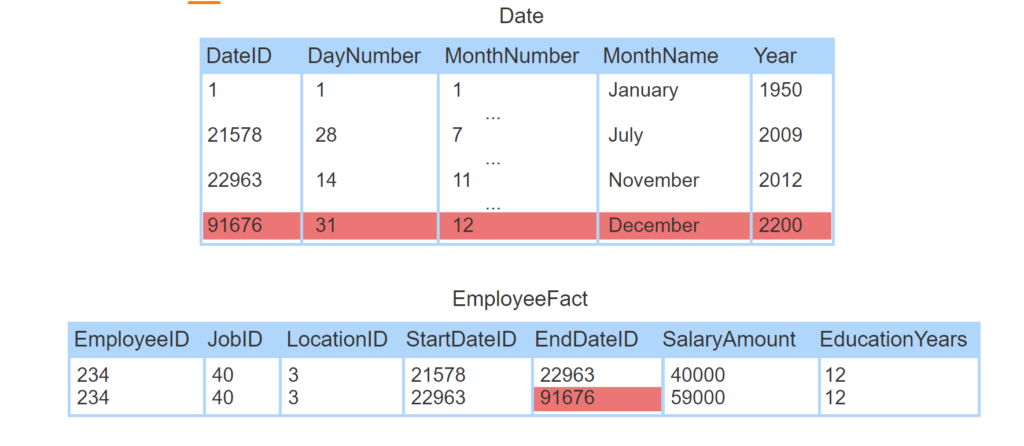
- The Date dimension has one row for each day between January 1, 1950 and December 31, 2200.
- EmployeeFact contains historical data. StartDateID and EndDateID indicate effective dates of each row.
- Between July 28, 2009 and November 14, 2012, employee 234 had a salary of $40,000.
- On November 14, 2012, the employee received a raise to $59,000.
- The salary of 59,000 is current, so EndDateID refers to a distant future date.
6.7 Other database architectures
In-memory databases
An in-memory database is a database that stores data in main memory, instead of or in addition to storage media. Main memory is much faster than storage media, such as flash memory and disk drives. Consequently, in-memory databases are appropriate for analytic applications, which require fast execution of lengthy queries. In-memory databases are also appropriate for applications that rapidly insert high volumes of data, such as data collection from internet devices.
Historically, main memory cost per byte was too high and capacity was too limited for most database applications. In the past decade, however, main memory cost has dropped, and capacity has increased significantly. In-memory databases can now store terabytes of data, which is adequate for many databases.
Main memory is volatile and lost when power fails or the database process crashes, so in-memory data is periodically backed up on storage media. In-memory databases may also record insert, update, and delete operations in a log file on storage media, which can be used to reconstruct databases in the event of a crash.
Many databases now allow database administrators to store selected tables in memory while other tables remain on storage media:
- SQL Server In-Memory OLTP is an extension to SQL Server supporting in-memory tables. In-memory tables offer the same transaction and recovery options as storage media tables.
- Oracle Database In-Memory creates in-memory copies of tables. The table source data remains on storage media, grouped by rows in blocks. In-memory copies are physically organized by column, rather than by row. The memory’s columnar organization is optimal for analytic queries, which often summarize large volumes of data from one or two columns.
- MySQL assigns a specific storage engine to individual tables. Both the MEMORY and MySQL NDB Cluster storage engines support in-memory tables. MEMORY does not support transactions or recovery in the event of a failure, and consequently is appropriate for temporary tables only. NDB Cluster supports transactions, recovery, and distributed data, and is recommended for persistent data.
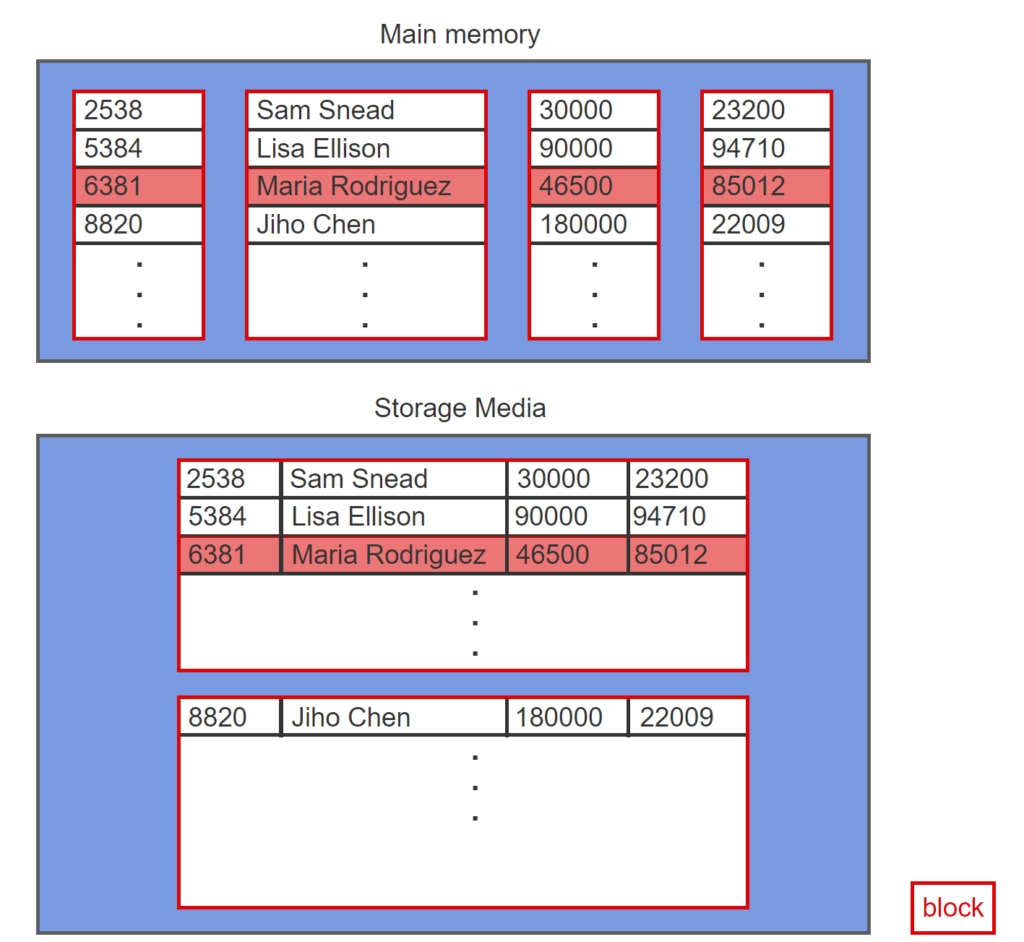
- Oracle database organizes tables on storage media by row.
- Oracle Database In-Memory creates a copy of a table in memory.
- In-memory data is organized by column to optimize for analytic queries.
- Copies of tables are synchronized.
Embedded databases
An embedded database, sometimes called an in-process database, is a database that is packaged with a programming language. An embedded database and application program execute together in a single software process. Embedded databases are used in single-user applications that require no database administration, such as applications designed for mobile devices.
A software process containing an embedded database runs on a single hardware tier but is often part of a complex multi-tier system. Ex: A JavaScript program running within a web browser may contain an embedded database to manage local data. The program may connect to a web server, application, and services running in lower tiers of a multi-tier architecture.
SQLite is the dominant embedded relational database. SQLite is an open source relational database and supports all major programming languages.Several leading embedded relational database products have been deprecated due to limited revenue opportunity and the dominance of SQLite. SQL Server Compact is an embedded database from Microsoft. The last major release of SQL Server Compact was in 2011, and Microsoft will discontinue support after 2021. The MySQL software library libmysqld configures MySQL as an embedded database but was discontinued as of MySQL release 8.0.
Terminology
An embedded database is not the same as embedded SQL. Embedded database is a database architecture, while embedded SQL, described elsewhere in this material, is a database programming technique.
Terminology
An embedded database is not the same as embedded SQL. Embedded database is a database architecture, while embedded SQL, described elsewhere in this material, is a database programming technique.
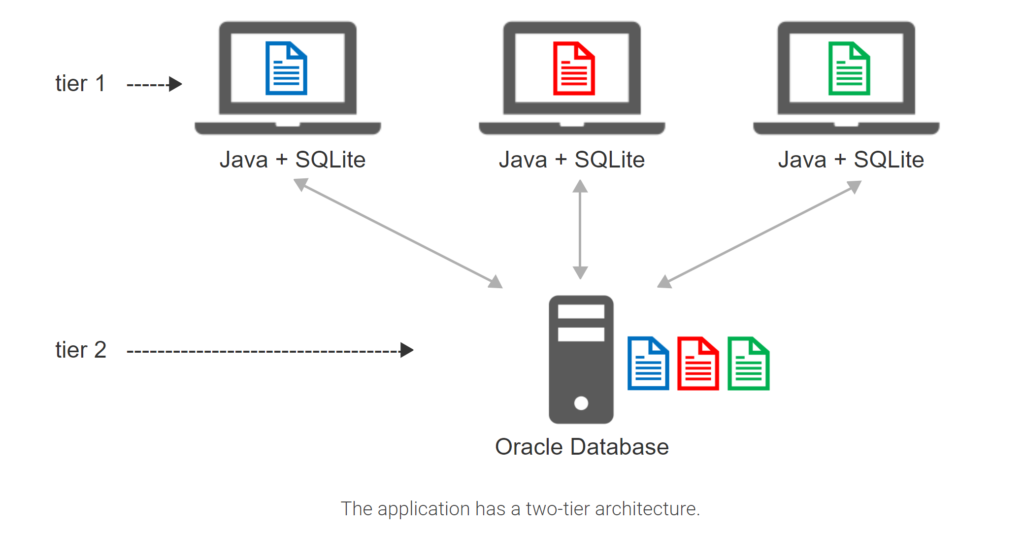
- Students take and edit notes on laptop computers.
- A Java application stores notes in SQLite on the laptop.
- Students can upload notes to a server and share with others.
- Thousands of students may access the server concurrently. Oracle Database scales better than SQLite and is installed on the server.
- The application has a two-tier architecture.
Federated databases
A federated database is a collection of two or more participating databases underneath a coordinating software layer. The participating databases are autonomous and heterogeneous:
- An autonomous database operates independently of other participating databases. An autonomous database is administered and can be queried as if the database were not part of a federated database.
- Heterogeneous databases either run under different database systems or have incompatible schema. Databases with incompatible schema might have inconsistent primary and foreign keys keys, similar tables with different designs, or similar columns with different names and data types
The coordinating software layer is called middleware, since the software lies between application programs and database software. Many federated database middleware products are available. Ex: InfoSphere Federated Server from IBM and WebLogic Server from Oracle. Although product capabilities vary, most products have the following components:
- A global catalog is a directory of participating database objects, such as tables, columns, and indexes.
- A global query processor decomposes a federated query into queries for each participating database.
- A database wrapper converts the decomposed queries to the appropriate syntax for each participating database.
Some products support SQL/Management of External Data, or SQL/MED, an extension of the SQL standard for federated databases. SQL/MED adds constructs such as nicknames and user mappings to SQL. A nickname is a federated database name for a participating database object, such as tables and columns. A user mapping associates a federated database user with a participating database user.
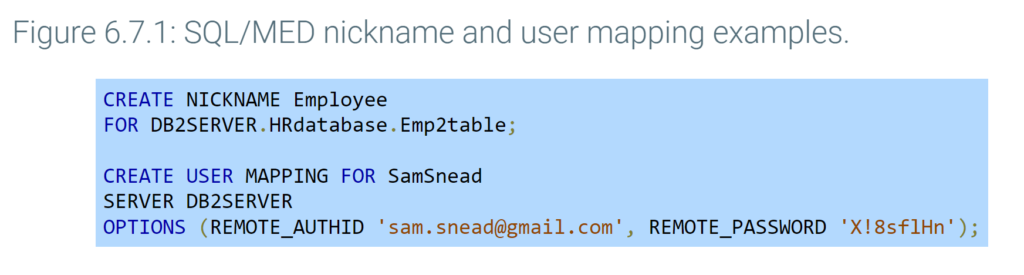
From the perspective of users and application programs, federated databases are more complex than distributed databases and data warehouses. In a distributed database, the assignment of data to nodes is invisible to users and programs. In a data warehouse, the data sources are invisible. In a federated database, however, the participating databases may be visible. Ex: Incompatible schema may specify different update rules for similar foreign keys, so the behavior of foreign key updates depends on the participating database.
Although a federated database does not provide a seamless view of data, a federated database is relatively easy to build and often the only practical way to combine data from existing, incompatible databases.
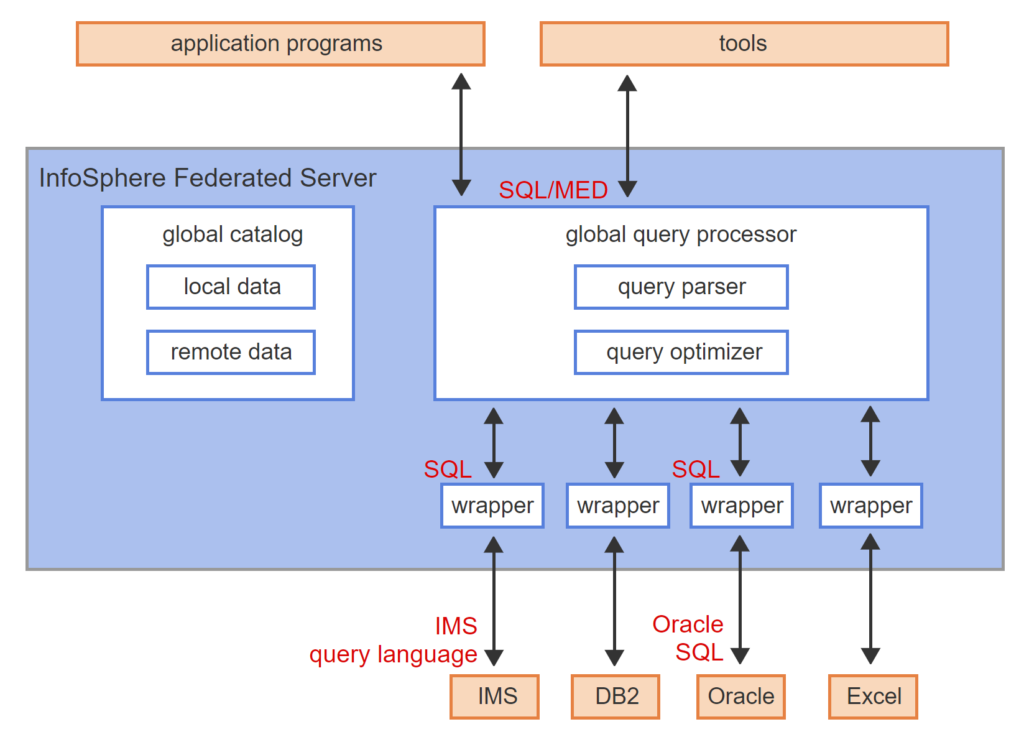
- InfoSphere Federated Server is a federated database middleware product from IBM.
- InfoSphere supports relational and non-relational databases. IMS is an older, non-relational database from IBM.
- The global catalog contains local data about internal InfoSphere objects and remote data about participating database objects.
- The global query processor decomposes a SQL/MED query into SQL queries for each database.
- Database wrappers translate standard SQL to database query language.
- The query parser checks SQL/MED syntax and converts queries into an internal format.
- The query optimizer determines an optimal execution plan using information in the global catalog.
Data lakes
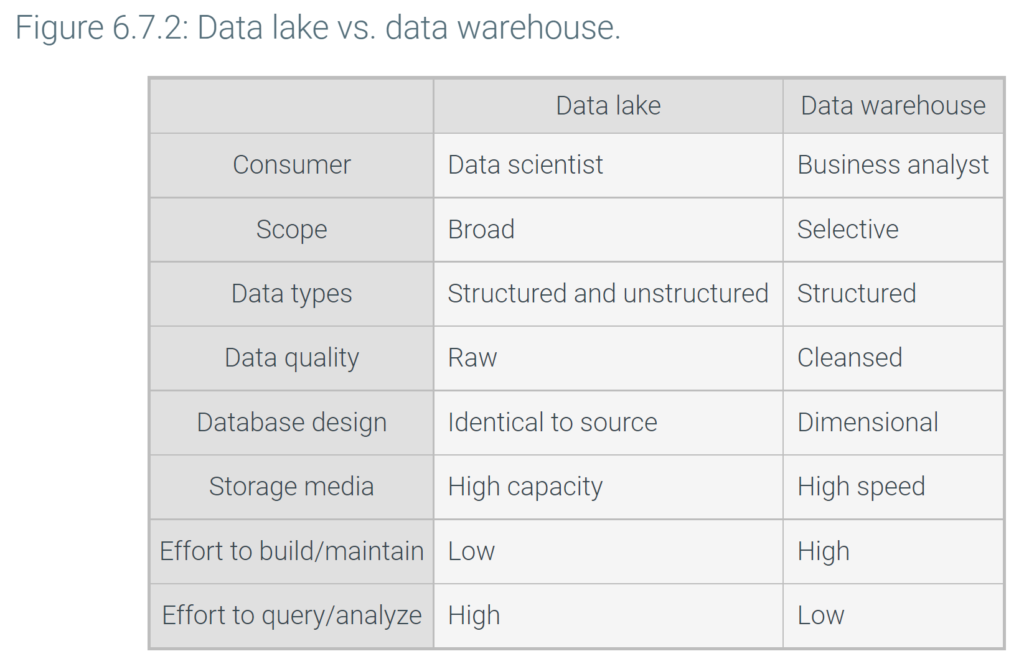
A data lake is an analytic database of raw, unprocessed data copied from multiple data sources. Data lakes share some characteristics of data warehouses and some characteristics of federated databases:
- Like a data warehouse, a data lake is a separate database designed for analytic queries and consisting of data extracted from multiple source systems.
- Like a federated database, data in a data lake is not cleansed, integrated, or restructured. Data is stored in the original format and structure. Depending on the data source, data may be loaded continuously rather than at fixed intervals.
Data lakes often contain large volumes of data, such as sensor data or website clicks. Data lakes also contain unstructured data, such as images, video, and text documents, which consume megabytes or gigabytes per data item. As a result, data lakes usually require a large amount of storage and utilize inexpensive, but relatively slow, storage media.
Data lakes emerged in response to the high cost of building and maintaining data warehouses. Since data is copied exactly as stored in the source system, constructing a data lake is relatively simple. On the other hand, formulating and understanding queries is more difficult with a data lake than a data warehouse. Consequently, data lakes are more suitable for data scientists, who are trained to work with complex, unstructured data, than for business analysts.
Ex: Healthcare organizations have had mixed success with data warehouses. Healthcare data, such as doctor’s notes and clinical data, is often unstructured, complex, and difficult to analyze. A data lake supported by specialized data scientists is a better solution for many healthcare organizations.