Example code:
#include <iostream>     // enables inputs and outputs
using namespace std;

int main() {     //starts the main part of the program
  int wage;     // int wage = 20; would also work
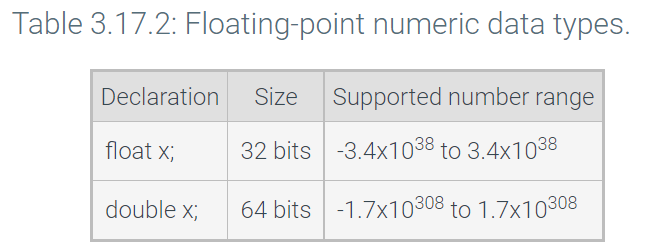
  double money;  // a call for decimals in there
  char middleInitial;    // store one character as a variable
  bool isSomething;     //Boolean call
  string sentenceVerb;   // store a string of characters as a variable but just one word
  getline(cin, firstString);    // this takes the whitespace as well on a whole line
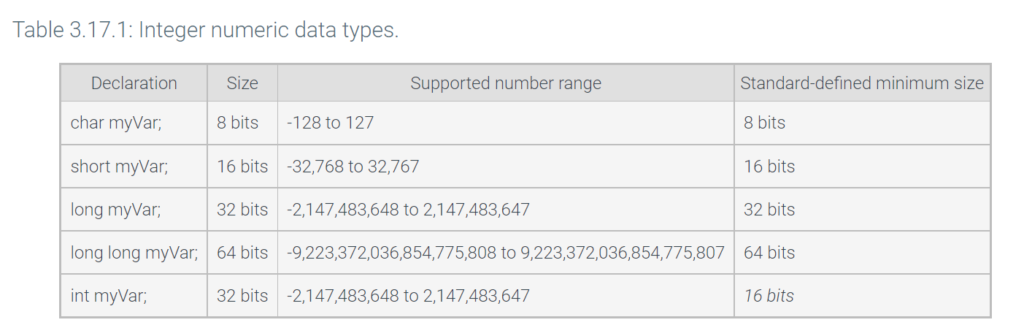
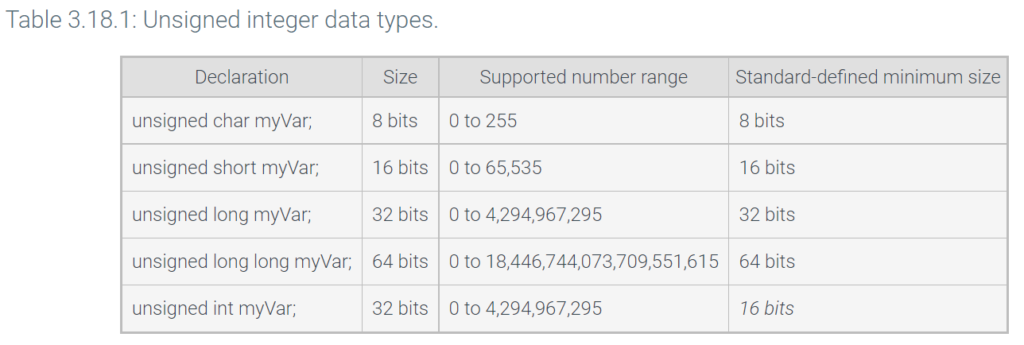
  unsigned long myVar;     // all positive numbers so it can store double the amount
  wage = 20;

  wage += 5;     // this would be the same as wage = wage + 5;

  money = static_cast<double>((wage * 40 * 52) * 0.78);      //converting wage to double

  cout << "Salary is ";     //cout connotes output
  cout << wage * 40 * 52;
  cout << endl;

  cout << rand() % 6 + 10;   // this will output numbers 10-15 because of random with remainder
  return 0;     // return 0 ends the program
}

cin >> wage;     // this would enable a user input to enter the wage
cout << endl;     //connotes a line break - you can also use \n within quotes too
cout << "Wage is: " << wage << endl;     // You can stack the << after cout
/* comments can be done like this as well as the others above */
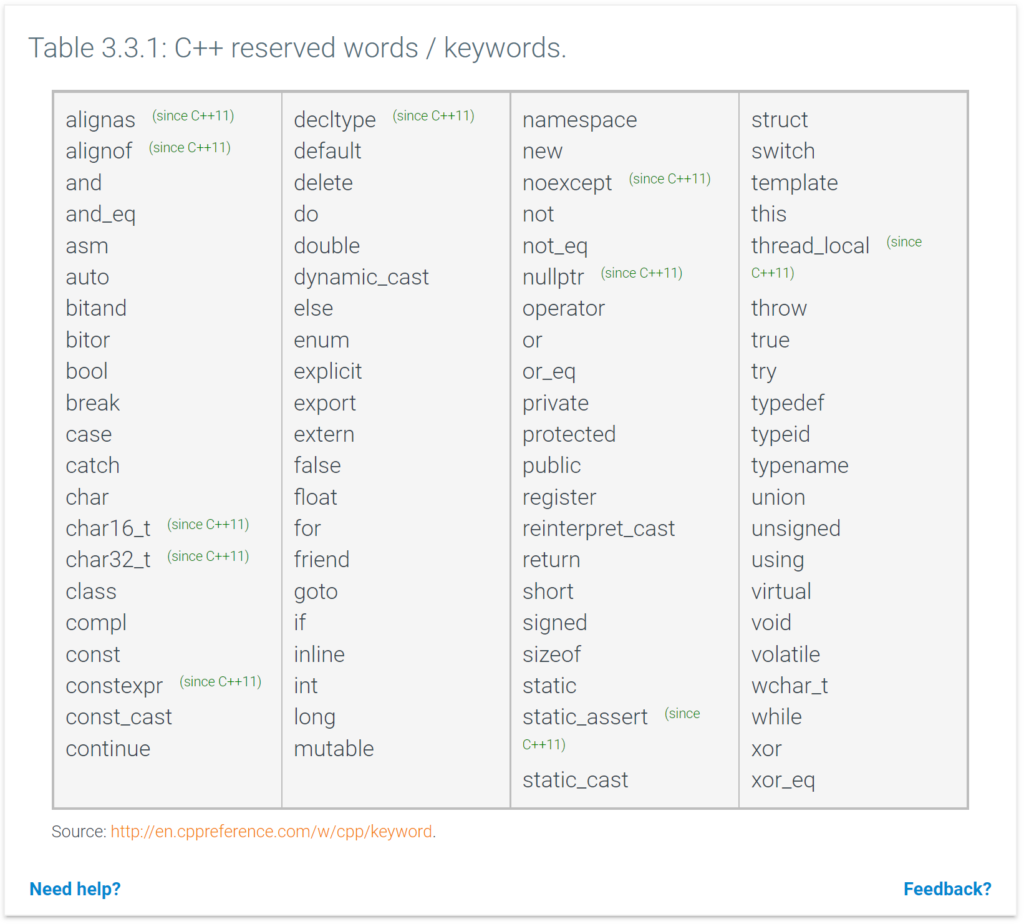
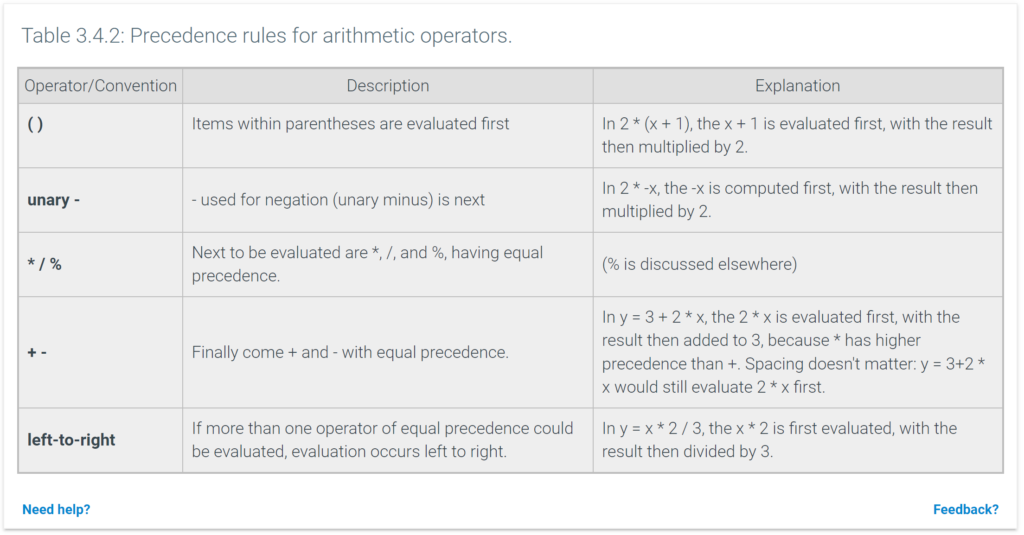
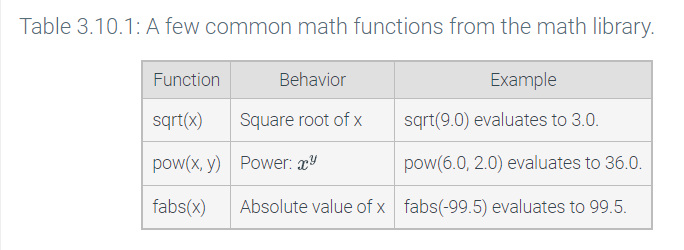
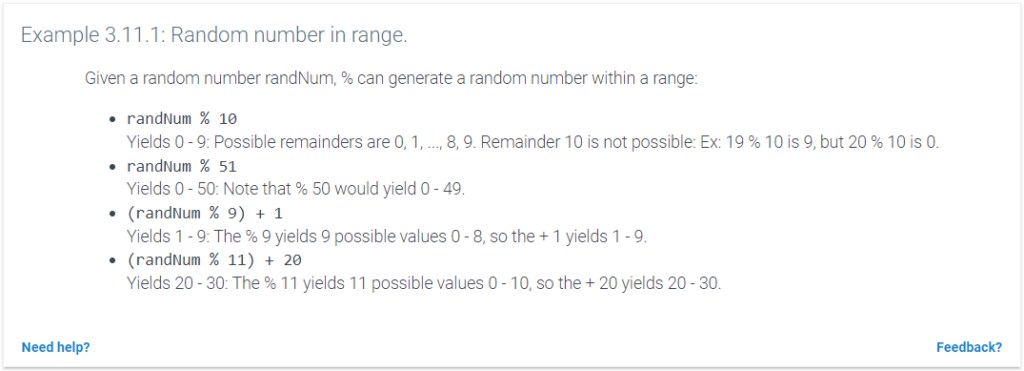
If Statements:
#include <iostream>
using namespace std;

int main() {
   int hotelRate;
   int numYears;

   hotelRate = 150;

   cout << "Enter number of years married: ";
   cin >> numYears;

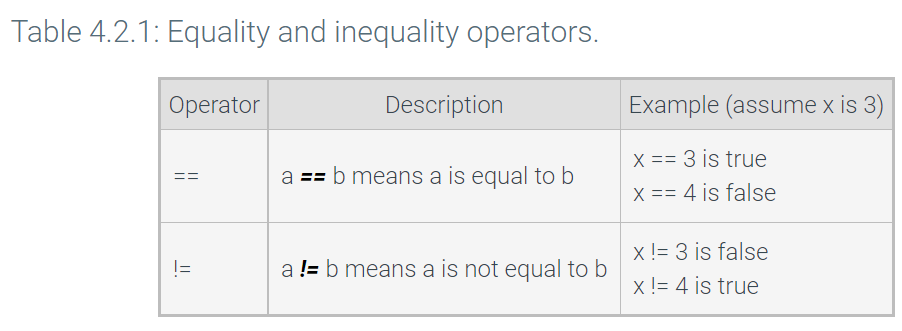
   if (numYears == 50) {
      cout << "Congratulations on 50 years "
            << "of marriage!" << endl;

      hotelRate = hotelRate / 2;
   }

   cout << "Your hotel rate: ";
   cout << hotelRate << endl;

   return 0;
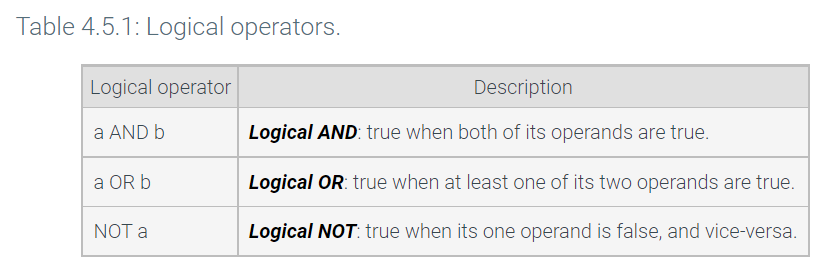
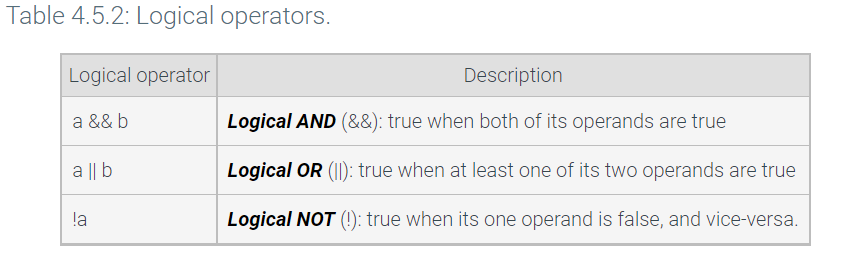
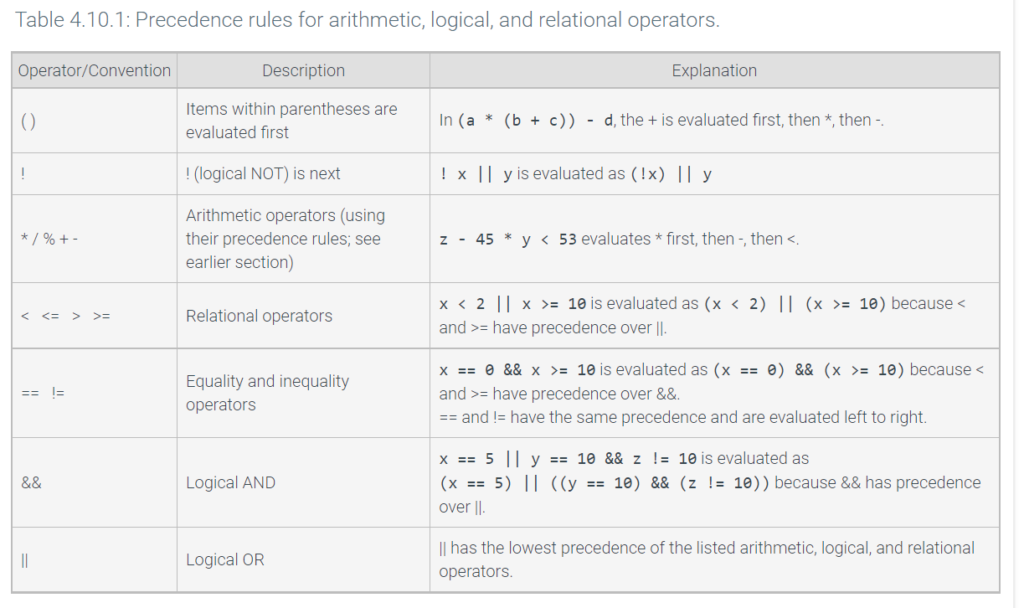
Example code in a switch statement:
#include <iostream>
using namespace std;

/* Estimates dog's age in equivalent human years.
   Source: www.dogyears.com
*/

int main() {
   int dogAgeYears;

   cout << "Enter dog's age (in years): ";
   cin  >> dogAgeYears;

   switch (dogAgeYears) {
      case 0:
         cout << "That's 0..14 human years." << endl;
         break;

      case 1:
         cout << "That's 15 human years." << endl;
         break;

      case 2:
         cout << "That's 24 human years." << endl;
         break;

      case 3:
         cout << "That's 28 human years." << endl;
         break;

      case 4:
         cout << "That's 32 human years." << endl;
         break;

      case 5:
      case 5:
      case 5:
      case 5:
         cout << "That's 37 human years." << endl;
         break;

      default:
         cout << "Human years unknown." << endl;
         break;
   }

   return 0;
}
Grabbing Words at a specific location in a string – string access operations
#include <iostream>
#include <string>
using namespace std;

int main() {
   string userWord;

   int wordSize;

   cout << "Enter a 5-letter word: ";
   cin  >> userWord;

   cout << "Scrambled: ";
   cout << userWord.at(3);
   cout << userWord.at(1);
   cout << userWord.at(4);
   cout << userWord.at(0);
   cout << userWord.at(2);
   cout << endl;

   userWord.at(3) = '*';     // replaces the the letter in spot 3 with *
   userWord.append(".");      // puts a period at the end of the word
   wordSize = userWord.size();       // Stores how many letters userWord is
   return 0;
}
#include <cctype> // provides access to several functions for working with characters
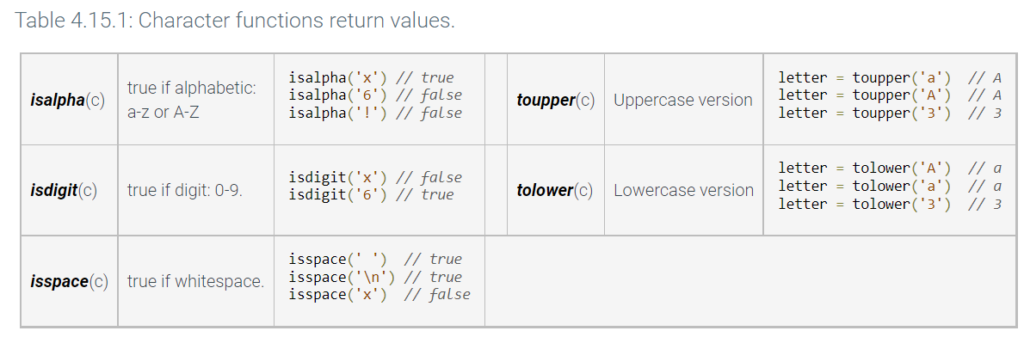
example of use:
#include <iostream>
#include <cctype>
using namespace std;

int main() {
   char let0;
   char let1;

   cout << "Enter a two-letter state abbreviation: ";
   cin >> let0;
   cin >> let1;

   if ( ! (isalpha(let0) && isalpha(let1)) ) {
      cout << "Error: Both are not letters." << endl;
   }
   else {
      let0 = toupper(let0);
      let1 = toupper(let1);
      cout << "Capitalized: " << let0 << let1 << endl;
   }

   return 0;
}
More string operations:
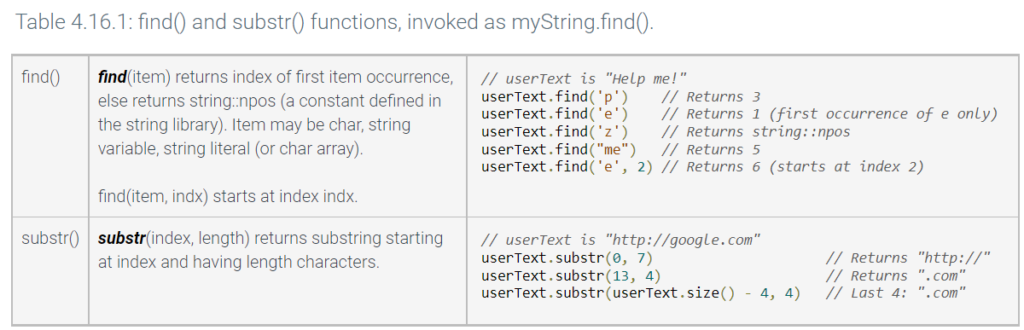
example of use:
#include <iostream>
#include <string>
using namespace std;

int main() {
   string emailText;
   int atSymbolIndex;
   string emailUsername;

   cout << "Enter email address: ";
   cin  >> emailText;

   atSymbolIndex = emailText.find('@');
   if (atSymbolIndex == string::npos) {
      cout << "Address is missing @" << endl;
   }
   else {
      emailUsername = emailText.substr(0, atSymbolIndex);
      cout << "Username: " << emailUsername << endl;
   }

   return 0;
}
Combining / Replacing
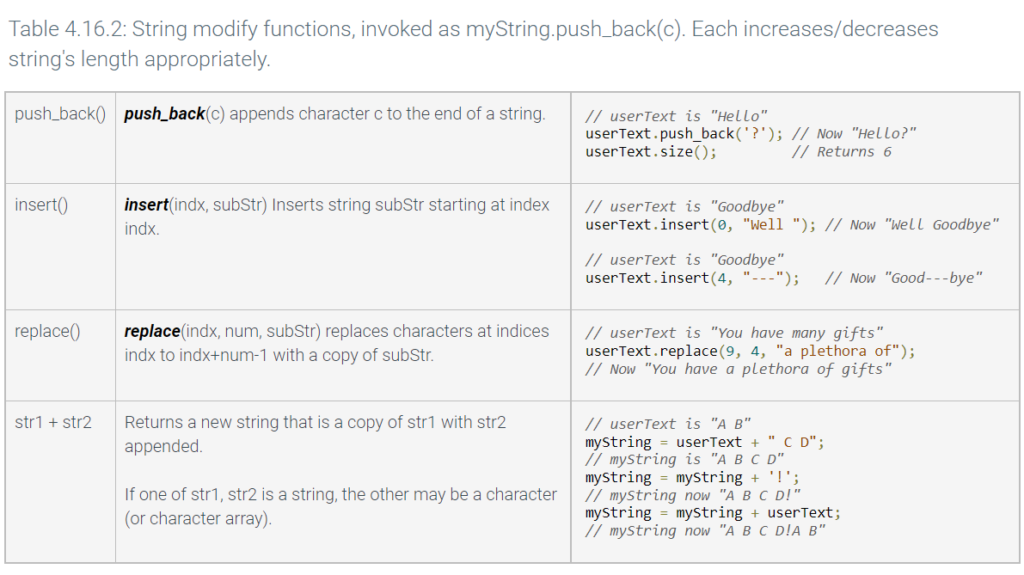
example of string modifying
#include <iostream>
#include <string>
using namespace std;

int main() {
   string userName;
   string greetingText;
   int itemIndex;

   itemIndex = 0;

   cout << "Enter name: ";
   getline(cin, userName);

   // Combine strings using +
   greetingText = "Hello " + userName;

   // Append a period (could have used +)
   greetingText.push_back('.'); // '' not ""
   cout << greetingText << endl;

   // Insert Mr/Ms before user's name
   greetingText.insert(6, "Mr/Ms ");
   cout << greetingText << endl;

   // Replace occurrence of "Darn" by "@$#"
   if (greetingText.find("Darn") != string::npos) { // Found
      itemIndex = greetingText.find("Darn");
      greetingText.replace(itemIndex, 4, "@#$");
   }
   cout << greetingText << endl;

   return 0;
}
Conditional Expression
A conditional expression has the form condition ? exprWhenTrue : exprWhenFalse.
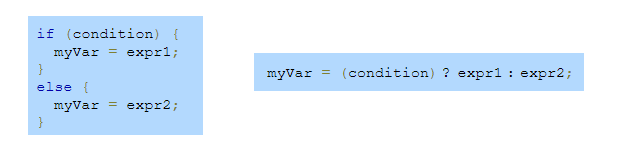
if (x > 50) {
   y = 50;
}
else {
   y = x;
}
this is equal to:
y = (x > 50) ? 50 : x;
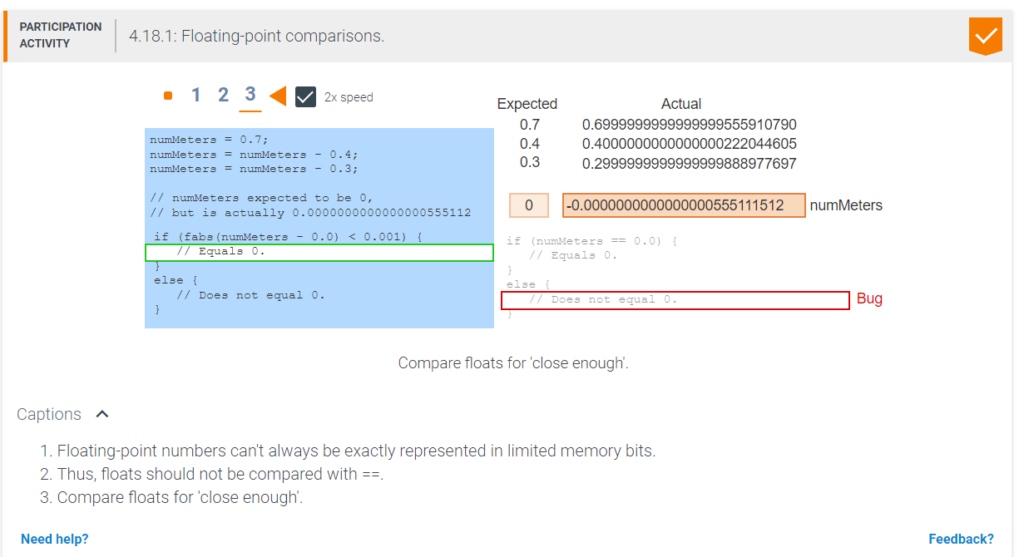
Floating Point Comparisons
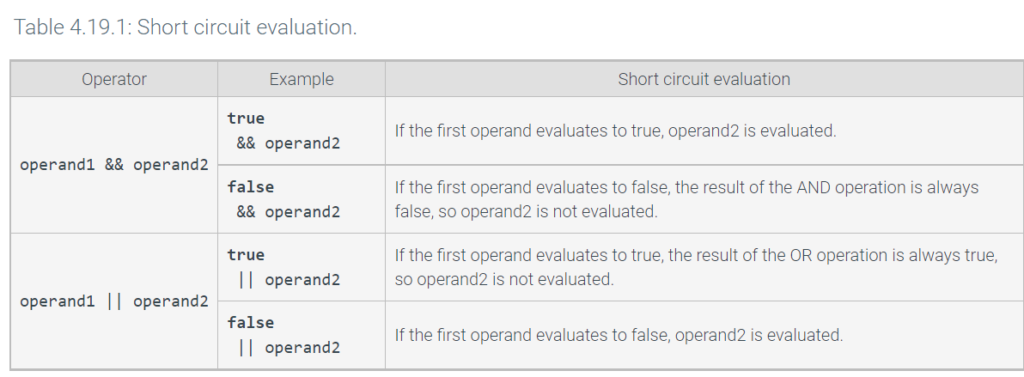
Short Circuit Evaluation
While Loops
A while loop is a program construct that repeatedly executes a list of sub-statements (known as the loop body) while the loop’s expression evaluates to true. Each execution of the loop body is called an iteration. Once entering the loop body, execution continues to the body’s end, even if the expression would become false midway through.
The following Celsius to Fahrenheit example shows the common pattern of getting user input at the end of each loop iteration to determine whether to continue looping.
using namespace std;

int main() {
   double celsiusValue;
   double fahrenheitValue;
   char userChar;

   celsiusValue = 0.0;
   userChar = 'y';

   while (userChar == 'y') {
      fahrenheitValue = (celsiusValue * 9.0 / 5.0) + 32.0;

      cout << celsiusValue << " C is ";
      cout << fahrenheitValue << " F" << endl;

      cout << "Type y to continue, any other to quit: ";
      cin >> userChar;

      celsiusValue = celsiusValue + 5;
      cout << endl;
   }

   cout << "Goodbye." << endl;

   return 0;
}
While Loop Example: The program asks the user to enter a year, and then outputs the approximate number of a person’s ancestors who were alive for each generation leading back to that year, with the loop computing powers of 2 along the way.
#include <iostream>
using namespace std;

int main() {
   const int YEARS_PER_GEN = 20; // Approx. years per generation
   int userYear;                 // User input
   int consYear;                 // Year being considered
   int numAnc;                   // Approx. ancestors in considered year

   consYear = 2020;
   numAnc = 2;

   cout << "Enter a past year (neg. for B.C.): ";
   cin >> userYear;

   while (consYear >= userYear) {
      cout << "Ancestors in " << consYear << ": " << numAnc << endl;

      numAnc = 2 * numAnc;                 // Each ancestor had two parents
      consYear = consYear - YEARS_PER_GEN; // Go back 1 generation
   }

   return 0;
}
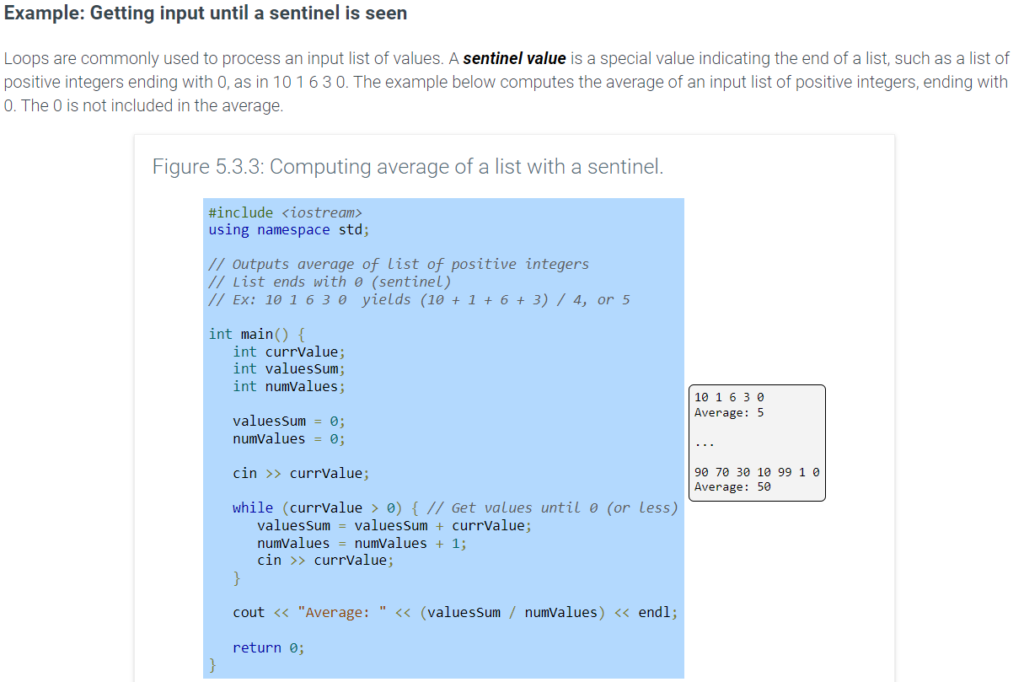
sentinel value example
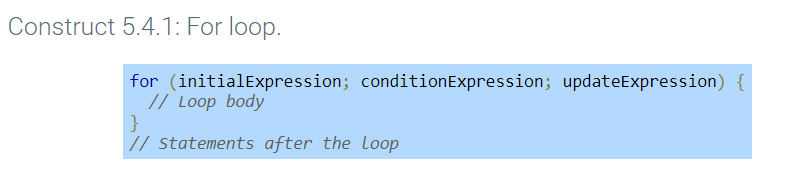
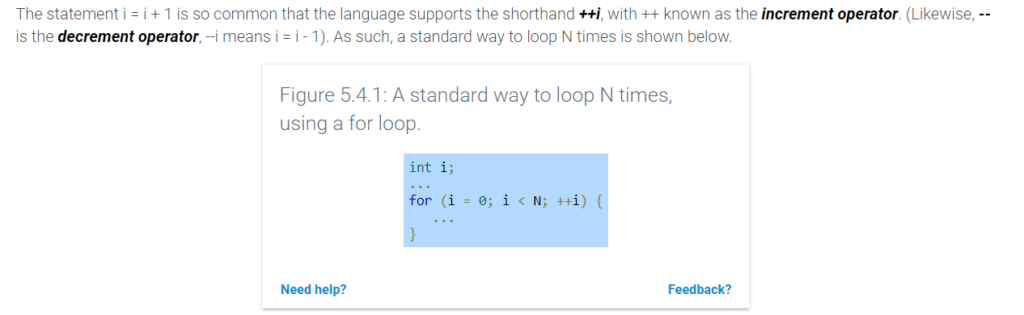
For Loop: A loop commonly must iterate a specific number of times, such as 10 times. Though achievable with a while loop, that situation is so common that a special kind of loop exists. A for loop is a loop with three parts at the top: a loop variable initialization, a loop expression, and a loop variable update. A for loop describes iterating a specific number of times more naturally than a while loop.
Example: Computing the average of a list of input values
The example below computes the average of an input list of integer values. The first input indicates the number of values in the subsequent list. That number controls how many times the subsequent for loop iterates.
#include <iostream>
using namespace std;

// Outputs average of list of integers
// First value indicates list size
// Ex: 4  10 1 6 3  yields (10 + 1 + 6 + 3) / 4, or 5

int main() {
   int currValue;
   int valuesSum;
   int numValues;
   int i;

   cin >> numValues; // Gets number of values in list

   valuesSum = 0;

   for (i = 0; i < numValues; ++i) {
          cin >> currValue; // Gets next value in list
          valuesSum += currValue;
   }

   cout << "Average: " << (valuesSum / numValues) << endl;

   return 0;
}
Generally, a programmer uses a for loop when the number of iterations is known (like loop 5 times, or loop numItems times), and a while loop otherwise.
5.7 Nested loops
A nested loop is a loop that appears in the body of another loop. The nested loops are commonly referred to as the inner loop and outer loop.
Nested loops have various uses. One use is to generate all combinations of some items. For example, the following program generates all two-letter .com Internet domain names.
5.9 Break and continue
A break statement in a loop causes an immediate exit of the loop. A break statement can sometimes yield a loop that is easier to understand.
#include <iostream>
using namespace std;

int main() {
   const int EMPANADA_COST = 3;
   const int TACO_COST     = 4;

   int userMoney;
   int numTacos;
   int numEmpanadas;
   int mealCost;
   int maxEmpanadas;
   int maxTacos;

   mealCost = 0;

   cout << "Enter money for meal: ";
   cin >> userMoney;

   maxEmpanadas = userMoney / EMPANADA_COST;
   maxTacos = userMoney / TACO_COST;

   for (numTacos = 0; numTacos <= maxTacos; ++numTacos) {
      for (numEmpanadas = 0; numEmpanadas <= maxEmpanadas; ++numEmpanadas) {

         mealCost = (numEmpanadas * EMPANADA_COST) + (numTacos * TACO_COST);

         // Find first meal option that exactly matches user money
         if (mealCost == userMoney) {
            break;
         }
      }

      // If meal option exactly matching user money is found,
      // break from outer loop as well
      if (mealCost == userMoney) {
         break;
      }
   }

   if (mealCost == userMoney) {
      cout << "$" << mealCost << " buys " << numEmpanadas
      << " empanadas and " << numTacos << " tacos without change." << endl;
   }
   else {
      cout << "You cannot buy a meal without having change left over." << endl;
   }

   return 0;
}
A continue statement in a loop causes an immediate jump to the loop condition check. A continue statement can sometimes improve the readability of a loop. The example below extends the previous meal finder program to find meal options for which the total number of items purchased is evenly divisible by the number of diners. The program also outputs all possible meal options, instead of just reporting the first meal option found.
Figure 5.9.2: Continue statement: Meal finder program that ensures items purchased is evenly divisible by the number of diners.
#include <iostream>
using namespace std;

#include <stdio.h>

int main() {
   const int EMPANADA_COST = 3;
   const int TACO_COST     = 4;

   int userMoney;
   int numTacos;
   int numEmpanadas;
   int mealCost;
   int maxEmpanadas;
   int maxTacos;
   int numOptions;
   int numDiners;

   mealCost = 0;
   numOptions = 0;

   cout << "Enter money for meal: ";
   cin >> userMoney;

   cout << "How many people are eating: ";
   cin >> numDiners;

   maxEmpanadas = userMoney / EMPANADA_COST;
   maxTacos     = userMoney / TACO_COST;

   numOptions = 0;
   for (numTacos = 0; numTacos <= maxTacos; ++numTacos) {
      for (numEmpanadas = 0; numEmpanadas <= maxEmpanadas; ++numEmpanadas) {

         // Total items purchased must be equally
         // divisible by number of diners
         if ( ((numTacos + numEmpanadas) % numDiners) != 0) {
            continue;
         }

         mealCost = (numEmpanadas * EMPANADA_COST) + (numTacos * TACO_COST);

         if (mealCost == userMoney) {
            cout << "$" << mealCost << " buys " << numEmpanadas
                 << " empanadas and " << numTacos
                 << " tacos without change." << endl;
            numOptions = numOptions + 1;
         }
      }
   }

   if (numOptions == 0) {
      cout << "You cannot buy a meal without "
           << "having change left over." << endl;
   }

   return 0;
}
5.11 Enumerations
Some variables only need to store a small set of named values. For example, a variable representing a traffic light need only store values named GREEN, YELLOW, or RED. An enumeration type (enum) declares a name for a new type and possible values for that type.
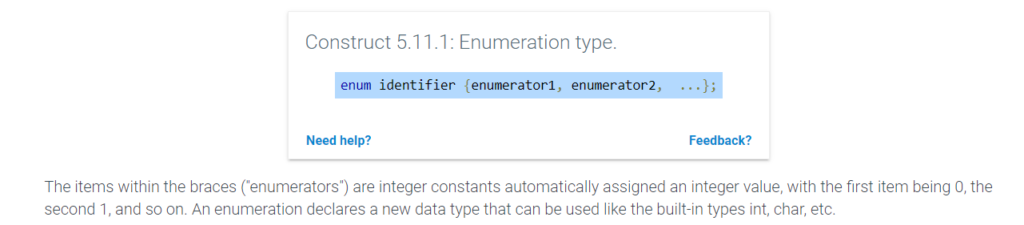
#include <iostream>
using namespace std;

/* Manual controller for traffic light */
int main() {
   enum LightState {LS_RED, LS_GREEN, LS_YELLOW, LS_DONE};
   LightState lightVal;
   char userCmd;

   lightVal = LS_RED;
   userCmd = '-';

   cout << "User commands: n (next), r (red), q (quit)." << endl << endl;

   lightVal = LS_RED;
   while (lightVal != LS_DONE) {

      if (lightVal == LS_GREEN) {
         cout << "Green light  ";
         cin >> userCmd;
         if (userCmd == 'n') { // Next
            lightVal = LS_YELLOW;
         }
      }
      else if (lightVal == LS_YELLOW) {
         cout << "Yellow light  ";
         cin >> userCmd;
         if (userCmd == 'n') { // Next
            lightVal = LS_RED;
         }
      }
      else if (lightVal == LS_RED) {
         cout << "Red light  ";
         cin >> userCmd;
         if (userCmd == 'n') { // Next
            lightVal = LS_GREEN;
         }
      }

      if (userCmd == 'r') { // Force immediate red
         lightVal = LS_RED;
      }
      else if (userCmd == 'q') { // Quit
         lightVal = LS_DONE;
      }
   }

   cout << "Quit program." << endl;

   return 0;
}
Vectors
Example of a vector used in an oldest person app
#include <iostream>
#include <vector>
using namespace std;

int main() {
   vector<int> oldestPeople(5);
   int nthPerson;               // User input, Nth oldest person

   oldestPeople.at(0) = 122; // Died 1997 in France
   oldestPeople.at(1) = 119; // Died 1999 in U.S.
   oldestPeople.at(2) = 117; // Died 1993 in U.S.
   oldestPeople.at(3) = 117; // Died 1998 in Canada
   oldestPeople.at(4) = 116; // Died 2006 in Ecuador

   cout << "Enter N (1..5): ";
   cin  >> nthPerson;

   if ((nthPerson >= 1) && (nthPerson <= 5)) {
      cout << "The #" << nthPerson << " oldest person lived ";
      cout << oldestPeople.at(nthPerson - 1) << " years." << endl;
   }

   return 0;
}
Here is a basic program with loops and vectors:
#include <iostream>
#include <vector>
using namespace std;

int main() {
   const int NUM_VALS = 8;         // Number of elements in vector
   vector<int> userVals(NUM_VALS); // User values
   unsigned int i;                 // Loop index

   cout << "Enter " << NUM_VALS << " integer values..." << endl;
   for (i = 0; i < userVals.size(); ++i) {
      cout << "Value: ";
      cin >> userVals.at(i);
   }

   cout << "You entered: ";
   for (i = 0; i < userVals.size(); ++i) {
      cout << userVals.at(i) << " ";
   }
   cout << endl;

   return 0;
}
Determining a quantity about a vector’s items
Iterating through a vector for various purposes is an important programming skill to master. Programs commonly iterate through vectors to determine some quantity about the vector’s items. The example below computes the sum of a vector’s element values.
#include <iostream>
#include <vector>
using namespace std;

int main() {
   const int NUM_ELEMENTS = 8;         // Number of elements in vector
   vector<int> userVals(NUM_ELEMENTS); // User values
   unsigned int i;                     // Loop index
   int sumVal;                         // For computing sum

   cout << "Enter " << NUM_ELEMENTS << " integer values..." << endl;
   for (i = 0; i < userVals.size(); ++i) {
      cout << "Value: ";
      cin >> userVals.at(i);
      cout << endl;
   }

   // Determine sum
   sumVal = 0;
   for (i = 0; i < userVals.size(); ++i) {
      sumVal = sumVal + userVals.at(i);
   }
   cout << "Sum: " << sumVal << endl;

   return 0;
}
Here is how you resize a vector
#include <iostream>
#include <vector>
using namespace std;

int main() {
   vector<int> userVals; // No elements yet
   int numVals;
   unsigned int i;

   cout << "Enter number of integer values: ";
   cin >> numVals;

   userVals.resize(numVals); // Allocate elements

   cout << "Enter " << numVals << " integer values..." << endl;
   for (i = 0; i < userVals.size(); ++i) {
      cout << "Value: ";
      cin >> userVals.at(i);
   }

   cout << "You entered: ";
   for (i = 0; i < userVals.size(); ++i) {
      cout << userVals.at(i) << " ";
   }
   cout << endl;

   return 0;
}
Appending items to a vector
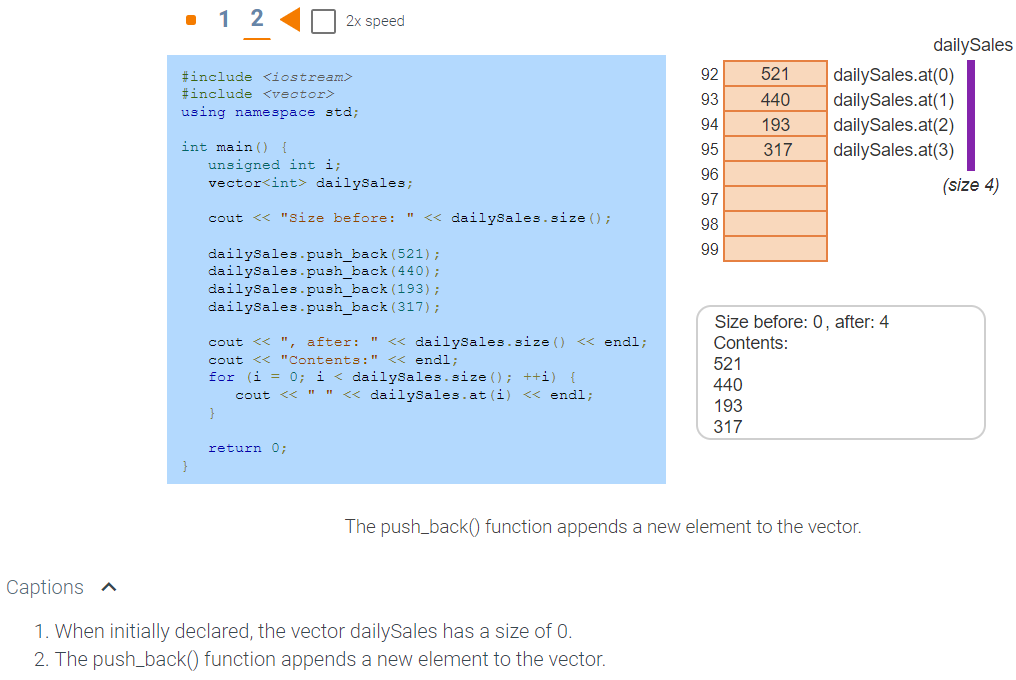
A programmer can append a new element to the end of an existing vector using a vector’s push_back() function. Ex: dailySales.push_back(521) creates a new element at the end of the vector dailySales and assigns that element with the value 521.
#include <iostream>
#include <vector>
using namespace std;

int main() {
   unsigned int i;
   vector<int> dailySales;

   cout << "Size before: " << dailySales.size();

   dailySales.push_back(521);
   dailySales.push_back(440);
   dailySales.push_back(193);
   dailySales.push_back(317);

   cout << ", after: " << dailySales.size() << endl;
   cout << "Contents:" << endl;
   for (i = 0; i < dailySales.size(); ++i) {
      cout << " " << dailySales.at(i) << endl;
   }

   return 0;
}
Vector pop_back() and back()
The following table summarizes a few common functions dealing with the back (or last element) of a vector.
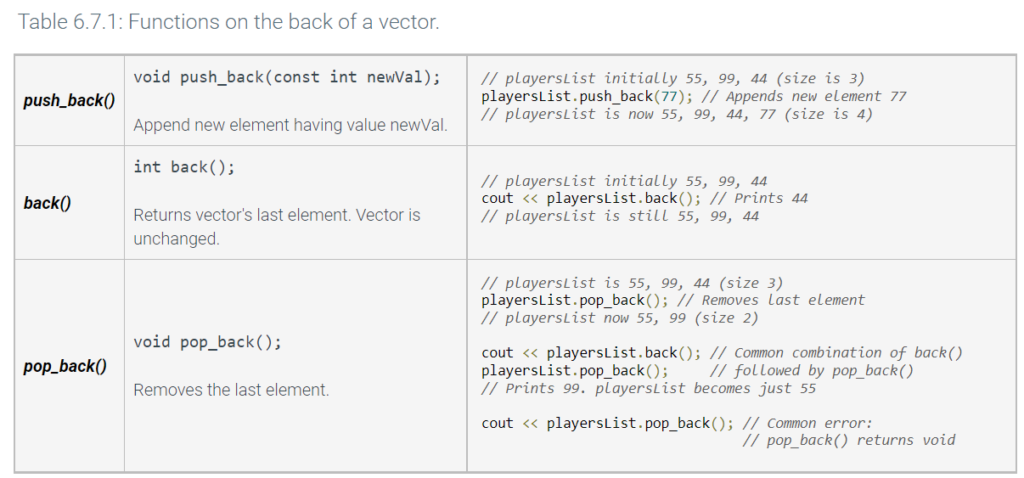
Element by element vector copy
In C++, the = operator conveniently performs an element-by-element copy of a vector, called a vector copy operation. The operation vectorB = vectorA resizes vectorB to vectorA’s size, appending or deleting elements as needed. vectorB commonly has a size of 0 before the operation.
int main() {
   const int   NUM_ELEMENTS = 4;         // Number of elements
   vector<int> origPrices(NUM_ELEMENTS); // Original prices
   vector<int> salePrices(NUM_ELEMENTS); // Sale prices
   unsigned int i;                       // Loop index

   // Assign original prices
   origPrices.at(0) = 10;
   origPrices.at(1) = 20;
   origPrices.at(2) = 30;
   origPrices.at(3) = 40;

   // Copy original prices to sales prices
   salePrices = origPrices;
6.12 Two-dimensional arrays
An array can be declared with two dimensions. int myArray[R][C] represents a table of int variables with R rows and C columns, so R*C elements total. For example, int myArray[2][3] creates a table with 2 rows and 3 columns, for 6 int variables total. Example accesses are myArray[0][0] = 33; or num = myArray[1][2].
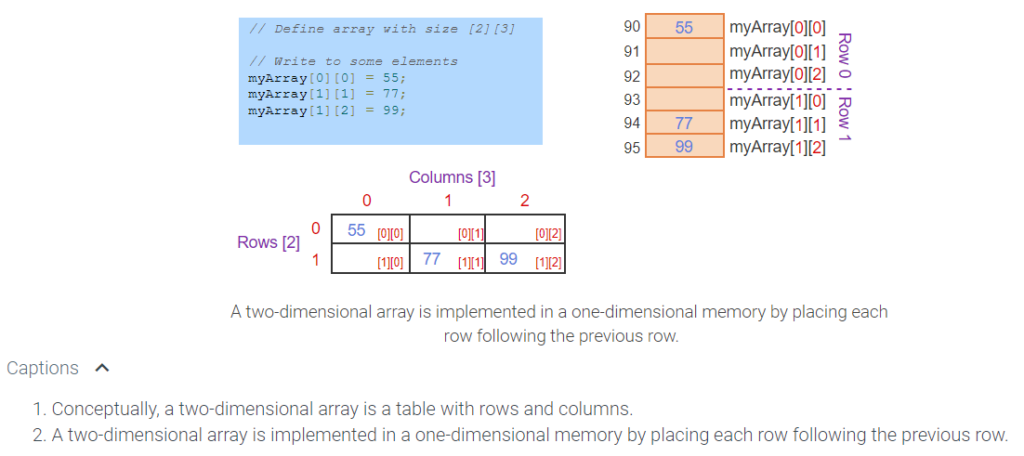
42
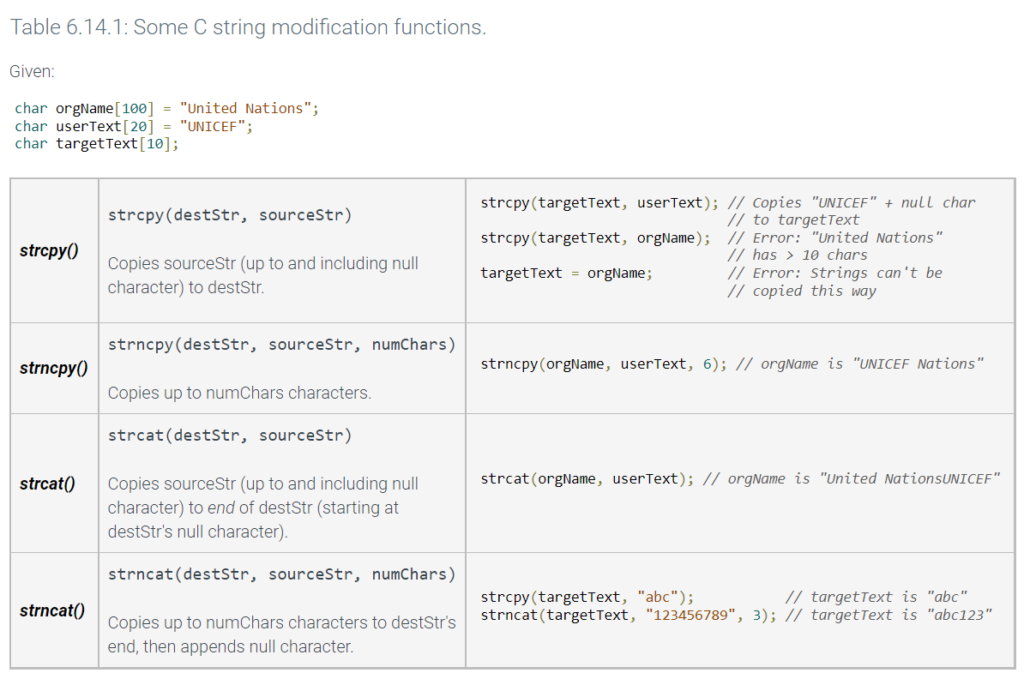
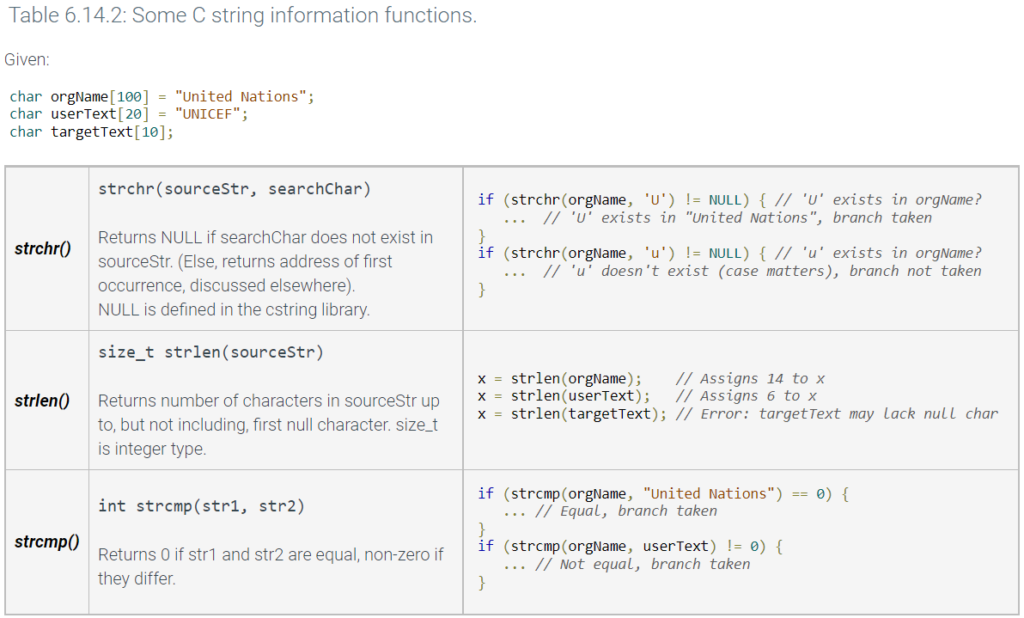
6.14 C-String library functions
C++ provides functions for working with C strings, presented in the cstring library. To use those functions, the programmer starts with: #include <cstring>.
Some C string functions for modifying strings are summarized below.
6.15 Char library functions: ctype
C++ provides common functions for working with characters, presented in the cctype library. The first c indicates the library is a C language standard library, and ctype is short for “character type”. To use those functions, the programmer adds the following at the top of a file: #include <cctype>
Commonly-used cctype functions are summarized below; a complete reference is found at http://www.cplusplus.com/reference/cctype/.
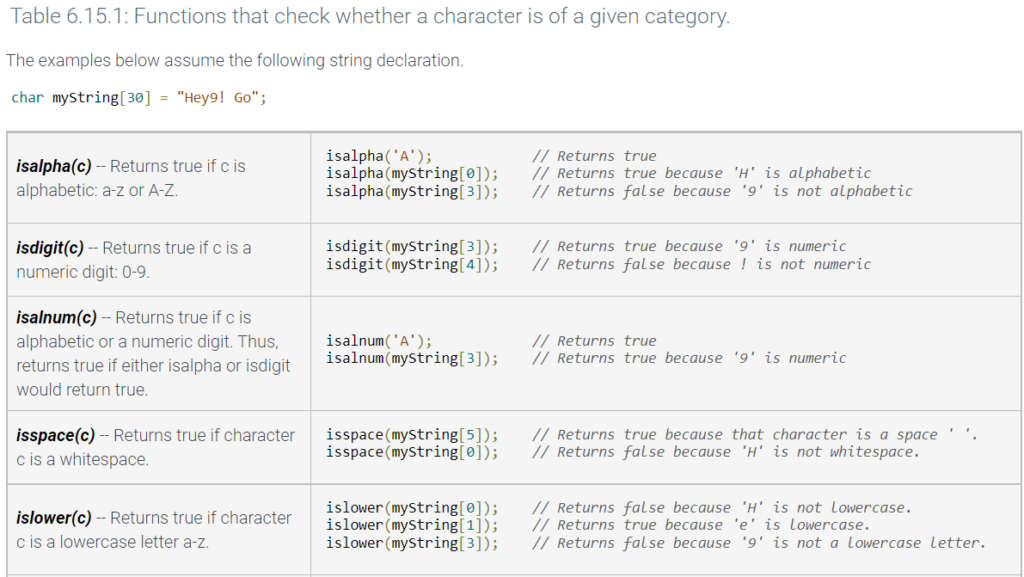
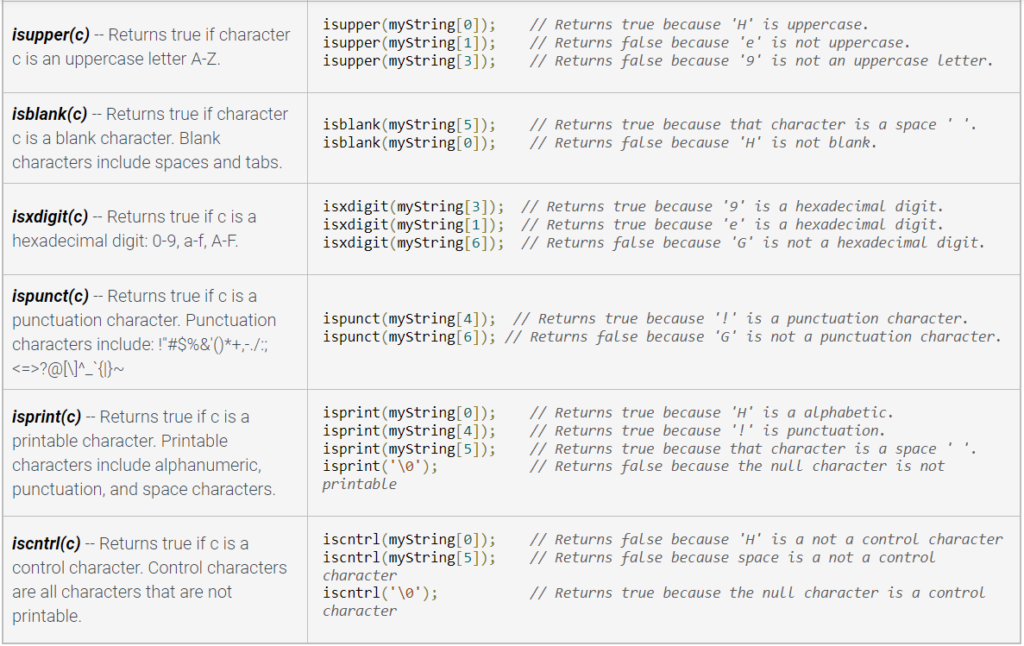
Character checking functions
The following functions check whether a character is of a given category, returning either false (0) or true (non-zero).
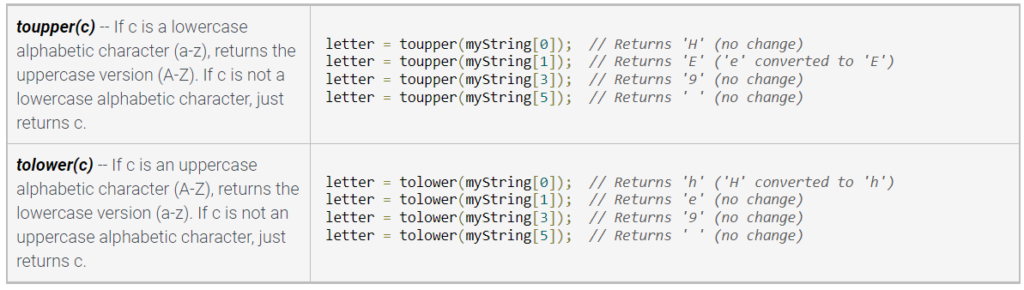
Character conversion functions
The following functions return a character representing a converted version of the input character.
Table 6.15.2: Functions that convert a character is of a given category.
The examples below assume the following string declaration.
char myString[30] = "Hey9! Go";
7.1 User-defined function basics
Functions (general)
A program may perform the same operation repeatedly, causing a large and confusing program due to redundancy. Program redundancy can be reduced by creating a grouping of predefined statements for repeatedly used operations, known as a function. Even without redundancy, functions can prevent a main program from becoming large and confusing.
Returning a value from a function
A function may return one value using a return statement. Below, the ComputeSquare() function is defined to have a return type of int; thus, the function’s return statement must have an expression that evaluates to an int.
#include <iostream>
using namespace std;

int ComputeSquare(int numToSquare) {
   return numToSquare * numToSquare;
}

int main() {
   int numSquared;

   numSquared = ComputeSquare(7);
   cout << "7 squared is " << numSquared << endl;

   return 0;
}
Dude Video Notes
for (int i = 0; i < 4; i++)
{
cout << ” Please enter data” << i + 1 << endl;
cin >> QuarterSales[i];
}
Functions – module that written to execute a certain task
- outside of Main
- shows up in 3 areas – declaration, the code, and the call
- Declaration needs the return type, and name, and return types and parameters – sometimes parameterless
- parameters can intake information to run it
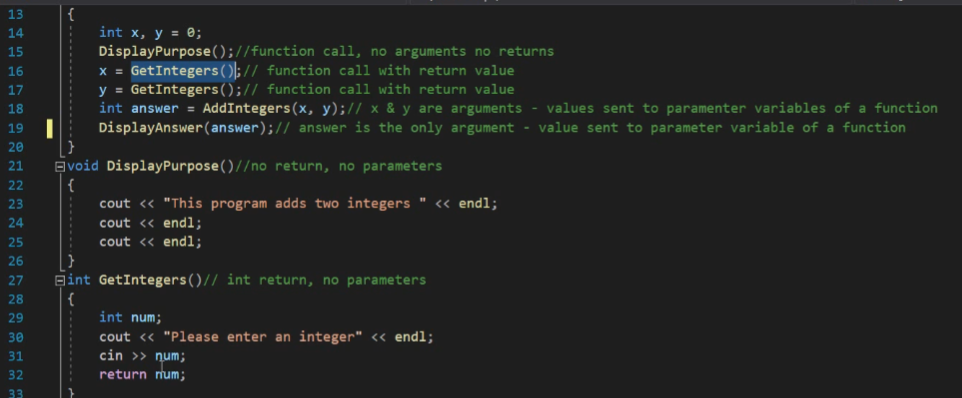
In the above – the variable is established based on the function call
CLASSES AND OBJECTS!