12 pages
3.1 Introduction to SQL
Structured Query Language
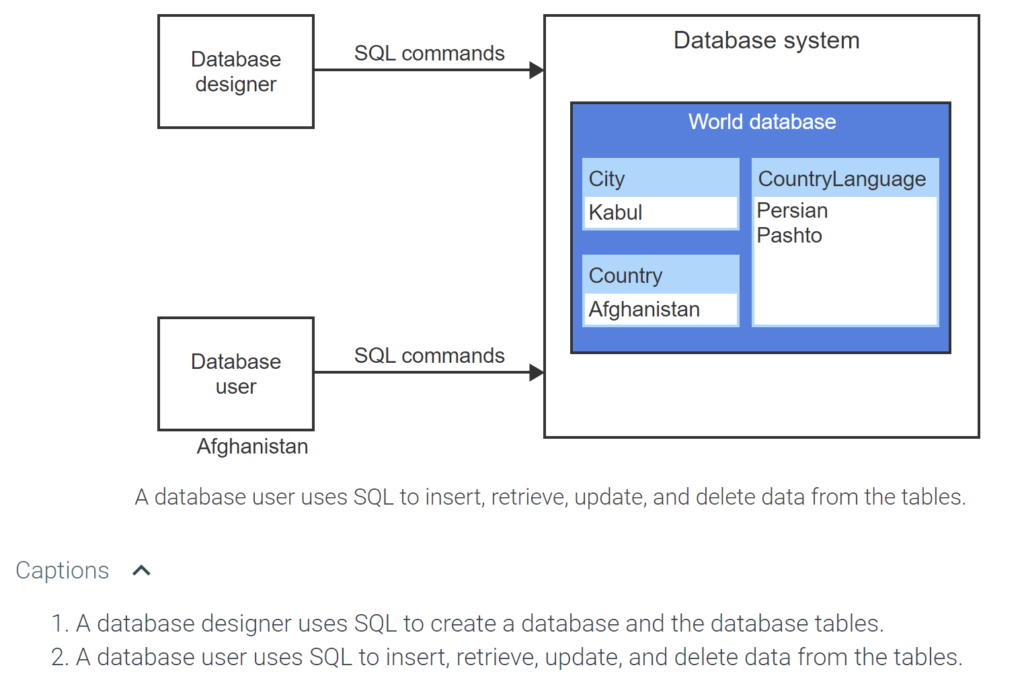
Structured Query Language (SQL) is a high-level computer language for storing, manipulating, and retrieving data in a relational database. SQL, pronounced “ess-que-el” or “see-qual”, is the language used by database designers and database users to interact with relational database systems. Though the SQL language has been standardized, a database system may implement variations of SQL statements.
SQL syntax
An SQL statement is a complete command composed of one or more clauses. A clause groups SQL keywords like SELECT, FROM, and WHERE with table names like City, column names like Name, and conditions like Population > 100000. An SQL statement may be written on a single line, but good practice is to write each clause on a separate line.
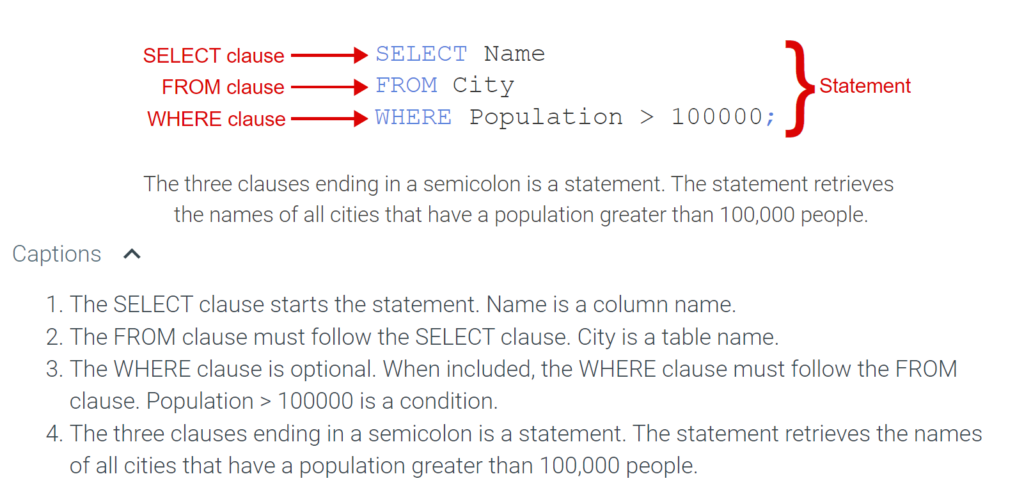
All SQL statements end with a semicolon. SQL keywords like SELECT, FROM, WHERE, etc. are not case sensitive. Ex: SELECT and select are equivalent. However, identifiers like column names and table names are case sensitive in many database systems. This material uses capital letters for SQL keywords so the keywords stand out from other syntactic parts. The table below summarizes various syntactic features of SQL.
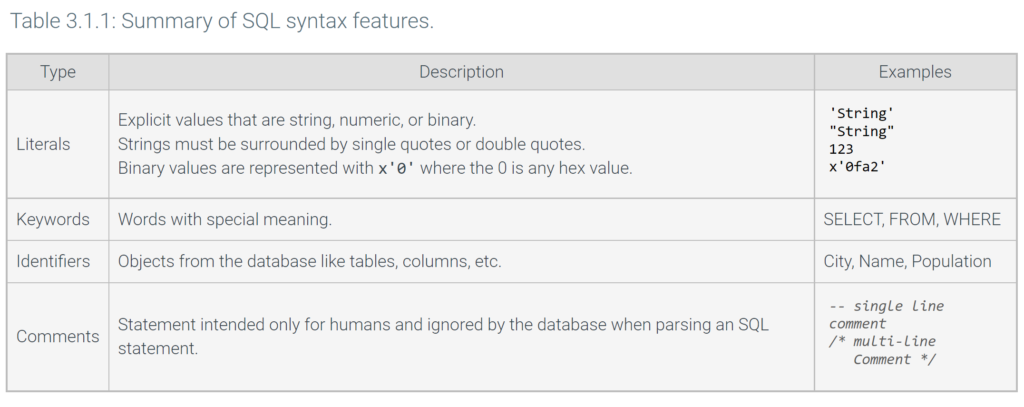
x'0' where the 0 is any hex value. ‘String’ “String” 123 x’0fa2′ Keywords Words with special meaning. SELECT, FROM, WHERE Identifiers Objects from the database like tables, columns, etc. City, Name, Population Comments Statement intended only for humans and ignored by the database when parsing an SQL statement.All database systems recognize single quotes for string literals, but some also recognize double quotes. This material uses single quotes to ensure the SQL statements are compatible with all database systems.
SQL sublanguages
The SQL language is divided into five sublanguages:
- Data Definition Language (DDL) defines the structure of the database.
- Data Query Language (DQL) retrieves data from the database.
- Data Manipulation Language (DML) manipulates data stored in a database.
- Data Control Language (DCL) controls database user access.
- Data Transaction Language (DTL) manages database transactions.
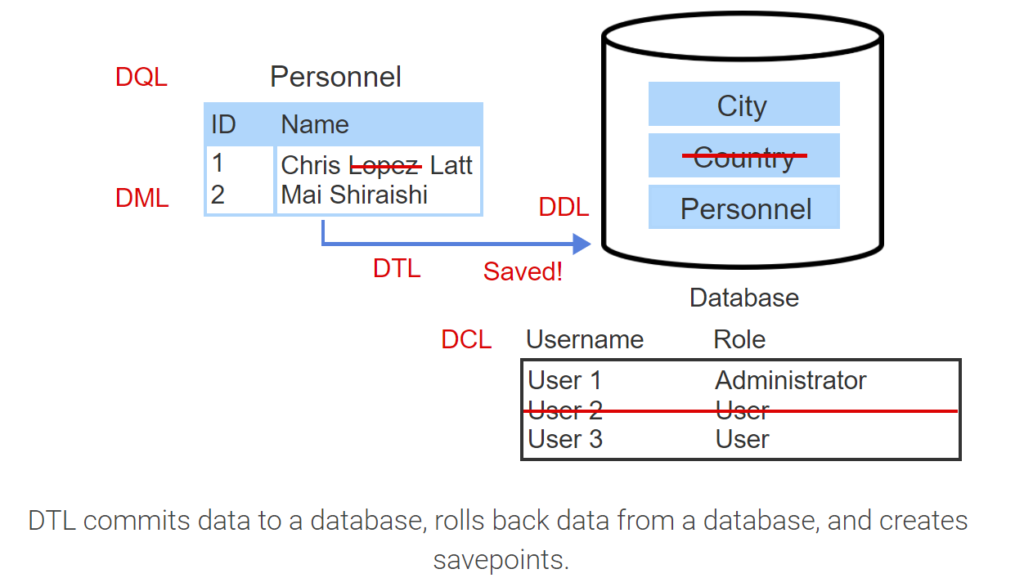
- DDL creates, alters, and drops tables.
- DQL selects data from a table.
- DML inserts, updates, and deletes data in a table.
- DCL grants and revokes permissions to and from users.
- DTL commits data to a database, rolls back data from a database, and creates savepoints.
3.2 Creating and dropping databases
CREATE DATABASE and DROP DATABASE statements
The CREATE DATABASE statement creates a new database. Once a database is created, tables can be added to the database. The DROP DATABASE statement deletes the database, including all tables in the database.
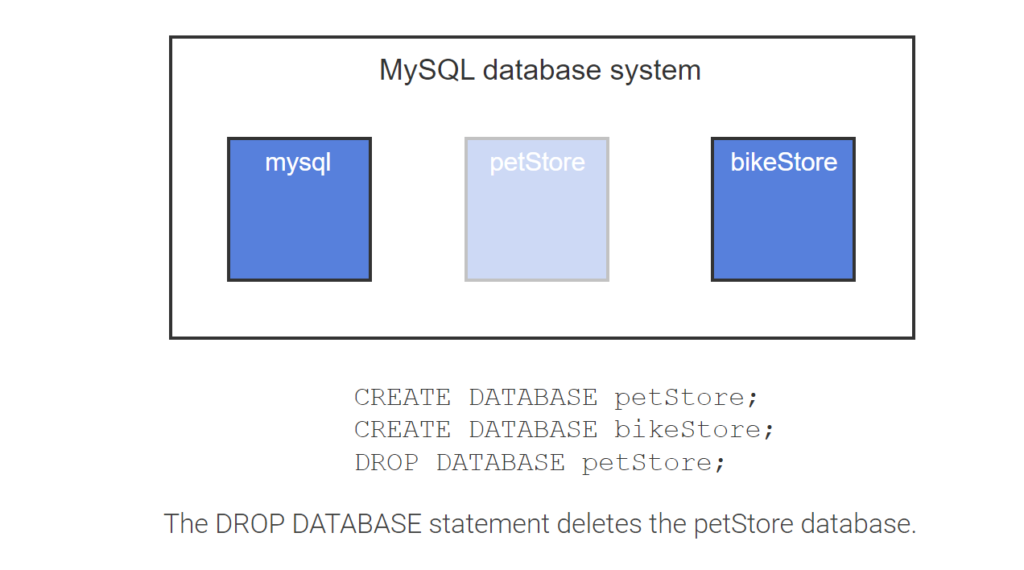
- The mysql database is automatically installed by the MySQL database system and used for system administration.
- The CREATE DATABASE statement creates a new database called petStore.
- Additional databases can be created.
- The DROP DATABASE statement deletes the petStore database.
SHOW statement
The SHOW statement provides database users and administrators with information about databases, the database contents (tables, columns, etc.), and server status information.
Commonly used SHOW statements include:
- SHOW DATABASES lists databases available in the database system.
- SHOW TABLES lists tables available in the currently selected database.
- SHOW COLUMNS lists columns available in a specific table named by a FROM clause.
- SHOW CREATE TABLE shows the CREATE TABLE statement for a given table.
The USE statement selects a database and is required to show information about tables within a specific database.
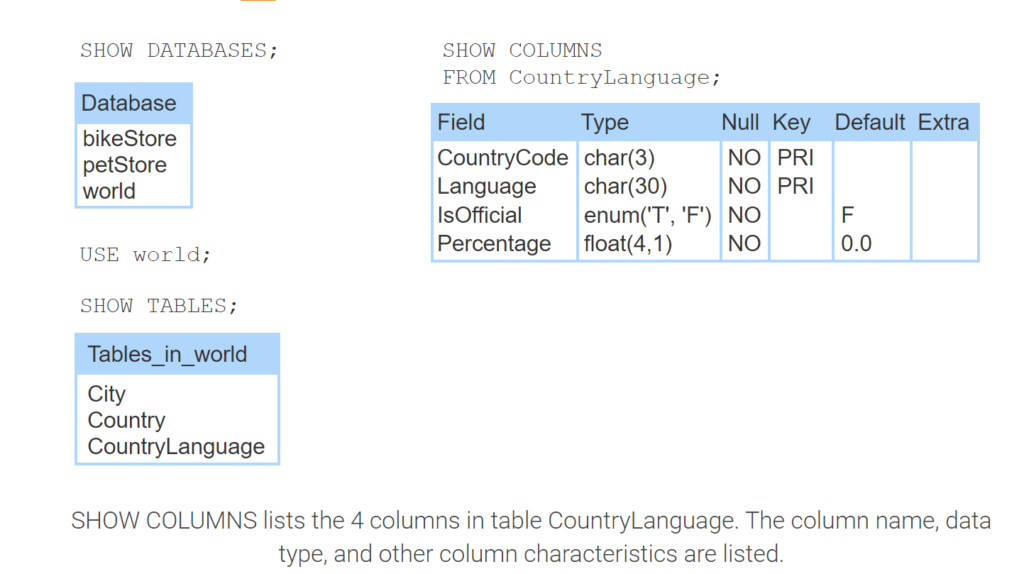
- SHOW DATABASES lists 3 databases in a database system: bikeStore, petStore, and world.
- USE world selects the database called world.
- SHOW TABLES lists the 3 tables in database world: City, Country, and CountryLanguage.
- SHOW COLUMNS lists the 4 columns in table CountryLanguage. The column name, data type, and other column characteristics are listed.
3.3 Creating and dropping tables
SQL data types
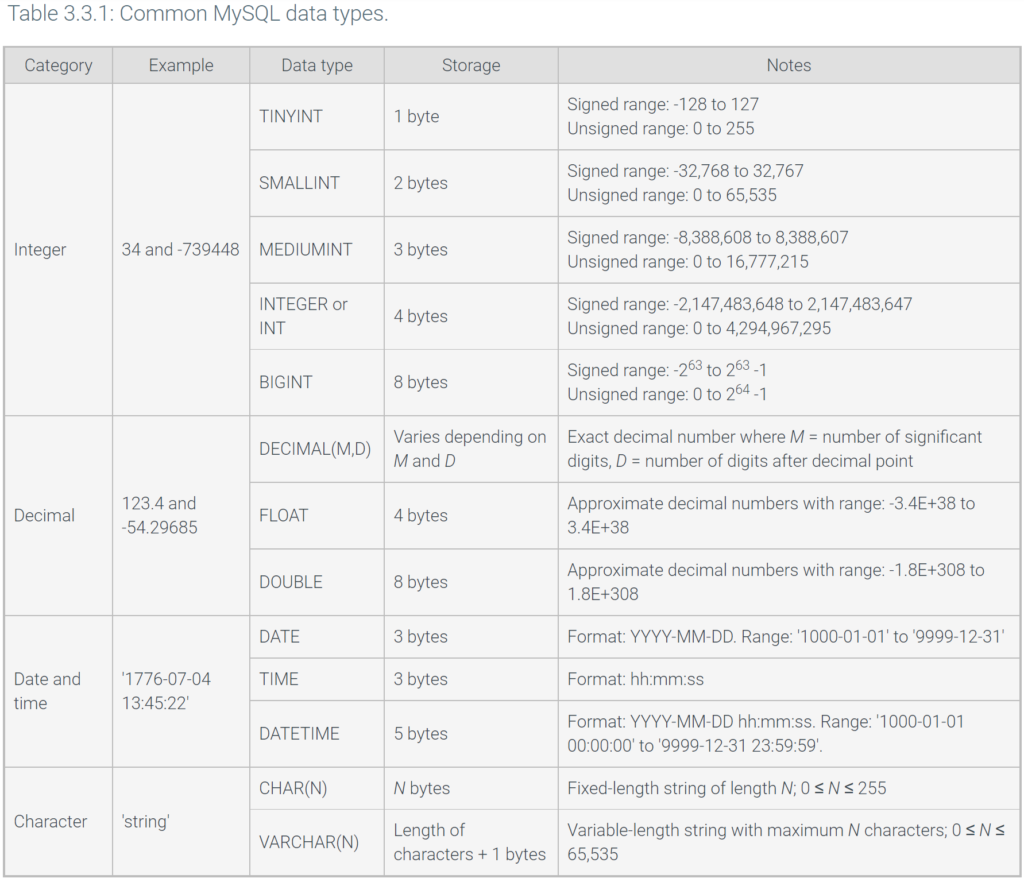
When creating a table, every table column must be assigned a data type. Common data types include: integer, decimal, date and time, and character. Most databases allow integer and decimal numbers to be signed or unsigned.
- A signed number is a number that may be negative.
- An unsigned number is a number that cannot be negative.
Data types vary in size requirements. Ex: A character data type generally uses 1 byte per character to store a character string, but an integer data type uses a fixed number of bytes to store a number. Unsigned data types can store larger numbers than the signed version of the same data type.
A database designer should choose the data type with the smallest storage requirements to minimize the overall table size. Ex: Any integer data type can store integers that range from -100 to 100, but TINYINT has the smallest storage requirements (1 byte) for storing numbers in the range -100 to 100.
The table below summarizes the commonly used data types available in MySQL. The table’s Storage column lists the number of bytes required to store values for the data type.
CREATE TABLE and DROP TABLE statements
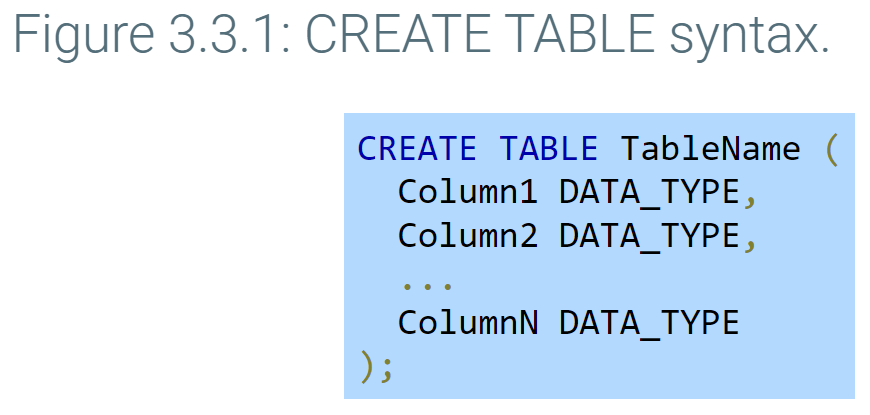
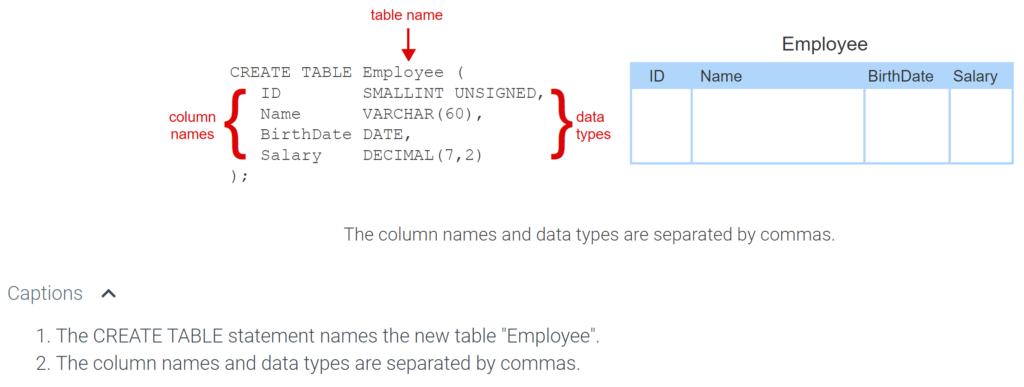
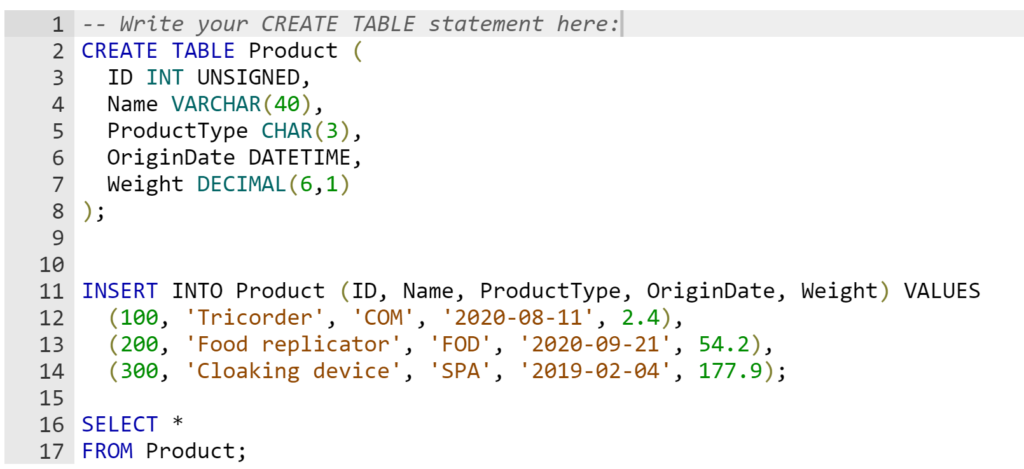
The CREATE TABLE statement creates a new table by specifying the table name, column names, and column data types
The DROP TABLE statement deletes a table, along with all the table’s rows, from a database. Ex: DROP TABLE Employee; deletes the Employee table.
ALTER TABLE statement
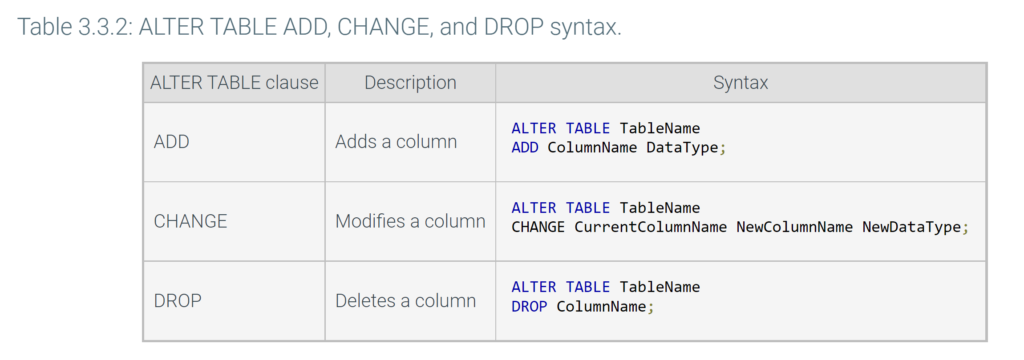
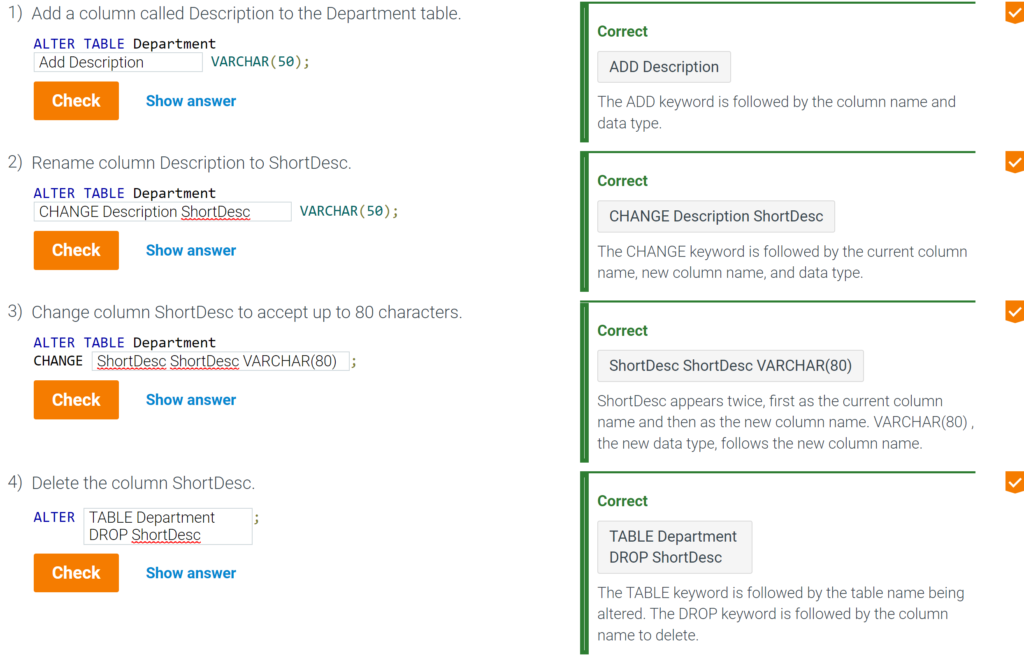
The ALTER TABLE statement adds, deletes, or modifies columns on an existing table. The ALTER TABLE statement specifies the table name followed by a clause that indicates what should be altered. The table below summarizes the three ALTER TABLE clauses.
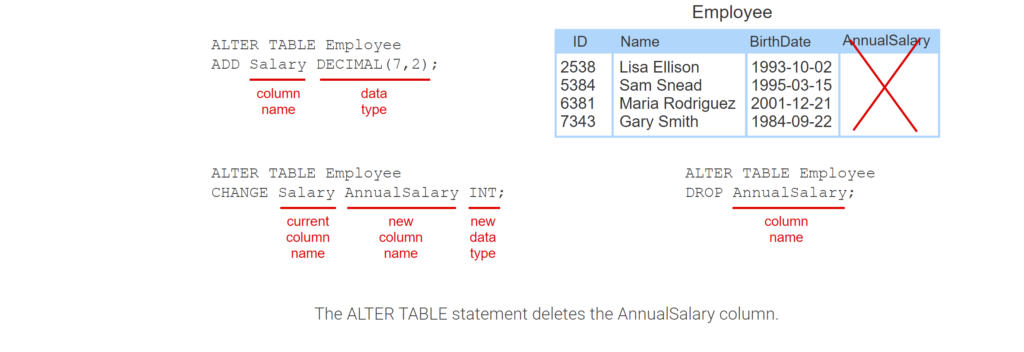
- The ALTER TABLE statement adds a Salary column to Employee that holds 7 significant digits and 2 decimal places.
- The ALTER TABLE statement changes the Salary column’s name to AnnualSalary. The data type is changed to INT.
- The ALTER TABLE statement deletes the AnnualSalary column.
3.4 Primary and foreign key constraints
PRIMARY KEY constraint
A constraint is a rule that applies to table data. Constraints are specified in a CREATE TABLE statement or may be added to a preexisting table with an ALTER TABLE statement.
The PRIMARY KEY constraint in a CREATE TABLE statement names the table’s primary key, the column(s) that uniquely identify each row.
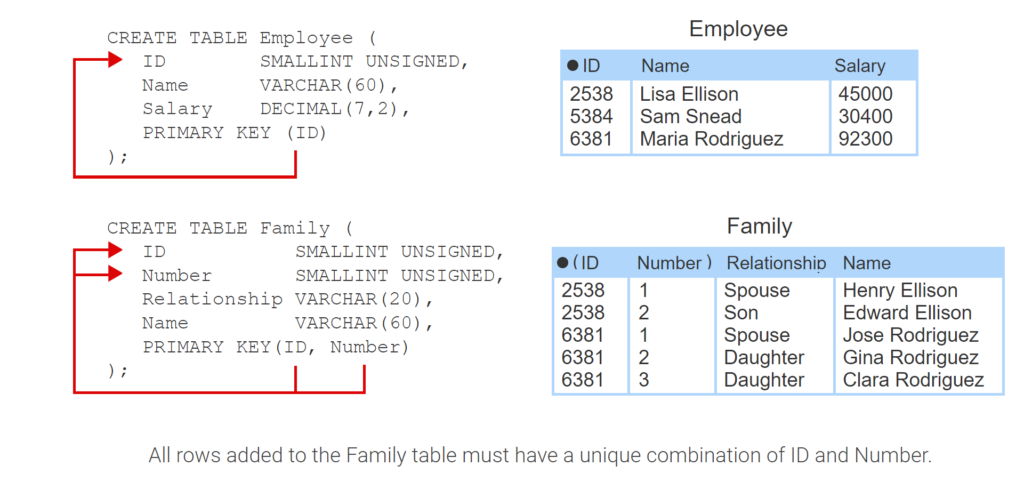
- The CREATE TABLE statement uses the keywords PRIMARY KEY to indicate the ID column is the table’s primary key.
- All rows added to the Employee table must have a unique ID.
- The PRIMARY KEY constraint identifies the ID and Number columns as the Family table’s composite primary key.
- All rows added to the Family table must have a unique combination of ID and Number.
Auto-increment columns
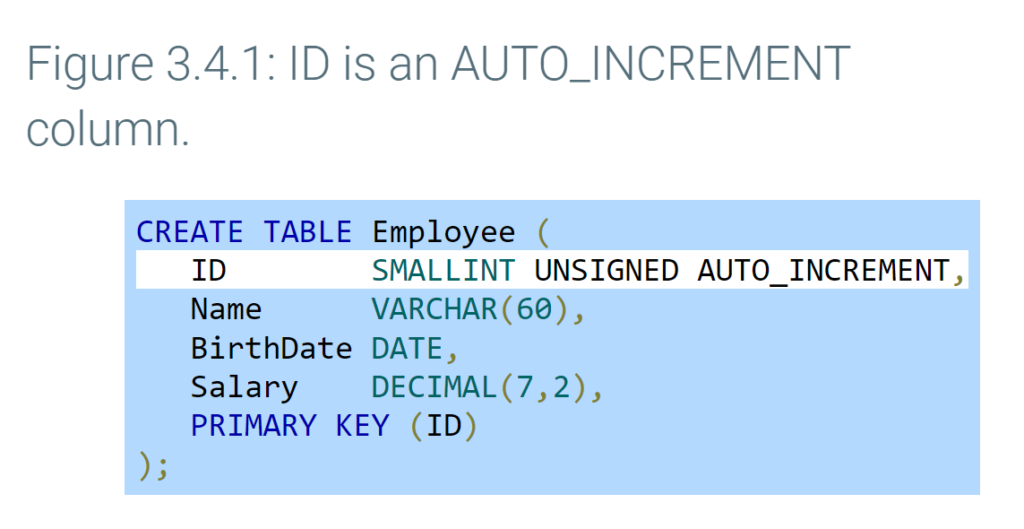
A primary key on an ID column is commonly implemented as an auto-increment column. An auto-increment column is a column that is assigned an automatically incrementing value. Ex: A database system may assign an auto-incrementing column values 1, 2, 3, etc. for each row that is inserted into the table.
The AUTO_INCREMENT keyword defines an auto-increment column in MySQL.
FOREIGN KEY constraint
A foreign key constraint is added to a CREATE TABLE statement with the FOREIGN KEY and REFERENCES keywords. The CREATE statement in the animation below indicates the foreign key ManagerID column refers to the primary key ID in the Employee table. When a foreign key constraint is specified, the database will not allow an insert or update that violates referential integrity. Ex: Inserting a row in Department with ManagerID 9999 is rejected if Employee ID 9999 does not exist.
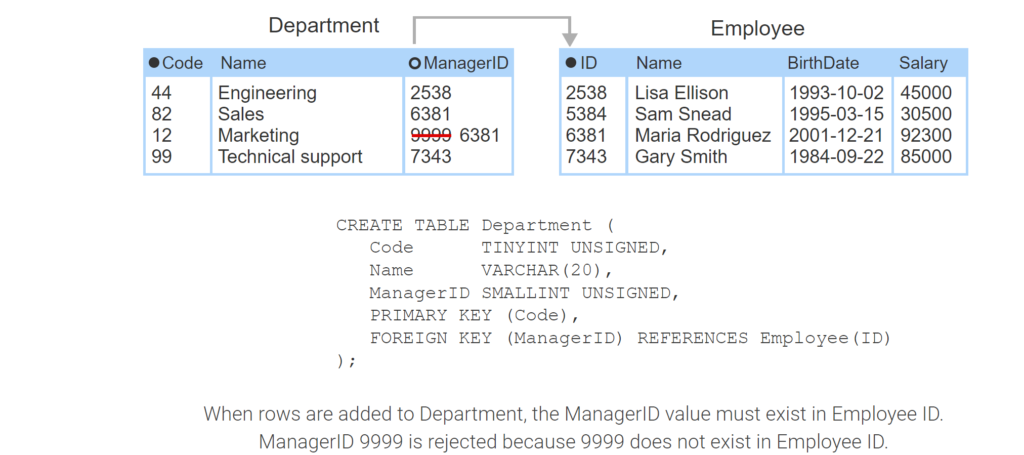
- The Employee table has primary key ID and several rows.
- The Department table is created with a FOREIGN KEY constraint that REFERENCES the Employee ID column.
- When rows are added to Department, the ManagerID value must exist in Employee ID. ManagerID 9999 is rejected because 9999 does not exist in Employee ID.
ON DELETE and ON UPDATE actions
Actions can be specified on the FOREIGN KEY constraint with ON DELETE and ON UPDATE keywords:
- ON DELETE responds to an invalid primary key deletion. Ex: Deleting a primary key 1234 that is used in a foreign key.
- ON UPDATE responds to an invalid primary key update. Ex: Updating a primary key 1234 to 5555 when 1234 is used in a foreign key.
ON DELETE and ON UPDATE must be followed by a response:
- RESTRICT rejects an insert, update, or delete that violates referential integrity. RESTRICT is applied by default when no action is specified.
- SET NULL sets an invalid foreign key value to NULL.
- SET DEFAULT sets invalid foreign keys to a default primary key value.
- CASCADE propagates primary key changes to foreign keys. If a primary key is deleted, rows containing matching foreign keys are deleted. If a primary key is updated, matching foreign keys are updated to the same value.
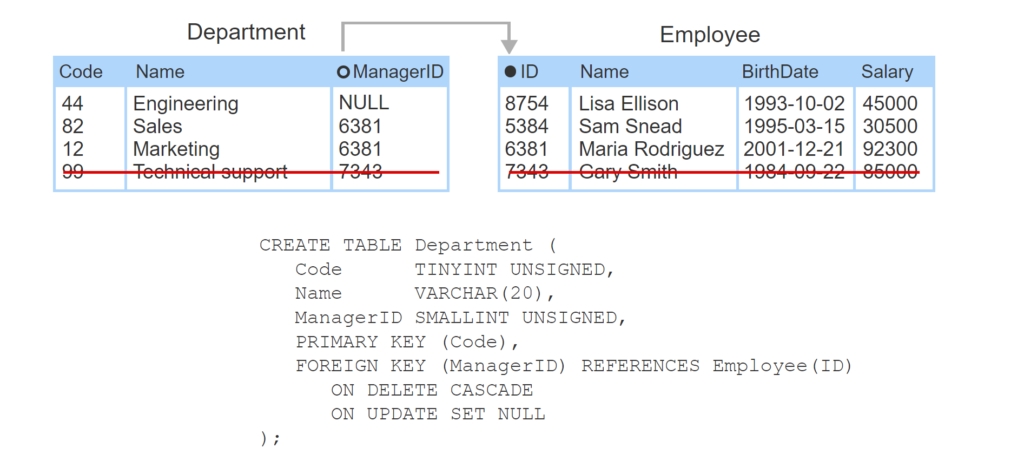
- ManagerID is a foreign key that references the Employee ID column.
- ON DELETE CASCADE causes the database to delete the row with ManagerID 7343 when the employee with ID 7343 is deleted.
- ON UPDATE SET NULL causes the database to set ManagerID 2538 to NULL when the Employee ID 2538 is changed to 8754.
DROP TABLE with foreign key constraintsWhen a table with a foreign key constraint references a table’s primary key, the table with primary key cannot be deleted with a DROP TABLE statement unless the table with the foreign key constraint is deleted first. Ex: The Employee table cannot be deleted without first deleting the Department table.
3.5 Column constraints
NOT NULL constraint
All table columns, except primary keys, may contain NULL values by default. The NOT NULL constraint is used in a CREATE TABLE statement to prevent a column from having a NULL value.
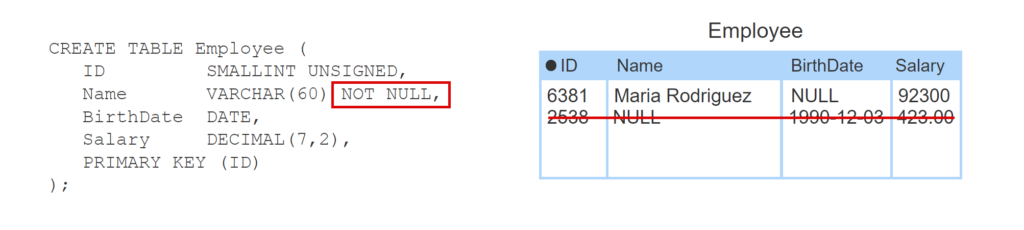
\
- The BirthDate column allows NULL values by default.
- The NOT NULL constraint prevents Name from being NULL when inserting a new row into Employee.
DEFAULT constraint
When a row is inserted into a table, an unspecified value is assigned NULL by default. The DEFAULT constraint is used in a CREATE TABLE statement to specify a column’s default value when no value is provided.
UNIQUE constraint
A table’s primary key always has unique values, but values in other columns may contain duplicates. The UNIQUE constraint ensures that all column values are unique.
The UNIQUE constraint may be applied to a single column or to multiple columns. A constraint that is applied to a single column is called a column-level constraint. A constraint that is applied to multiple columns is called a table-level constraint.
MySQL creates an index for each UNIQUE constraint, which can improve query retrieval performance.
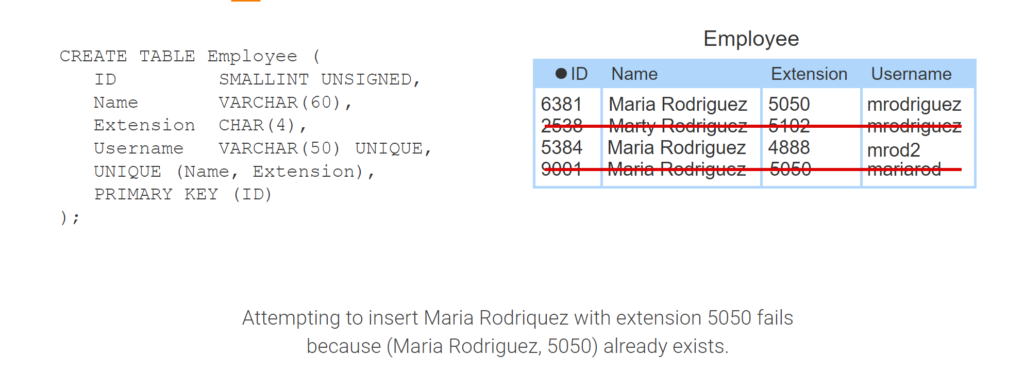
- The Username column has a UNIQUE column-level constraint, so each Username must be different.
- Attempting to insert a second row with username ‘mrodriguez’ fails because ‘mrodriguez’ already exists.
- The UNIQUE table-level constraint requires each combination of Name and Extension be different.
- Inserting Maria Rodriquez with extension 4888 does not violate the UNIQUE constraint because (Maria Rodriguez, 5050) and (Maria Rodriguez, 4888) are different.
- Attempting to insert Maria Rodriquez with extension 5050 fails because (Maria Rodriguez, 5050) already exists.
CHECK constraint
The CHECK constraint specifies an expression that limits the range of a column’s values. Ex: CHECK (Salary > 20000) ensures the Salary is greater than 20,000. If the CHECK expression does not evaluate to TRUE or UNKNOWN (for NULL values), the constraint is violated.
A CHECK constraint can be a column-level or table-level constraint.
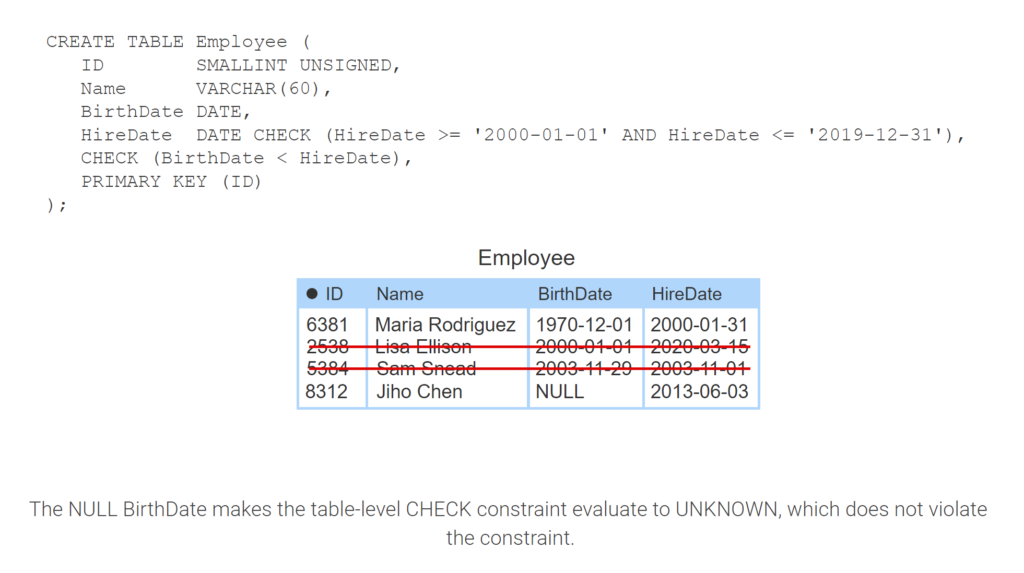
- The CHECK column-level constraint ensures all rows have a HireDate between Jan 1, 2000 and Dec 31, 2019.
- Maria’s HireDate is between Jan 1, 2000 and Dec 31, 2019. But inserting Lisa fails because Mar 15, 2020 is after Dec 31, 2019.
- The CHECK table-level constraint requires BirthDate to come before HireDate.
- Inserting Sam fails because the BirthDate Nov 29, 2003 is after HireDate Nov 1, 2003.
- The NULL BirthDate makes the table-level CHECK constraint evaluate to UNKNOWN, which does not violate the constraint.
BETWEEN operator
Determining if a value is between two other values, like the animation above does with HireDate, is a common SQL operation. The BETWEEN operator provides an alternative way to determine if a value is between two other values. Ex:
-- Same as: HireDate >= '2000-01-01' AND HireDate <= '2020-01-01'
HireDate DATE CHECK (HireDate BETWEEN '2000-01-01' AND '2020-01-01')
CONSTRAINT keyword
MySQL gives constraints a default name if no name is specified. A constraint can be given a name using the CONSTRAINT keyword, followed by the constraint name and declaration. Constraint names can help a database administrator or programmer identify which constraint is being violated in a database error message.
Constraints may be added to existing tables using the ALTER TABLE statement along with the CONSTRAINT keyword. Adding a constraint to an existing table fails if the table contains data that violates the constraint.
Most databases support dropping constraints using an ALTER TABLE statement with DROP CONSTRAINT ConstraintName. However, MySQL requires DROP INDEX ConstraintName for a UNIQUE constraint and DROP CHECK ConstraintName for a CHECK constraint.
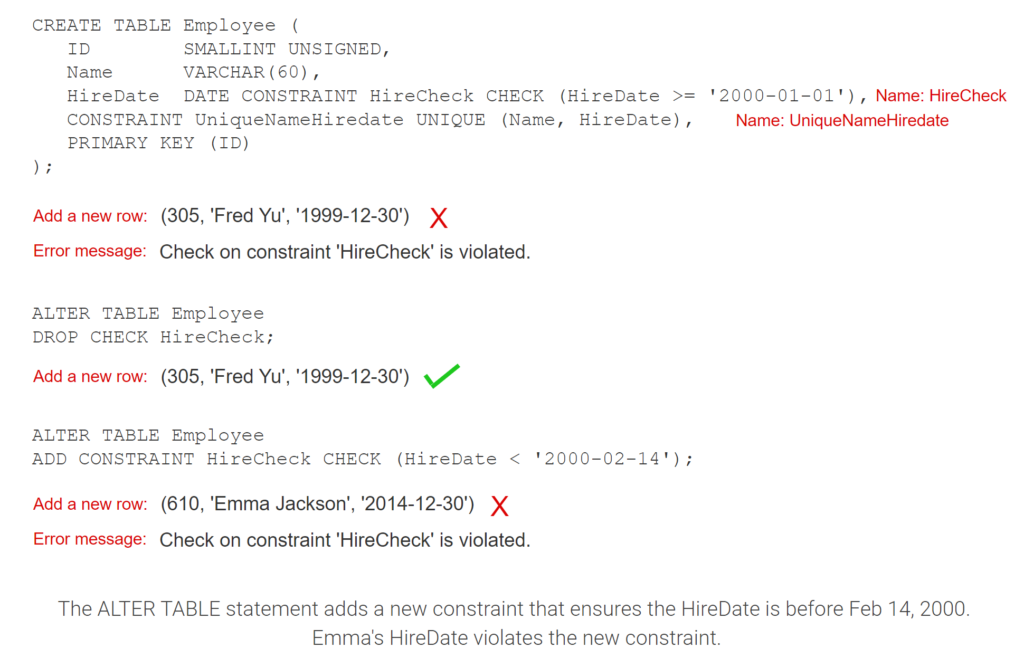
- The CONSTRAINT keyword gives the CHECK and UNIQUE constraints user-defined names.
- The database uses constraint names in error messages. Fred’s HireDate is not >= 2000-01-01.
- The ALTER TABLE statement drops the HireCheck constraint. Any HireDate may now be added to Employee.
- The ALTER TABLE statement adds a new constraint that ensures the HireDate is before Feb 14, 2000. Emma’s HireDate violates the new constraint.
3.6 Inserting, updating, and deleting rows
INSERT statement
The INSERT statement adds rows to a table. The INSERT statement includes the INTO and VALUES clauses:
- The INTO clause names the table and columns where data is to be added.
- The VALUES clause specifies the column values to be added.
The VALUES clause may list any number of rows in parentheses to insert multiple rows.
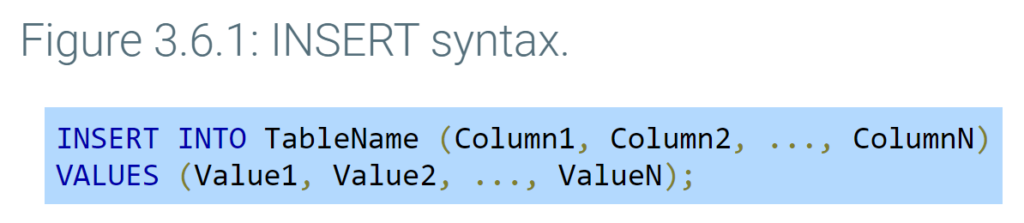
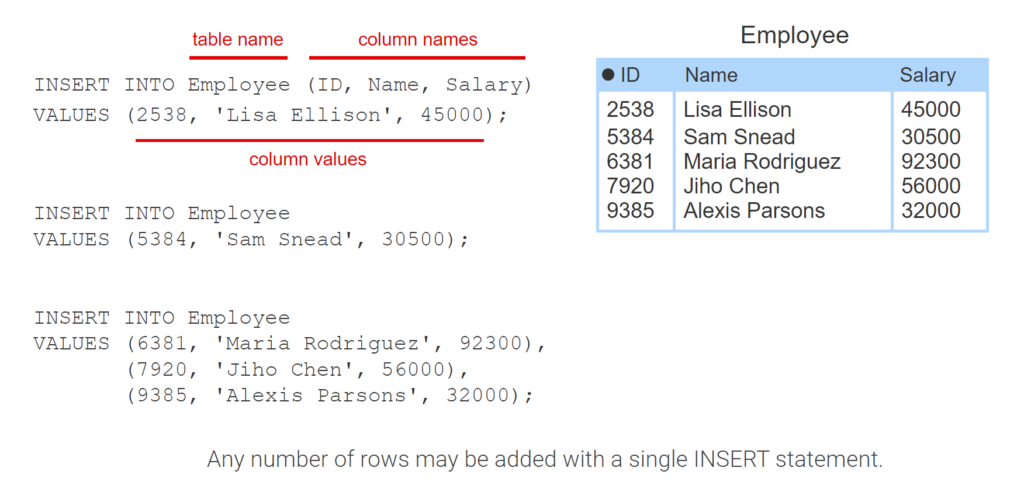
- The INSERT statement’s INTO clause names the Employee table and Employee’s columns in parentheses.
- The VALUES clause names the column values in parenthesis. The value order must match the column order in the INTO clause.
- The column names may be omitted as long as the VALUES clause lists all column values in the same order as the table’s columns.
- Any number of rows may be added with a single INSERT statement.
Common INSERT errors
Database users make some common errors when creating INSERT statements:
- Inserting duplicate primary key values or foreign key values that do not match an existing primary key.
- Inserting primary key values for auto-increment columns.
- Inserting NULL values for columns that are NOT NULL.
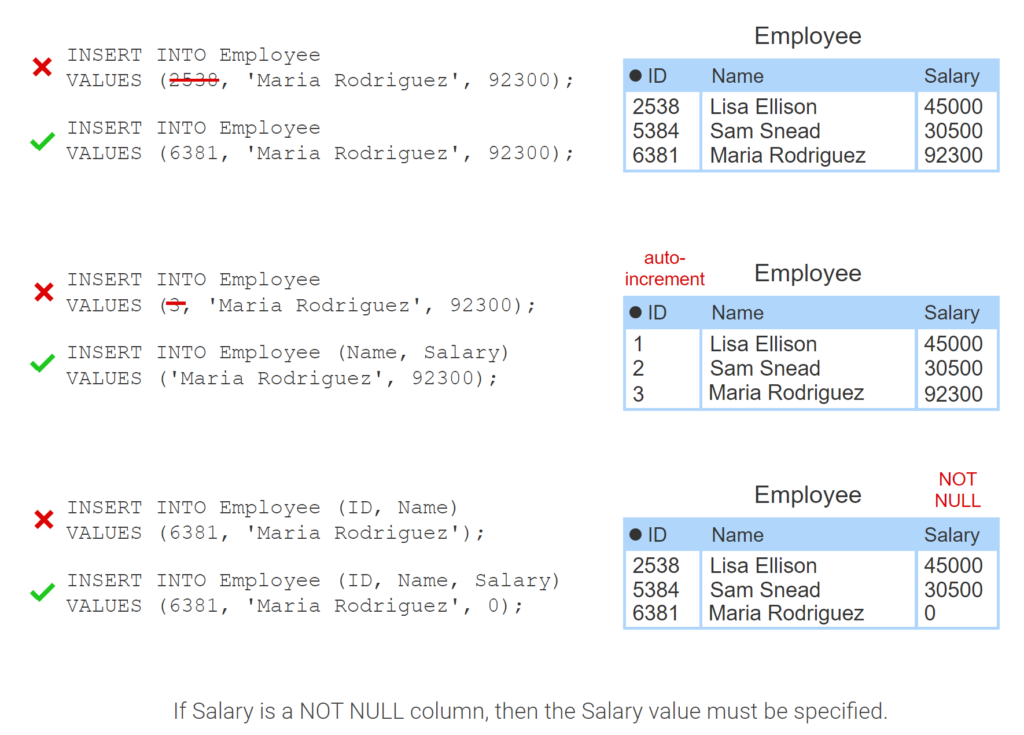
- The INSERT statement uses an ID that already exists in Employee. Duplicate primary key values cannot be added, so a unique ID must be chosen.
- If ID is an auto-increment column, the ID should not be listed in the INSERT statement. The database assigns the ID automatically.
- If Salary is a NOT NULL column, then the Salary value must be specified.
UPDATE statement
The UPDATE statement modifies existing rows in a table. The UPDATE statement uses the SET clause to specify the new column values.
The UPDATE statement uses a WHERE clause to determine which rows are updated. The WHERE clause is used with UPDATE, DELETE, and SELECT statements to specify a condition that must be true for a row to be chosen. Omitting the WHERE clause results in all rows being updated.

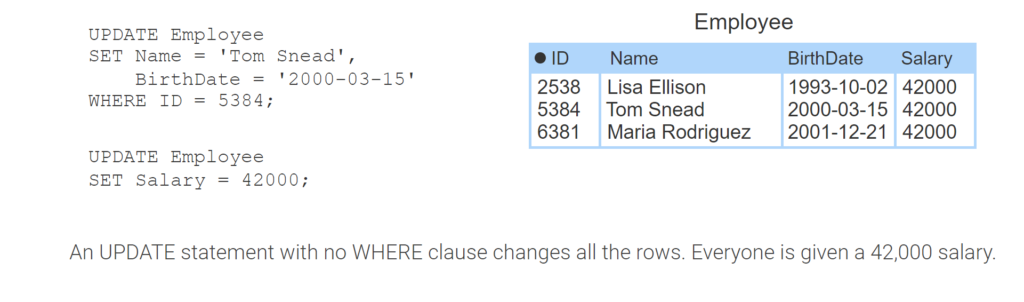
- The UPDATE clause indicates the Employee table will be changed. The SET clause names the new Name and BirthDate values. The WHERE clause indicates that only the row with ID 5384 will be changed.
- An UPDATE statement with no WHERE clause changes all the rows. Everyone is given a 42,000 salary.
DELETE statement
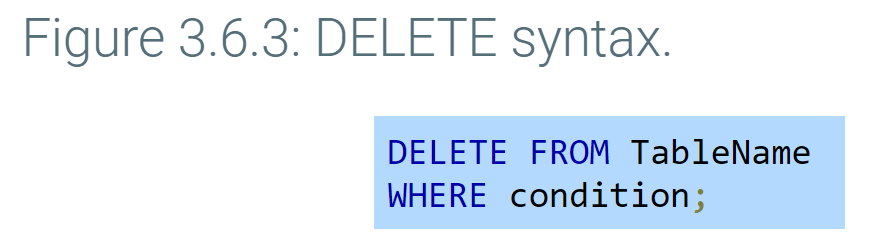
The DELETE statement deletes existing rows in a table. The FROM keyword is followed by the table name whose rows are to be deleted. The WHERE clause specifies which rows should be deleted. Omitting the WHERE clause results in all rows in the table being deleted.
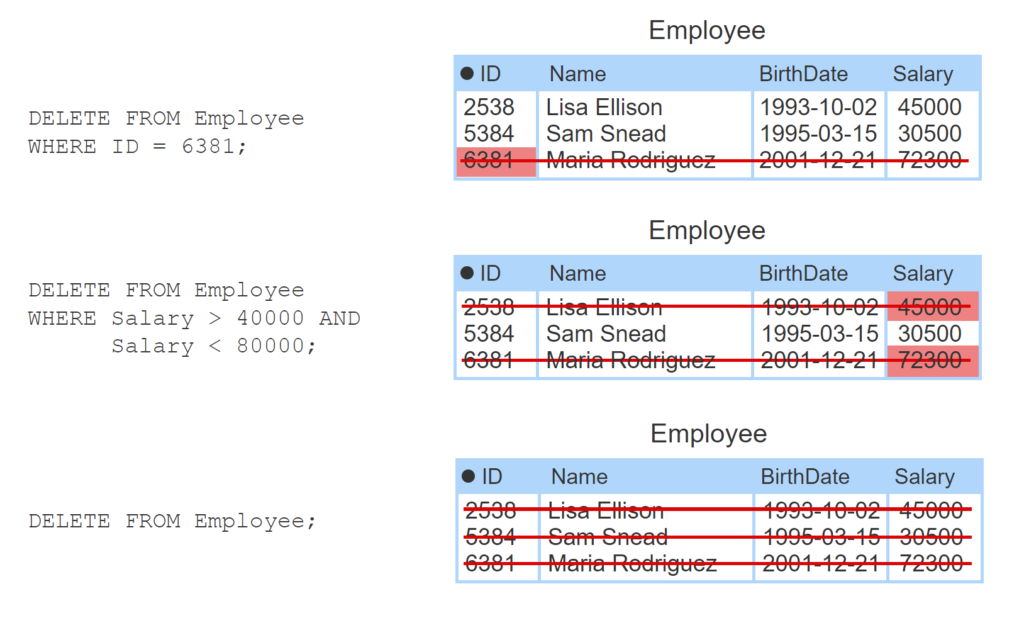
- The DELETE statement deletes the row with ID 6381 from the Employee table.
- The DELETE statement deletes rows where the Salary is between 40,000 and 80,000. Lisa and Maria are deleted.
- The DELETE statement has no WHERE clause, so all employees are deleted.
TRUNCATE
The TRUNCATE statement deletes all rows from a table. TRUNCATE is nearly identical to a DELETE statement with no WHERE clause except for some small differences that depend on the database system. Ex: In MySQL, A TRUNCATE statement resets the table’s auto-increment values back to 1, but a DELETE statement does not.
TRUNCATE TABLE TableName;
3.7 Selecting rows
SELECT statement
The SELECT statement selects rows from a table named in the FROM clause. The data returned from the SELECT statement, called the result set, is stored in a result table. Column names are listed after the SELECT keyword, separated by commas. The columns names can be replaced with an asterisk (*) to select all columns.
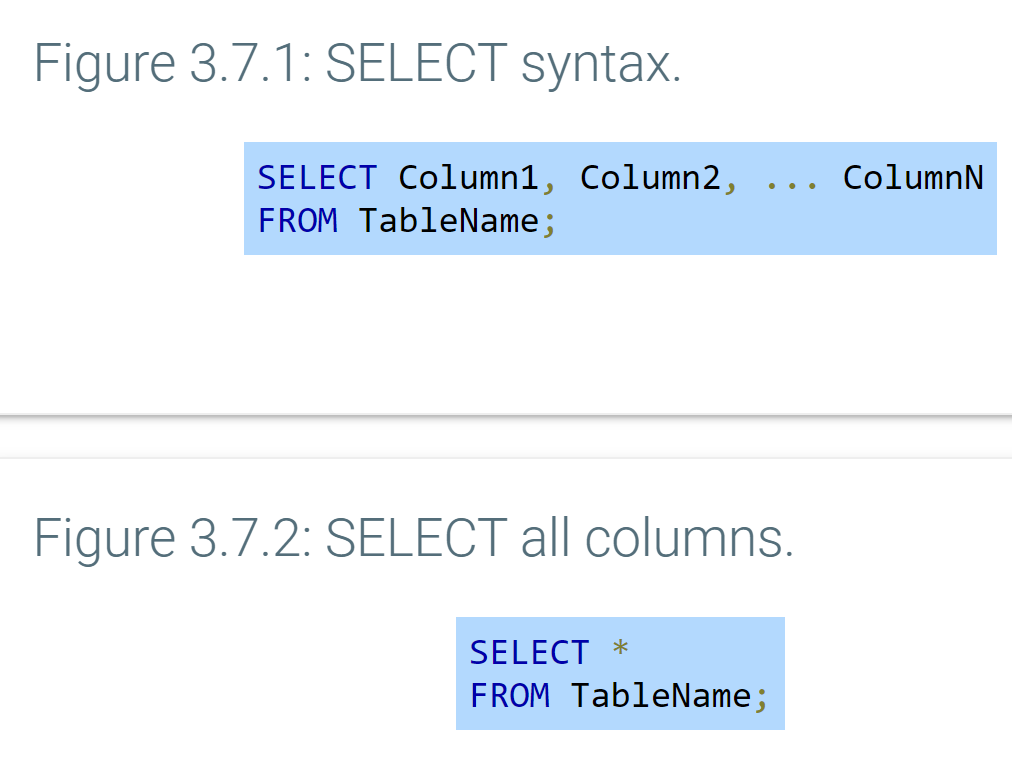
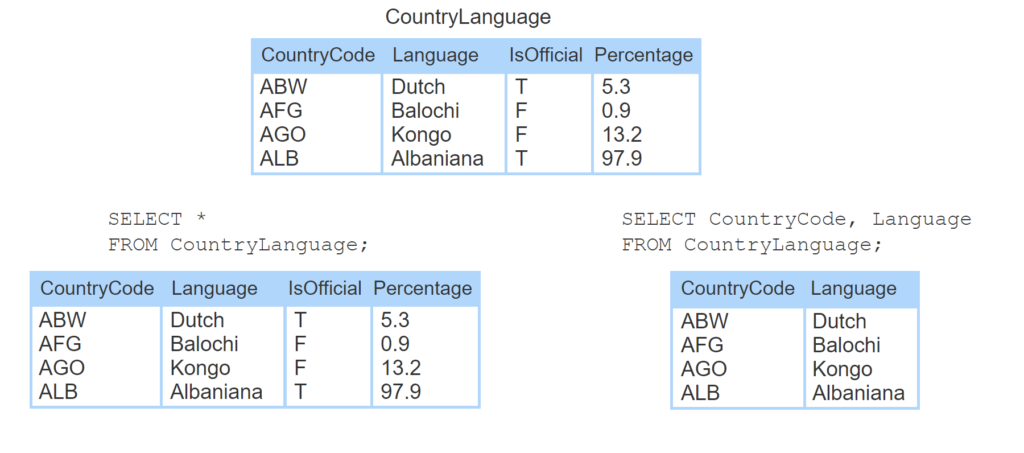
- The CountryLanguage table contains 4 rows with columns CountryCode, Language, IsOfficial, and Percentage.
- The SELECT statement selects all columns using *. All rows and columns are returned in the result set and appear in the result table.
- The SELECT statement selects only columns CountryCode and Language, so only two columns appear in the result table.
Long tables
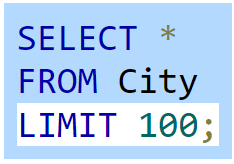
Some tables may contain thousands or millions of rows, and selecting all rows can take a long time. MySQL has a LIMIT clause that limits the number of rows returned by a SELECT statement. Ex: The SELECT statement below returns only the first 100 rows from the City table.\
WHERE clause
The SELECT statement retrieves all rows by default. The WHERE clause is combined with the SELECT statement to filter the result set. The WHERE clause must come after the FROM clause.
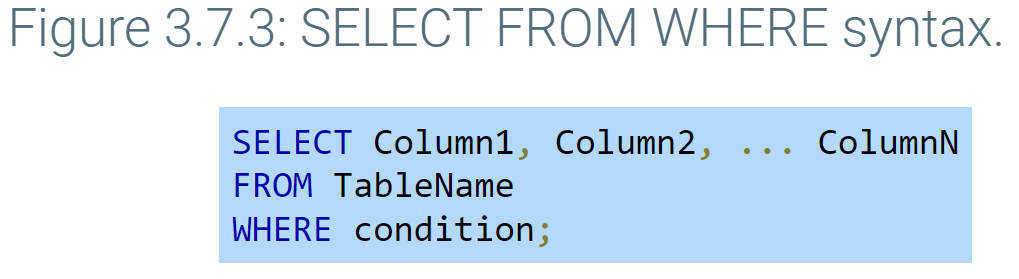
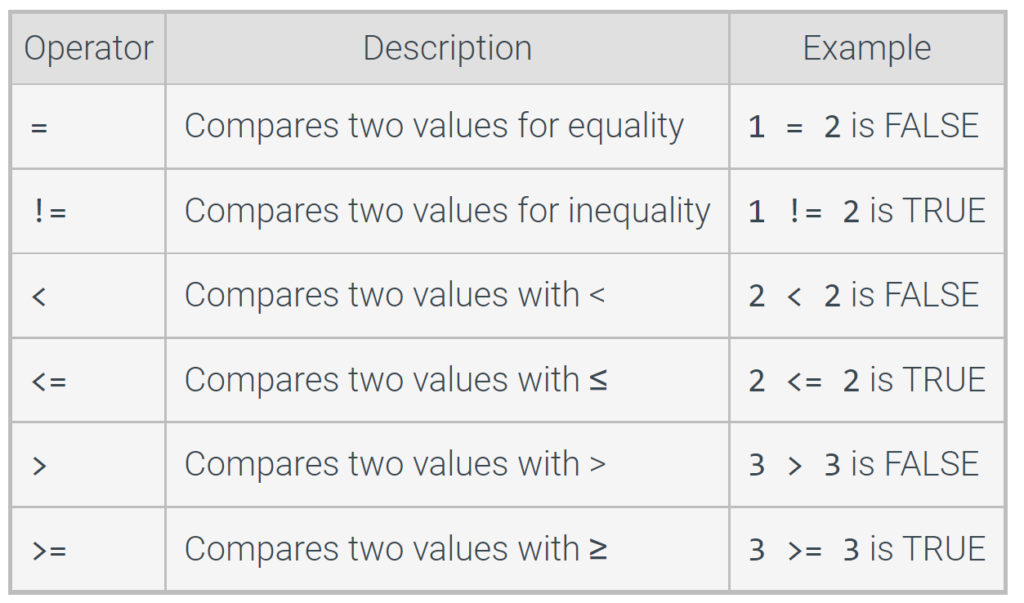
The WHERE clause works like an if statement in a programming language, specifying conditions that must be true for a row to be selected. A condition is an expression that evaluates to TRUE, FALSE, or NULL. Only a condition that is TRUE selects the row. A condition uses a comparison operator to compare two values. Common comparison operators are summarized in the table below.
A comparison operator evaluates to NULL if one or both operands are NULL. Ex: NULL > 1000 is NULL. More information about NULL values is covered elsewhere in this material.
Table 3.7.1: Common comparison operators.
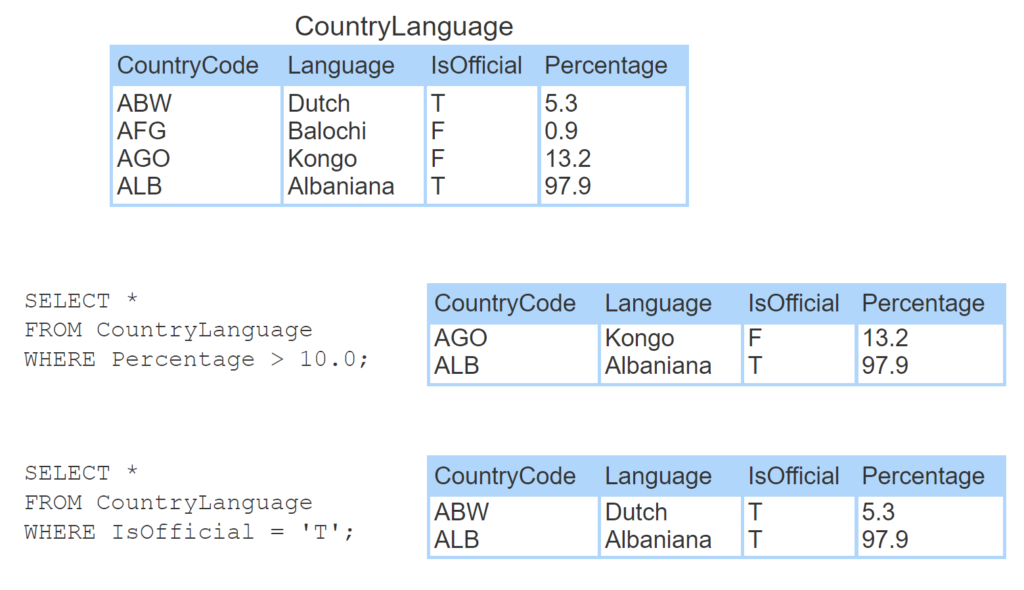
- The SELECT statement selects rows WHERE Percentage is > 10.0. Two rows are returned.
- The SELECT statement selects rows WHERE IsOfficial = ‘T’. Two rows are returned.
Logical operators
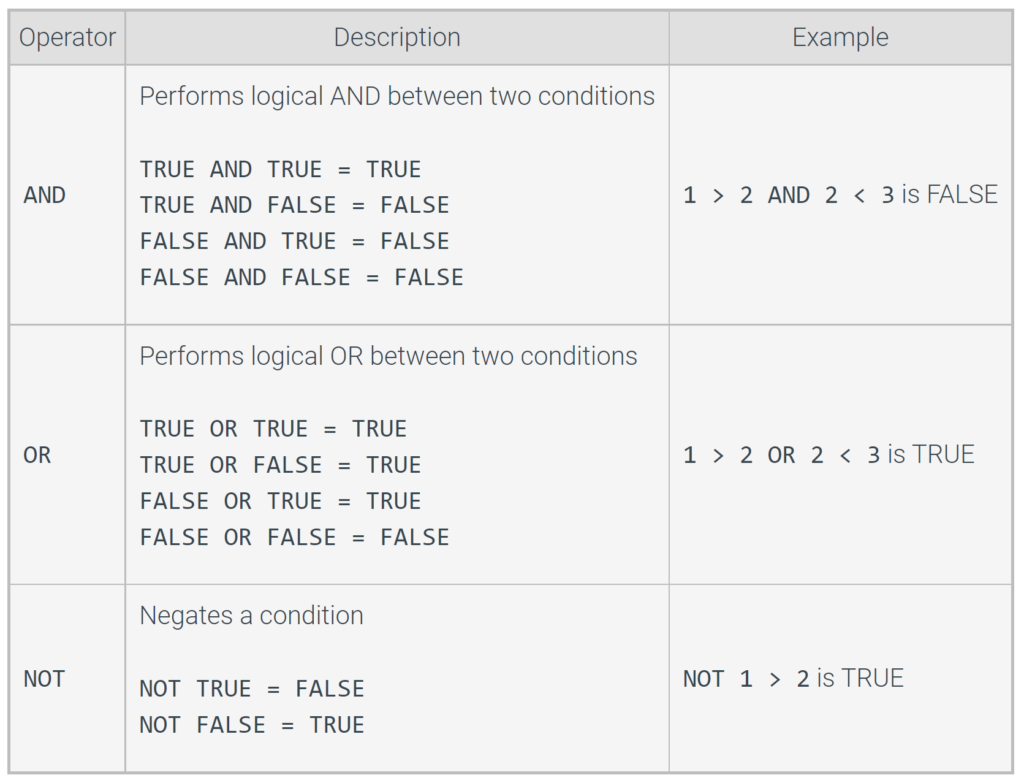
The WHERE clause supports logical operators AND, OR, and NOT. A logical operator evaluates to TRUE, FALSE, or NULL. Ex: 1 < 2 AND 2 < 3 is TRUE because the condition on the left is TRUE, and the condition on the right is TRUE.
Table 3.7.2: Common logical operators.
In a more complex WHERE clause with multiple logical operators, parentheses specify which logical operators are evaluated first. Ex: (Age >= 13 AND Age <= 18) OR Military = 'Army' evaluates the AND in parentheses first, then the OR.
A logical operator evaluates to NULL in certain situations when one or both operands are NULL. Ex: TRUE AND NULL is NULL, but FALSE AND NULL is FALSE. More information about NULL values is covered elsewhere in this material.
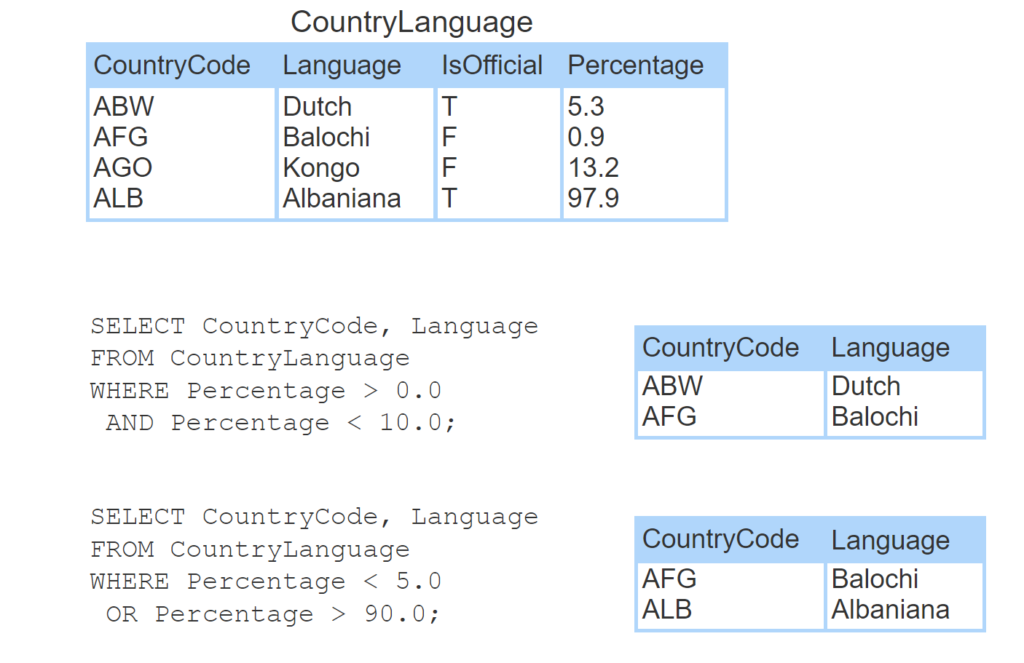
- The SELECT statement selects only rows WHERE percentage is between 0.0 and 10.0. Two rows are returned.
- The SELECT statement selects only rows WHERE percentage < 5.0 OR percentage > 90.0. Two rows are returned.
Arithmetic operators
The SELECT statement supports arithmetic operators, which perform calculations on two operands. Arithmetic operators can be used in the SELECT clause or the WHERE clause.
Expressions with arithmetic operators are computed using the same rules as basic arithmetic. Items in parentheses () have highest precedence. Multiplication (*), division (/), and modulus (%) have precedence over addition (+) and subtraction (-). Ex: The expression 7 + 3 * 2 = 7 + 6 = 13 because * has precedence over +, but (7 + 3) * 2 = 10 * 2 = 20 because () has precedence over *.
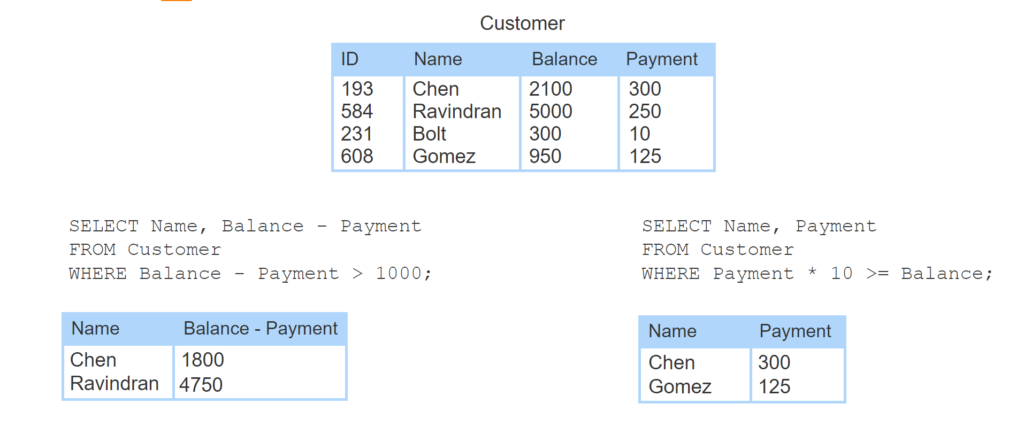
- The Customer table tracks each customer’s balance and payment information.
- The SELECT and WHERE clauses use subtraction to determine which customers owe more than $1000 after making a payment. Two rows are returned.
- The WHERE clause uses multiplication to determine which customers can pay off their balance after making 10 payments. Two rows are returned.
3.8 Selecting rows: Additional capabilities
Selecting NULL values
Two operators are used to test for NULL in a WHERE clause:
- IS NULL tests if a value is NULL.
- IS NOT NULL tests if a value is not NULL.
The Country table below contains two NULL values. The NULL for column IndepYear and row ABW indicates inapplicable data because the Country has not achieved independence. The NULL for column Population and row AIA indicates unknown data.
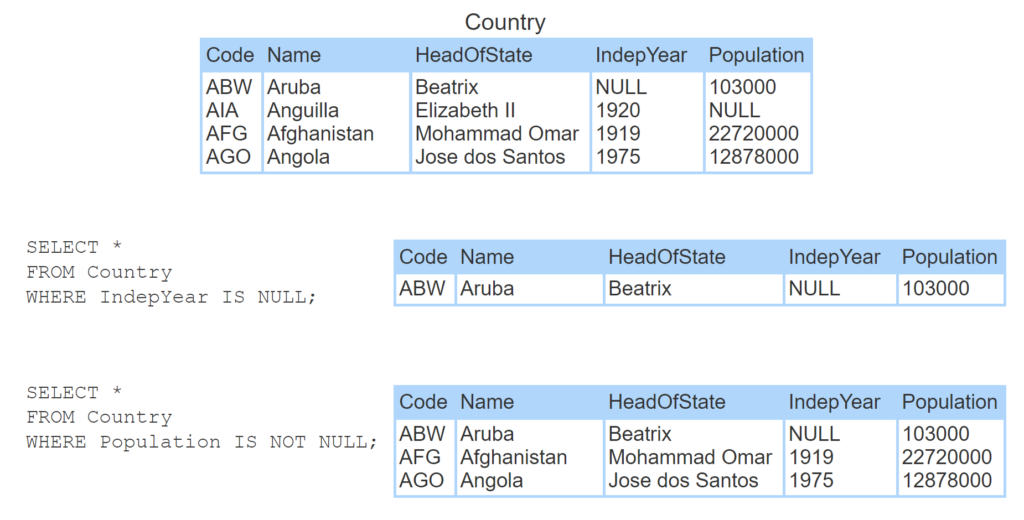
- Country is a table in the World database with two NULL values.
- Selecting rows where IndepYear IS NULL returns in one row.
- Selecting rows where Population IS NOT NULL returns three rows.
DISTINCT clause
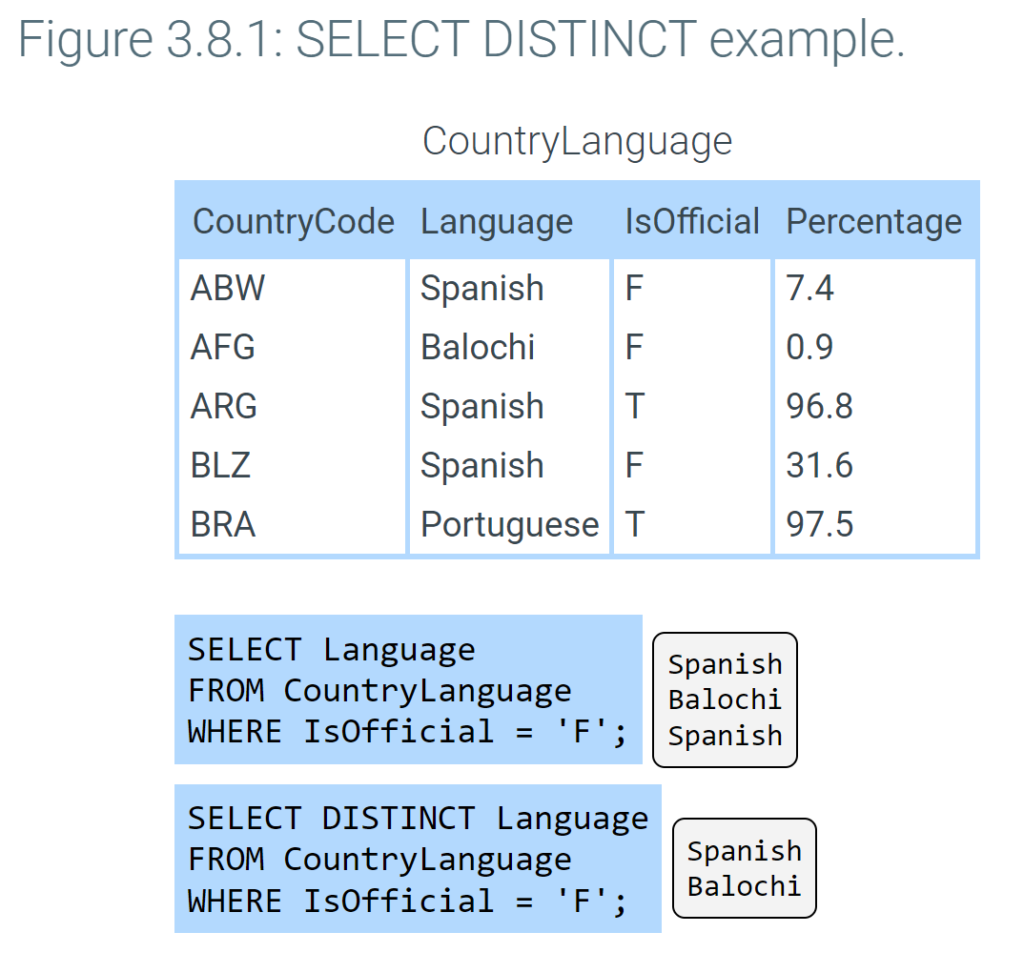
The DISTINCT clause is used with a SELECT statement to return only unique or ‘distinct’ values. Ex: The first SELECT statement in the figure below results in two ‘Spanish’ rows, but the second SELECT statement returns only unique languages, resulting in only one ‘Spanish’ row.
IN operator
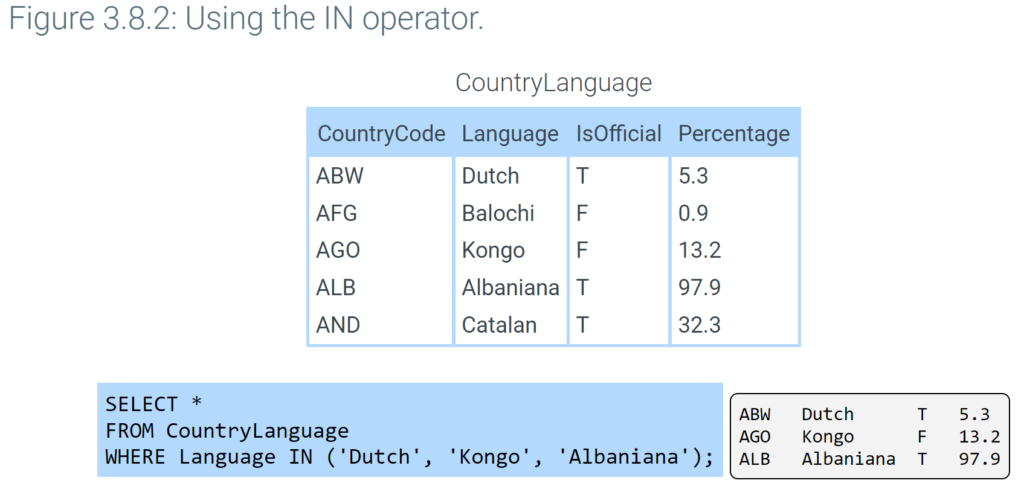
The IN operator is used in a WHERE clause to determine if a value matches one of several values. The SELECT statement in the figure below uses the IN operator to select only rows where the Language column has a Dutch, Kongo, or Albaniana value.
LIKE operator
The LIKE operator, when used in a WHERE clause, matches text against a pattern using the two wildcard characters % and _.
%matches any number of characters. Ex:LIKE 'L%t'matches “Lt”, “Lot”, “Lift”, and “Lol cat”._matches exactly one character. Ex:LIKE 'L_t'matches “Lot” and “Lit” but not “Lt” and “Loot”.
The LIKE operator performs case-insensitive pattern matching by default or case-sensitive pattern matching if followed by the BINARY keyword. Ex: LIKE BINARY 'L%t' matches ‘Left’ but not ‘left’.
To search for the wildcard characters % or _, a backslash (\) must precede % or _. Ex: LIKE 'a\%' matches “a%”.
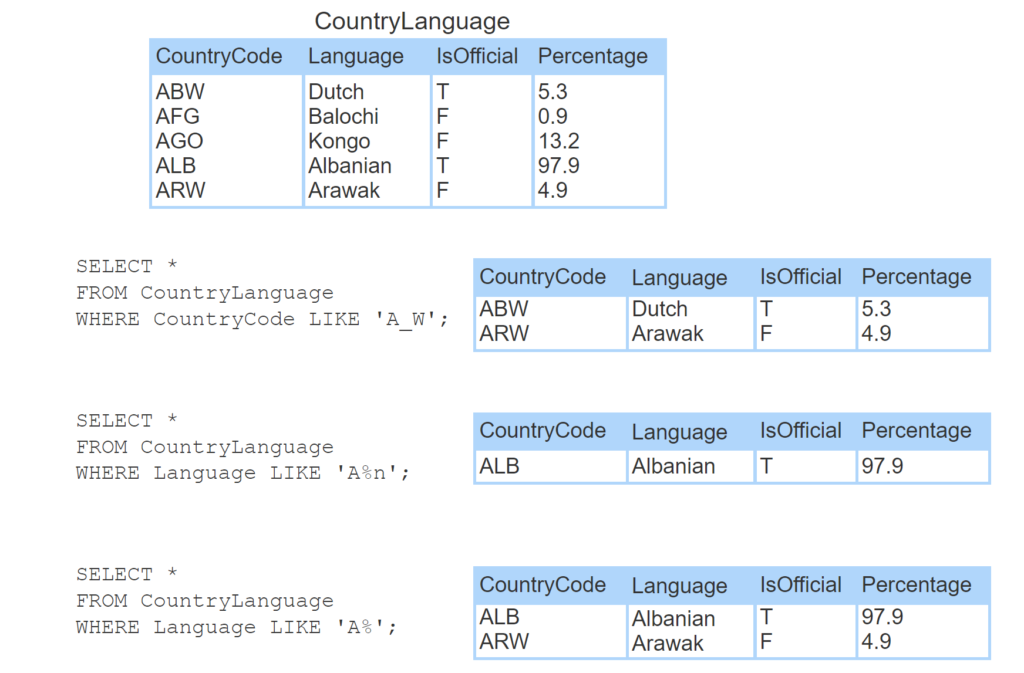
- Using the _ wildcard character with the LIKE operator matches exactly one character.
- Using the % wildcard character with the LIKE operator matches any number of characters in the middle of a string.
- Using the % wildcard character with the LIKE operator matches any number of characters at the beginning or end of a string.
Regular expressions
Most relational databases provide other mechanisms to perform more advanced pattern matching with regular expressions. Ex: MySQL uses REGEXP to match text against a regular expression, and PostgreSQL uses SIMILAR TO.
ORDER BY clause
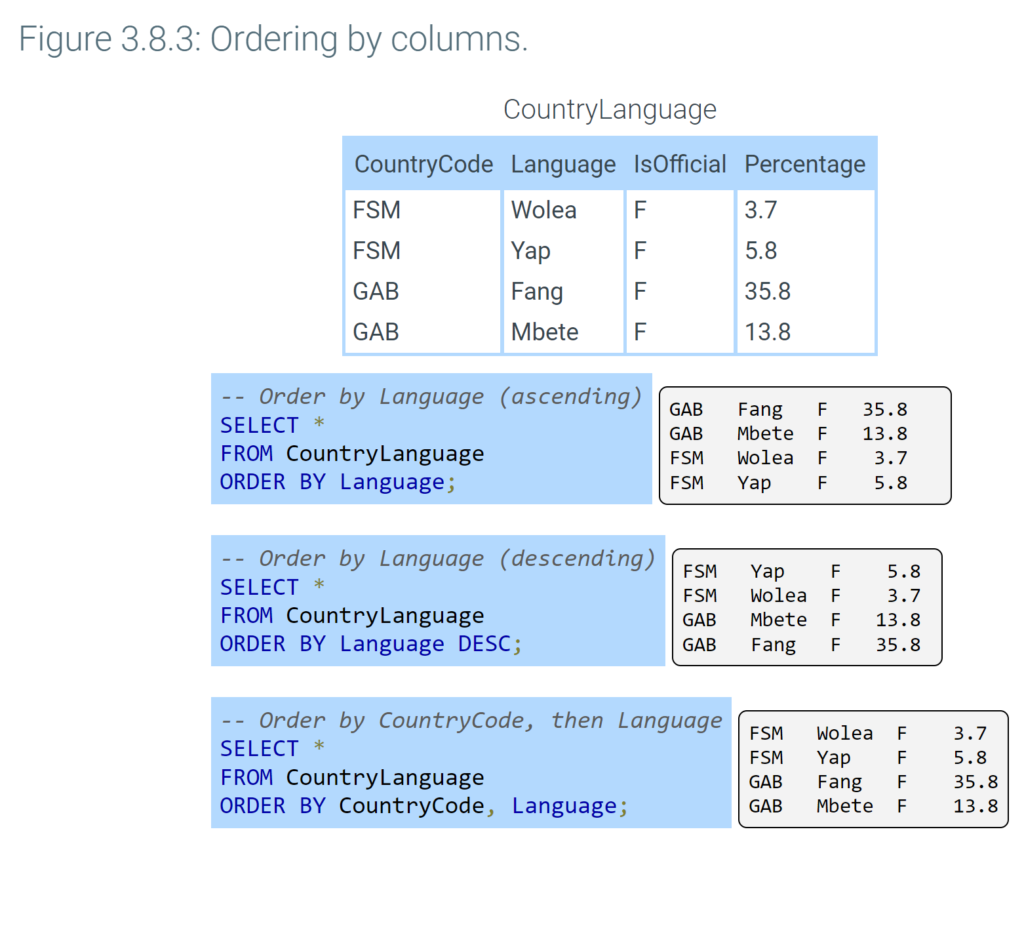
A SELECT statement selects rows from a table with no guarantee the data will come back in a certain order. The ORDER BY clause orders selected rows by one or more columns in ascending (alphabetic or increasing) order. The DESC keyword with the ORDER BY clause orders rows in descending order.
— Your SQL statement goes here
CREATE TABLE Horse (
ID SMALLINT UNSIGNED AUTO_INCREMENT,
RegisteredName VARCHAR(15) NOT NULL,
Breed VARCHAR(20) UNIQUE (
Height
BirthDate
);