4 pages
1.1 Database basics
Data
Data is numeric, textual, visual, or audio information that describes real-world systems. Data is collected and processed to aid in a variety of tasks, such as forecasting weather, analyzing financial investments, and tracking the global spread of pandemics.
Data can vary in several important ways:
- Scope. The amount of data produced and collected can vary. Ex: A small business might track an inventory of a few thousand items, but a large commerce website might track billions of items.
- Format. Data may be produced as numbers, text, image, audio, or video. Ex: A phone’s proximity sensor generates raw numbers, and a satellite captures images.
- Access. Some data sources are private while others are made publicly available. Ex: A retail company may use private customer data to discover purchasing behavior patterns, but a government may be required by law to share certain data sets.
Historically, data was mostly analog, encoded as continuous variations on various physical media. Ex: Audio was recorded as vibrations impressed on vinyl disks. Images were recorded as chemicals on celluloid tapes. Today, data is mostly digital, encoded as zeros and ones on electronic and magnetic media.
The shift from analog to digital data facilitated the rise of large computer databases.
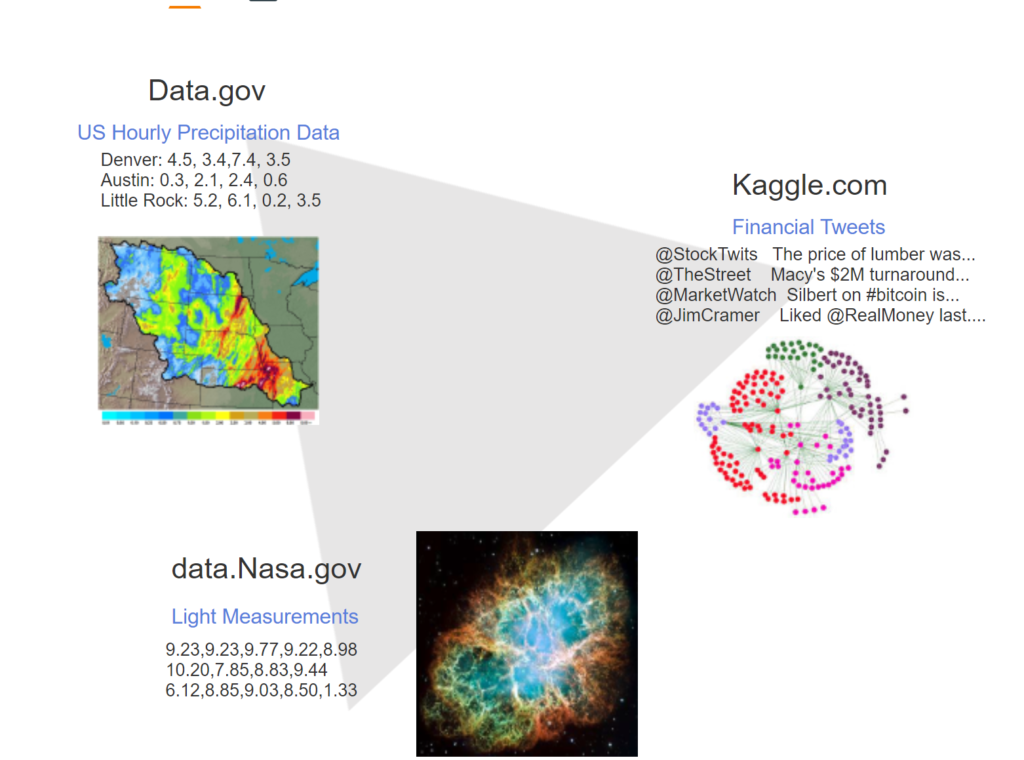
- Data.gov provides thousands of U.S. government data sets. Precipitation data can be used to visualize rainfall intensity.
- Kaggle.com allows users to find and publish data sets. The Financial Tweet data set can show who tweets on similar topics.
- data.Nasa.gov provides data sets in aerospace and other related sciences. A data set of light measurements describes astronomical phenomena.
Databases
A database is a collection of data in a structured format. In principle, databases can be stored on paper or even clay tablets. In practice, however, modern databases are invariably stored on computers. The database structure ensures that similar data is stored in a standardized manner.
Many modern databases contain trillions of bytes of data and support thousands of simultaneous users. Consequently, databases must be managed with sophisticated software tools:
- A database system, also known as a database management system or DBMS, is software that reads and writes data in a database. Database systems ensure data is secure, internally consistent, and available at all times. These functions are challenging for large databases with many users, so database systems are complex.
- A query language is a specialized programming language, designed specifically for database systems. Query languages read and write data efficiently, and differ significantly from general-purpose languages such as Python, Java, and C++.
- A database application is software that helps business users interact with database systems. Many databases are complex, and most users are not familiar with query languages. Consequently, direct database access is usually not feasible. Instead, programmers write applications to simplify the user experience and ensure data access is efficient and secure.
Database software is organized in layers. Applications interact with a query language on one layer, and a query language interacts with a database system on another layer. Other software layers, such as the operating system, are beyond the scope of this material.
Terminology
The term database sometimes refers to a database system rather than the data managed by the system. The meaning is usually clear from context. In this material, database is used both ways.
Database roles
People interact with databases in a variety of roles:
- A database administrator is responsible for securing the database system against unauthorized users. A database administrator enforces procedures for user access and database system availability.
- A database designer determines the format of each data element and the overall database structure. Database designers must balance several priorities, including storage, response time, and support for rules that govern the data. Since these priorities often conflict, database design is technically challenging.
- A database programmer develops computer programs that utilize a database. Database programmers write applications that combine database query languages and general-purpose programming languages. Query languages and general-purpose languages have significant differences, so database programming is a specialized challenge.
- A database user is a consumer of data in a database. Database users request, update, or use stored data to generate reports or information. Database users usually access the database via applications but can also submit queries directly to the database system.
For simple databases with a limited amount of data and few users, one person may assume several roles. Ex: The database administrator might also be a database designer or database programmer. For large, complex databases, each person usually takes on just one role.
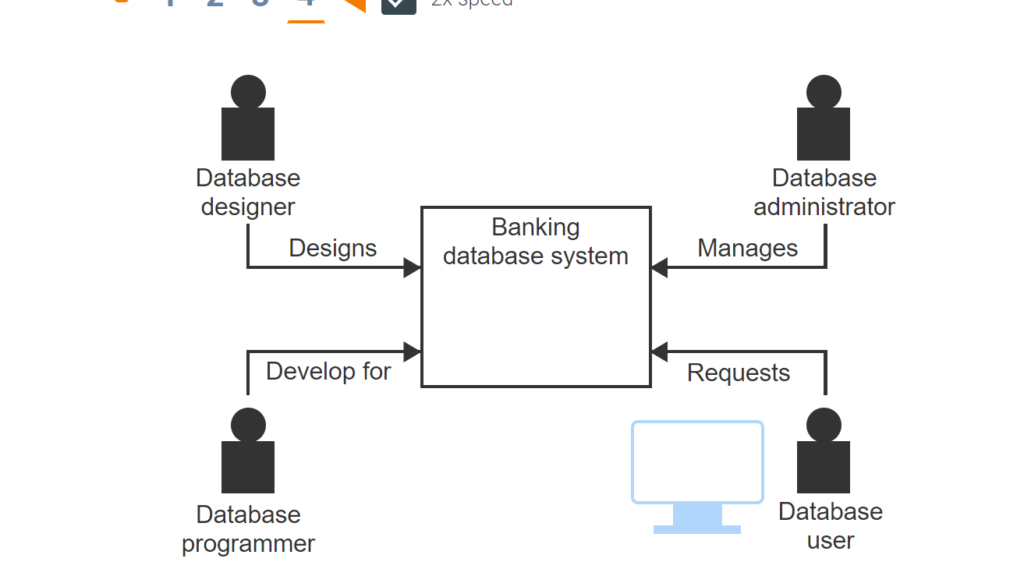
- The database designer establishes the structure of the database and determines the data to be collected and stored.
- The database administrator ensures the database is available and secure.
- A database programmer uses query languages and programming languages to develop applications for database users.
- Database users are the primary consumers of database data through applications or with query languages.
1.2 Database systems
File systems and database systems
Small databases that are shared by one or two users can be managed in a text file or spreadsheet. Text files and spreadsheets are inadequate, however, as databases grow in size, complexity, and use. Large, complex databases that are shared by many users have special requirements:
- Performance. When many users and applications simultaneously access large databases, query response time degrades rapidly. Database systems must maintain fast response times by structuring data properly on storage media and processing queries efficiently.
- Authorization. Many database users should have limited access to specific tables, columns, or rows of a database. Database systems must authorize individual users to access specific data.
- Security. Database systems must ensure authorized users only access permissible data. Database systems must also protect against hackers by encrypting data and restricting access.
- Rules. Database systems must ensure data is consistent with structural and business rules. Ex: When multiple copies of data are stored in different locations, copies must be synchronized as data is updated. Ex: When a course number appears in a student registration record, the course must exist in the course catalog.
- Recovery. Computers, database systems, and individual transactions occasionally fail. Database systems must recover from failures and restore the database to a consistent state without loss of data.
File systems are not designed for these demanding requirements. The limitations of file systems became clear as business adopted computers in the 1960s. Since then, database systems have replaced file systems for large databases with many users.
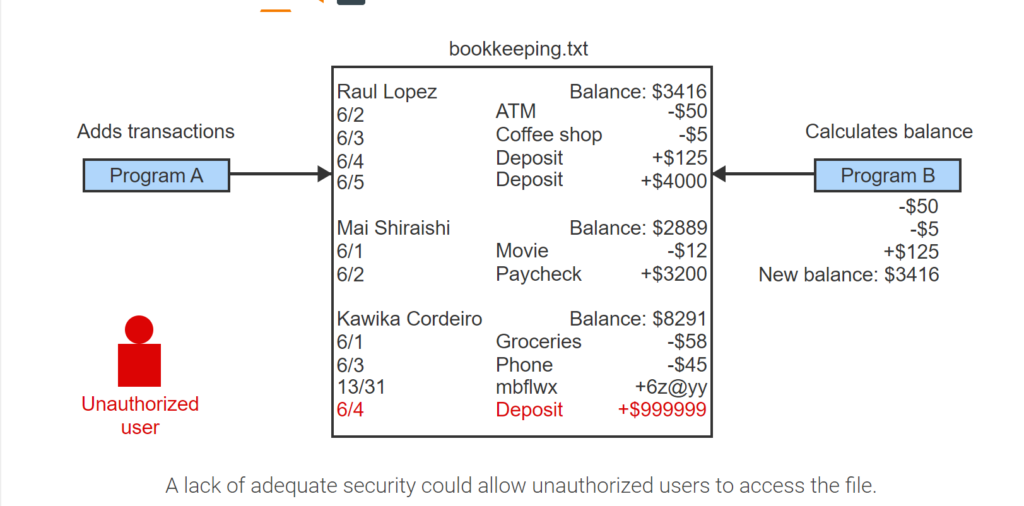
- A list of bank transactions is stored in the text file bookkeeping.txt. Each persons’ transactions include a date, type, and the amount of money paid or received.
- Two programs access the text file. One adds new transactions, and the other calculates account balances.
- When program A writes transactions quickly to the file, Program B misses the $4000 deposit and calculates Raul’s balance incorrectly.
- Program A may write an erroneous transaction.
- A lack of adequate security could allow unauthorized users to access the file.
Transactions
Transaction management is a particularly challenging requirement for database systems.
A transaction is a group of queries that must be either completed or rejected as a whole. Execution of some, but not all, queries results in inconsistent or incorrect data. Ex: A debit-credit transaction transfers funds from one bank account to another. The first query removes $100 from one account and the second query deposits $100 in another account. If the first query succeeds but the second fails, $100 is mysteriously lost. The transaction must process either both queries or neither query.
When processing transactions, database systems must:
- Ensure transactions are processed completely or not at all. A computer or application might fail while processing a transaction. When failing to process a transaction, the database system must reverse partial results and restore the database to the values prior to the transaction.
- Prevent conflicts between concurrent transactions. When multiple transactions access the same data at the same time, a conflict may occur. Ex: Sam selects a seat on a flight. Maria purchases the same seat in a separate transaction before Sam completes his transaction. When Sam clicks the ‘purchase’ button, his seat is suddenly unavailable.
- Ensure transaction results are never lost. Once a transaction completes, transaction results must always be saved on storage media, regardless of application or computer failures.
The above requirements are supported in sophisticated transaction management subsystems of most database systems.
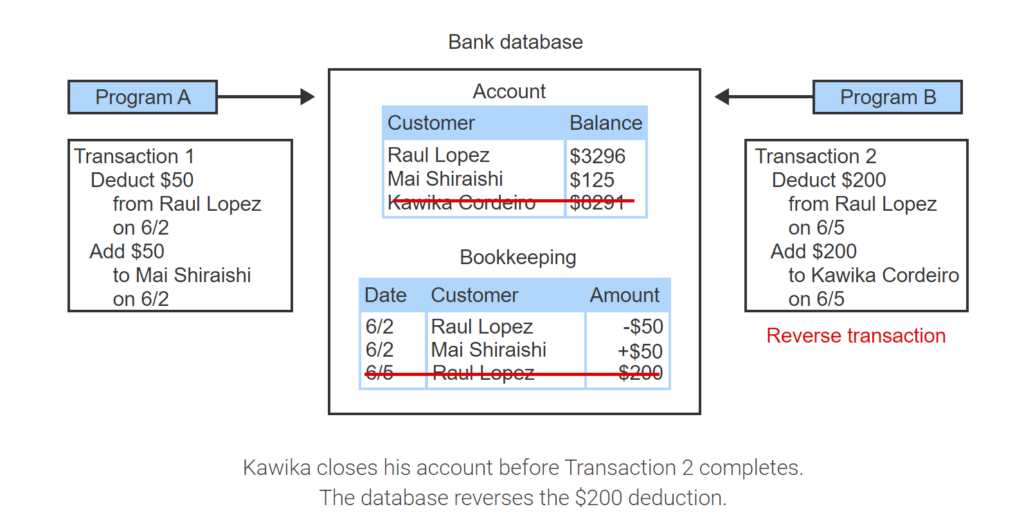
- Two programs access a bank database. The database tracks customer deposits, credits, and account balances.
- Program A requests the database transfer $50 from Raul to Mai.
- Transaction 1 deducts $50 from Raul’s account and adds $50 to Mai’s account.
- Program B requests that Raul transfer $200 to Kawika.
- $200 is deducted from Raul’s account.
- Kawika closes his account before Transaction 2 completes. The database reverses the $200 deduction.
Architecture
The architecture of a database system describes the internal components and the relationships between components. At a high level, the components of most database systems are similar:
- The query processor interprets queries, creates a plan to modify the database or retrieve data, and returns query results to the application. The query processor performs query optimization to ensure the most efficient instructions are executed on the data.
- The storage manager translates the query processor instructions into low-level file-system commands that modify or retrieve data. Database sizes range from megabytes to many terabytes, so the storage manager uses indexes to quickly locate data.
- The transaction manager ensures transactions are properly executed. The transaction manager prevents conflicts between concurrent transactions. The transaction manager also restores the database to a consistent state in the event of a transaction or system failure.
- The log is a file containing a complete record of all inserts, updates, and deletes processed by the database. The transaction manager writes log records before applying changes to the database. In the event of a failure, the transaction manager uses log records to restore the database.
- The catalog, also known as a data dictionary, is a directory of tables, columns, indexes, and other database objects. Other components use catalog information to process and execute queries.
Database systems have different capabilities, and component details vary significantly. Ex: Some database systems do not support transactions and therefore have no transaction manager. Ex: The storage manager implementation depends on the physical structure of data on storage media.
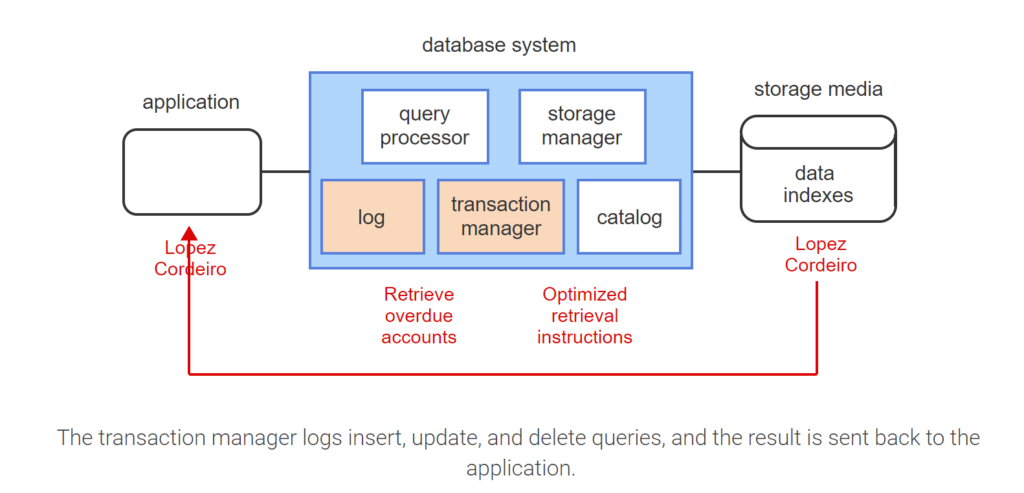
- A database system is composed of a query processor, storage manager, transaction manager, log, and catalog.
- An application sends queries to the query processor.
- The query processor uses information from the catalog to perform query optimization.
- The storage manager translates the query processor instructions into file-system commands and uses an index to quickly locate the requested data.
- The transaction manager logs insert, update, and delete queries, and the result is sent back to the application.
Products
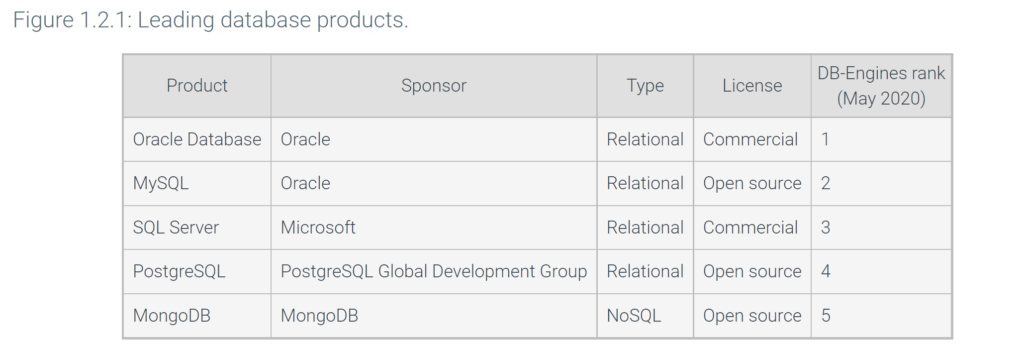
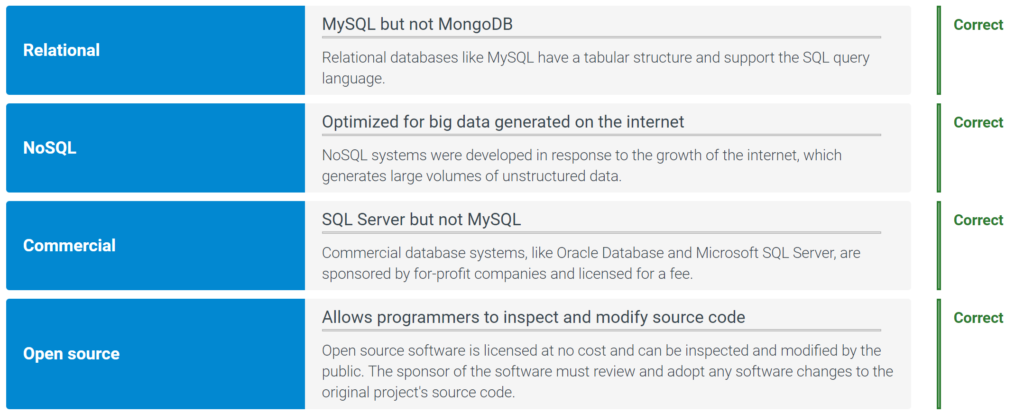
Most leading database systems are relational. A relational database stores data in tables, columns, and rows, similar to a spreadsheet. All data in a column has the same format. All data in a row represents a single object, such as a person, place, product, or activity.
All relational database systems support the SQL query language. SQL stands for Structured Query Language and includes statements that read and write data, create and delete tables, and administer the database system.
Relational systems are ideal for databases that require an accurate record of every transaction, such as banking, airline reservation systems, and student records. The growth of the internet in the 1990s generated massive volumes of online data, called big data, often with poorly structured or missing information. Relational systems were not initially designed for big data and, as a result, many non-relational systems have appeared since 2000. The newer non-relational systems are called NoSQL, for ‘not only SQL’, and are optimized for big data.
Prior to 2000, most database systems were commercial products, developed by for-profit companies and licensed for a fee. Since 2000, an alternative licensing model, called open source, has become popular. Open source software is software that anyone can inspect, copy, and modify with no licensing fee.
NoSQL and open source systems have proliferated, and hundreds of database systems are now available. The website db-engines.com ranks systems by tracking product references on social media, internet searches, job websites, and technical websites. Internet references are an imperfect measure of product utilization, but do provide a general indication of interest and activity.
1.3 Query languages
Common queries
A database system responds to queries written in a query language. A query is a command for a database that typically inserts new data, retrieves data, updates data, or deletes data from a database. A query language is a computer programming language for writing database queries.
- A bank database stores the names and balances for two accounts: Raul and Mai.
- An insert query inserts new data into the database. Ethan’s new account is inserted into the database.
- A retrieval query retrieves information from the database. The query retrieves the names of individuals that have a balance more than $3000.
- An update query changes existing data in the database. Raul’s balance is changed from 3300 to 4500.
- A delete query removes data from the database. Mai’s account is removed.
Terminology
The four common queries are sometimes referred to as CRUD operations, an acronym for Create, Read, Update, and Delete data.
Writing queries with SQL
Structured Query Language, or SQL, is the standard query language of relational database systems. The SQL standard is sponsored by the American National Standards Institute (ANSI) and the International Standards Organization (ISO). SQL is pronounced either ‘S-Q-L’ or ‘seekwəl’, but the preferred pronunciation is ‘S-Q-L’.
SQL was first developed at IBM in the 1970s as an experimental query language for a prototype relational database. At the time, IBM was the dominant computer company, so SQL became the dominant relational query language. Today, all relational database systems support SQL.
Terminology
The term NoSQL refers to a new generation of non-relational databases. NoSQL originally meant ‘does not support SQL’. However, many NoSQL databases have added support for SQL, and ‘NoSQL’ has come to mean ‘not only SQL’.
An SQL statement is a database command, such as a query that inserts, retrieves, updates, or deletes data:
- INSERT inserts rows into a table.
- SELECT retrieves data from a table.
- UPDATE modifies data in a table.
- DELETE deletes rows from a table.
The SQL language contains many other statements for creating and deleting databases, creating and deleting tables, assigning user permissions, and so on.
- A bank database has an Account table with three columns: ID, Name, and Balance.
- The Account table has two rows that store Raul and Mai’s account data.
- The INSERT statement adds a new row with Ethan’s account data.
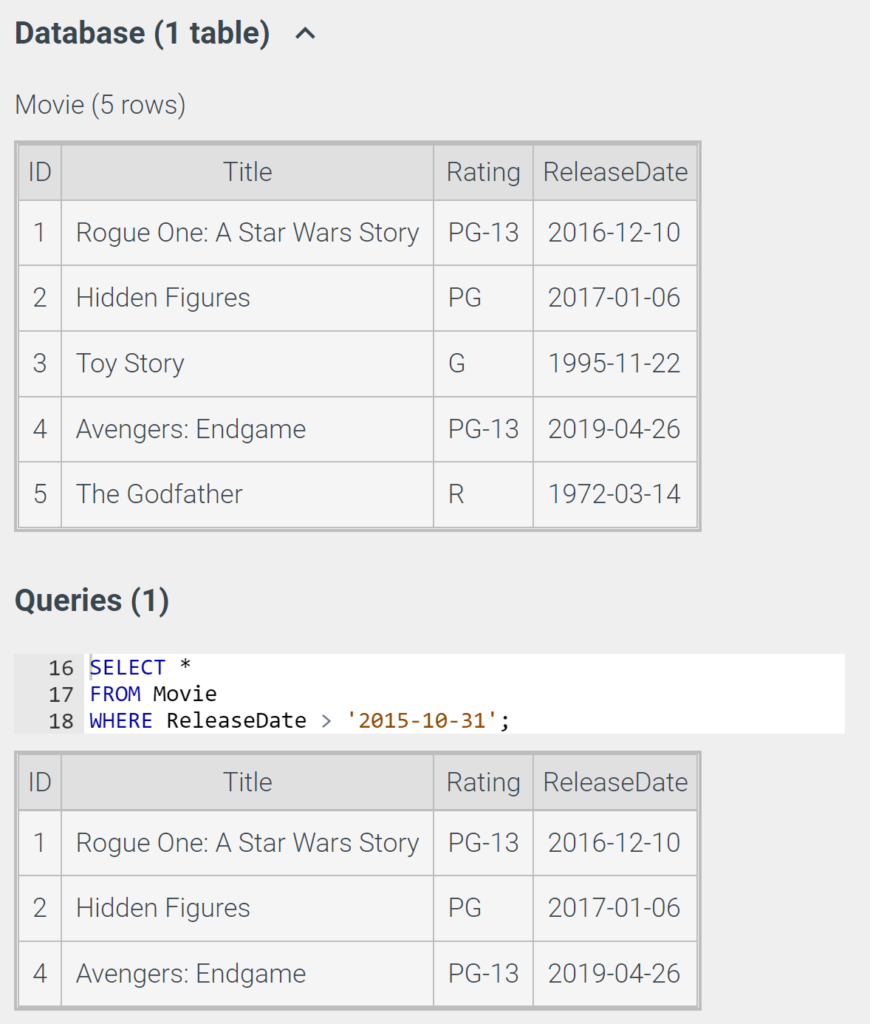
- The SELECT statement retrieves the names of accounts with a balance larger than $3000.
- The UPDATE statement change’s Raul’s balance from 3300 to 4500.
- The DELETE statement deletes Mai from the database.
Creating tables with SQL
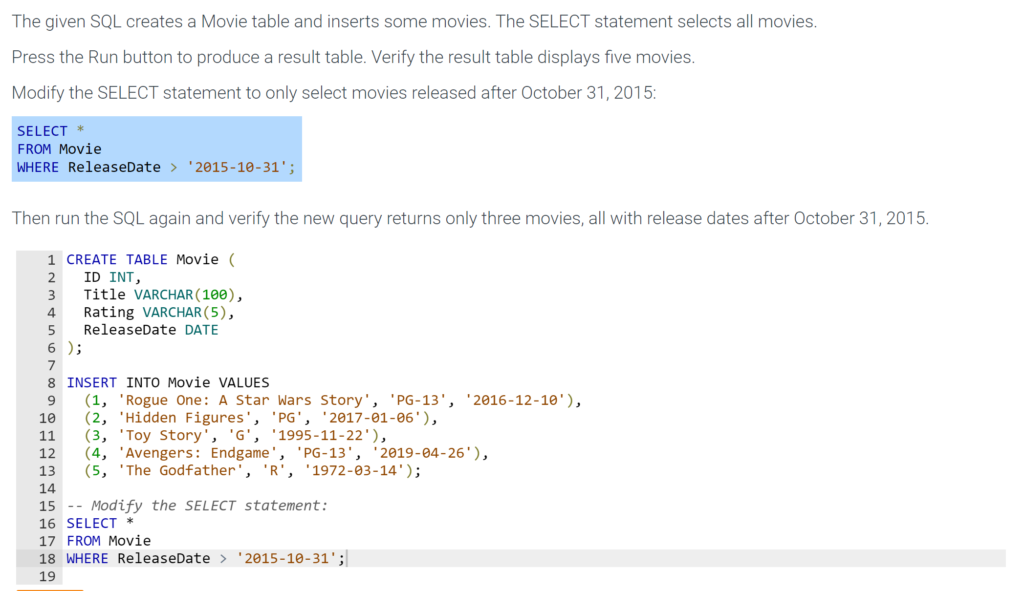
The SQL CREATE TABLE statement creates a new table by specifying the table and column names. Each column is assigned a data type that indicates the format of column values. Data types can be numeric, textual, or complex. Ex:
- INT stores integer values.
- DECIMAL stores fractional numeric values.
- VARCHAR stores textual values.
- DATE stores year, month, and day.
Some data types are followed by one or two numbers in parentheses, indicating the size of the data type. Ex: VARCHAR(10) indicates ten characters. DECIMAL(10, 3) indicates ten significant digits, including three after the decimal point.
1.4 Database design and programming
Analysis
A database design is a specification of database objects such as tables, columns, data types, and indexes. Database design also refers to the process used to develop the specification.
For small, simple databases, the database design process can be informal and unstructured. For large, complex databases, the process has three phases:
- Analysis
- Logical design
- Physical design
The analysis phase specifies database requirements without regard to a specific database system. Requirements are represented as entities, relationships, and attributes. An entity is a person, place, activity, or thing. A relationship is a link between entities, and an attribute is a descriptive property of an entity.
Terminology
Analysis has many alternative names, such as conceptual design, entity-relationship modeling, and requirements definition.
Entities, relationships, and attributes are depicted in ER diagrams:
- Rectangles represent entities. Entity names appear at the top of rectangles.
- Lines between rectangles represent relationships.
- Text inside rectangles and below entity names represent attributes.
ER diagrams are usually supplemented by textual descriptions of entities, relationships, and attributes.
Logical design
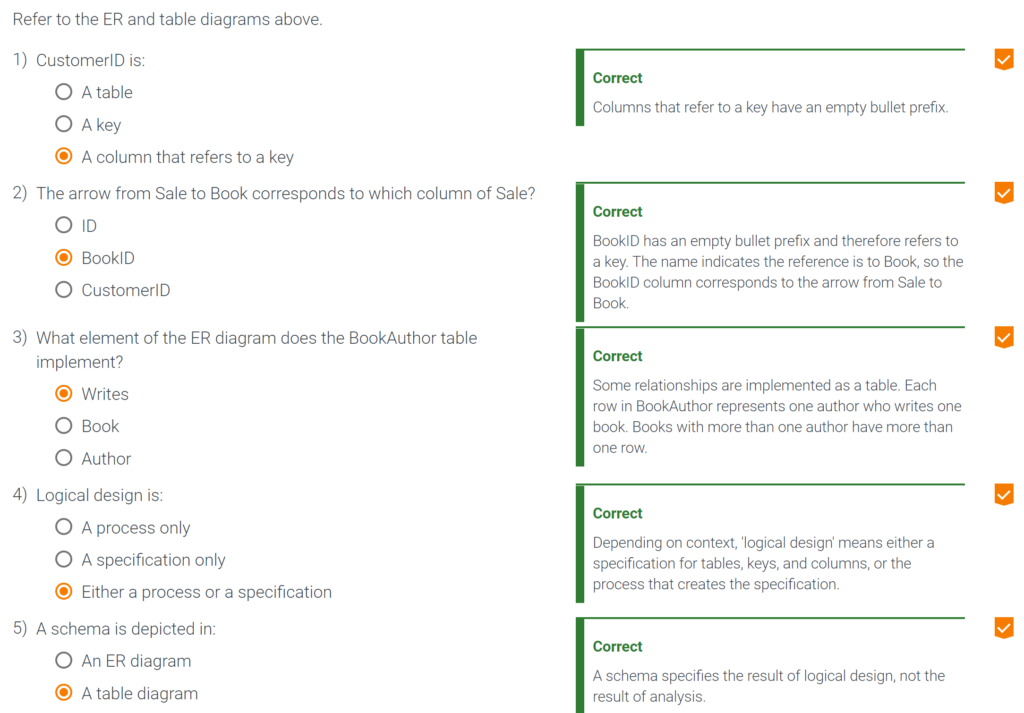
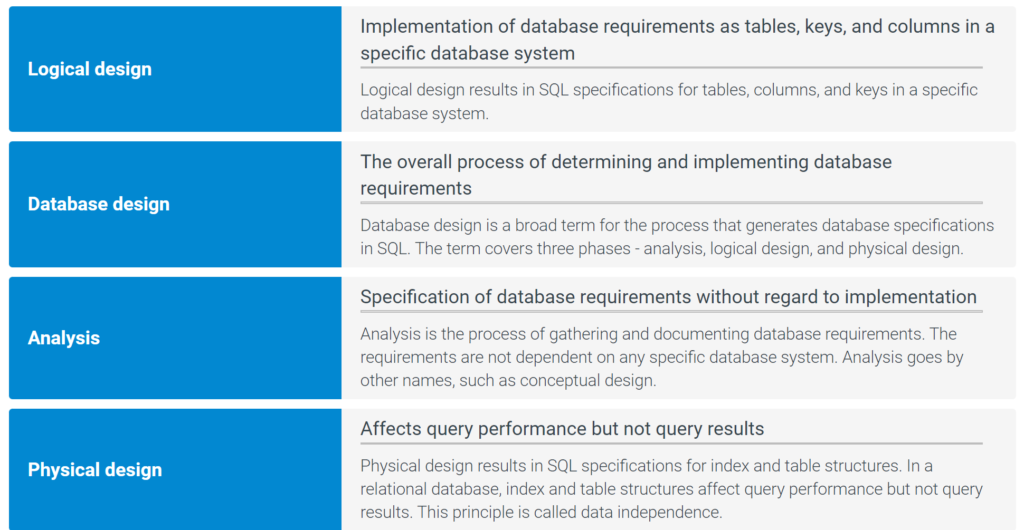
The logical design phase implements database requirements in a specific database system. For relational database systems, logical design converts entities, relationships, and attributes into tables, keys, and columns. A key is a column used to identify individual rows of a table. Tables, keys, and columns are specified in SQL with CREATE TABLE statements.
The logical design is depicted in a table diagram. Table diagrams are similar to ER diagrams but more detailed:
- Rectangles represent tables. Table names appear at the top of rectangles.
- Text within rectangles and below table names represents columns.
- Solid bullets (●) indicate key columns.
- Empty bullets (○) and arrows indicate columns that refer to keys.
The logical design, as specified in SQL and depicted in a table diagram, is called a database schema.
Physical design
The physical design phase adds indexes and specifies how tables are organized on storage media. Ex: Rows of a table may be sorted on the values of a column and stored in sort order. Physical design is specified with SQL statements such as CREATE INDEX and, like logical design, is specific to a database system.
Physical design can be depicted in diagrams. However, logical design is more important for database users and programmers, so physical design diagrams are not commonly used.
In relational databases, logical and physical design affect queries differently. Logical design affects the query result. Physical design affects query processing speed but never affects the query result. The principle that physical design never affects query results is called data independence.
Data independence allows database designers to tune query performance without changes to application programs. When database designers modify indexes or row order, applications run faster or slower but always generate the same results.
Prior to relational databases, most database systems did not support data independence. Performance tuning often forced time-consuming changes to applications. Data independence is a major advantage of relational databases and contributed to the rapid adoption of relational technology in the 1980s.
Programming
Because of data independence, relational database applications can be programmed before the physical design is in place. Applications may run slowly but will generate correct results.
SQL is the standard relational query language but lacks important programming features. Ex: Most SQL implementations are not object-oriented. To write a database program, SQL is usually combined with a general-purpose programming language such as C++, Java, or Python.
To simplify the use of SQL with a general-purpose language, database programs typically use an application programming interface. An application programming interface, or API, is a library of procedures or classes that links a host programming language to a database. The host language calls library procedures, which handle details such as connecting to the database, executing queries, and returning results. Ex: JDBC is a library of Java classes that access relational databases.
Dozens of database APIs are available. Each programming language supports a different API. Major programming languages like C++ and Java support several APIs.
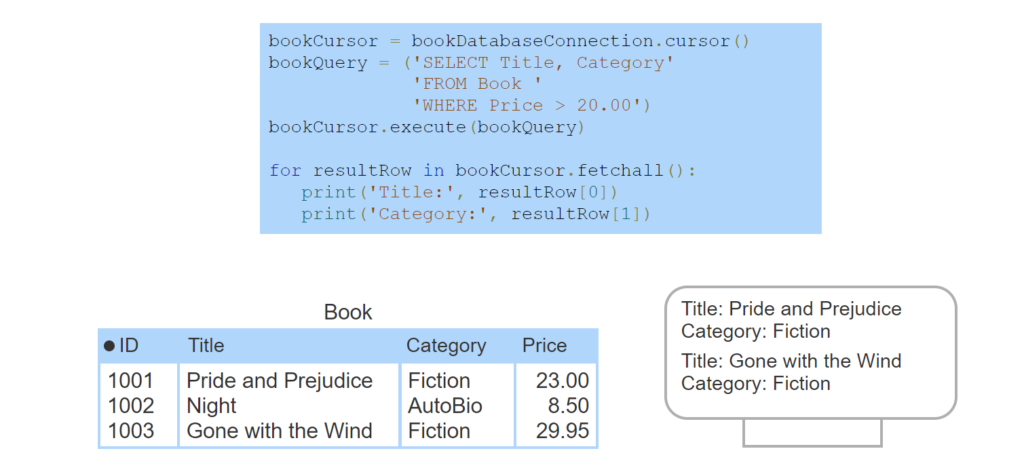
- The Book table contains book ID, title, category, and price.
- The Python code fragment uses the Connector/Python API to access the MySQL database system.
- A cursor object helps extract query results. The bookCursor object connects to the book database.
- bookQuery contains a SELECT query that selects the title and category for books that cost more than $20.00
- The execute() method executes the SELECT query.
- Each pass through the for loop fetches one query result row into the resultRow variable.
- resultRow has an element for each result column. The print statements print both elements.