18 pages 10 labs
6.1 User-defined function basics
Basics of functions
A function is a named list of statements.
- A function definition consists of the new function’s name and a block of statements. The function’s name can be any valid identifier.
- A function call is an invocation of a function’s name, causing the function’s statements to execute.
- A local variable is a variable declared in a function, which is then accessible only within that function.
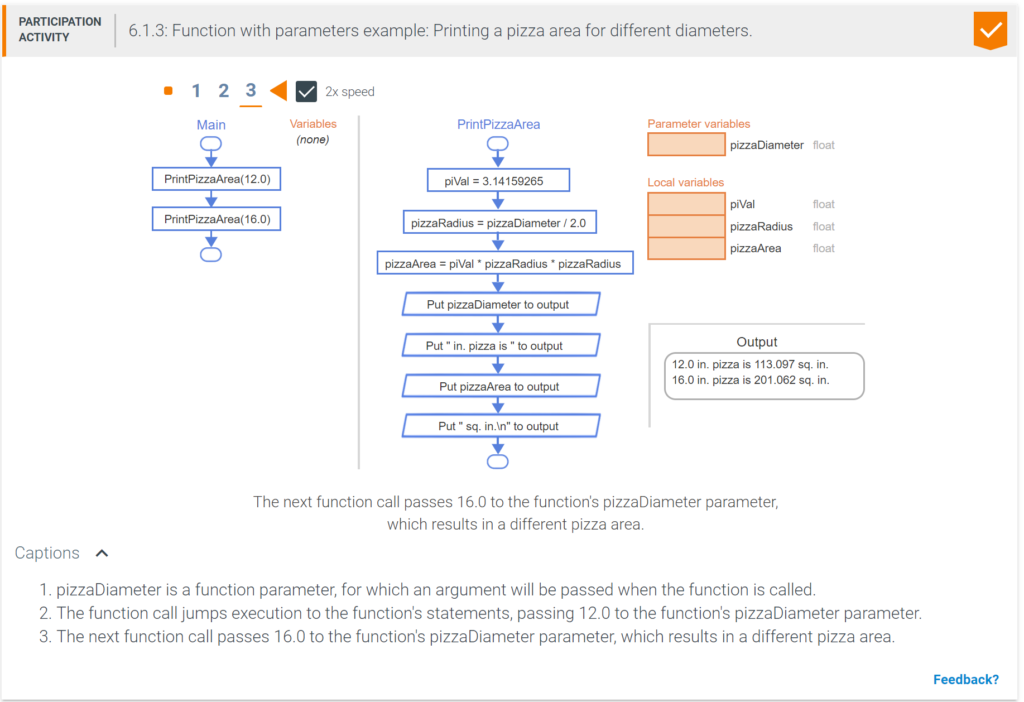
A program’s execution begins with the Main function. Below, the function call PrintPizzaArea() causes execution to jump to the function’s statements. Execution jumps back to the original location after executing the function’s last statement.
- The function call jumps execution to the function’s statements.
- When the function’s End statement is reached, execution jumps back to original call.
Parameters
A programmer can influence a function’s behavior via an input.
- A parameter is a function input specified in a function definition. Ex: A pizza area function might have diameter as an input.
- An argument is a value provided to a function’s parameter during a function call. Ex: A pizza area function might be called as PrintPizzaArea(12.0) or as PrintPizzaArea(16.0).
A parameter is like a variable declaration. Upon a call, the parameter’s memory location is allocated, and the parameter is assigned with the argument’s value. Upon return, the parameter is deleted from memory.
An argument may be an expression, like 12.0, x, or x * 1.5.
6.2 Return
Returning a value from a function
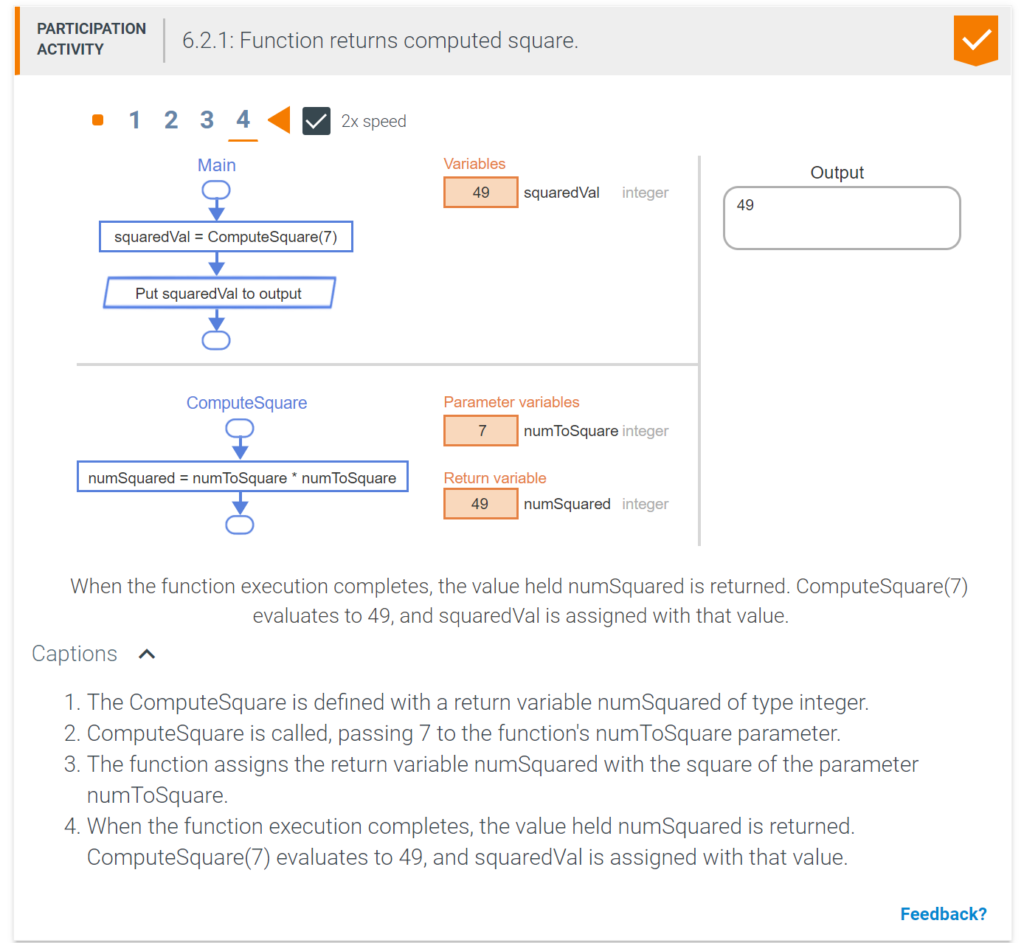
A function may return one value by assigning a return variable with the return value. Below, the ComputeSquare() function is defined to return the integer value held in the return variable numSquared. When the function reaches the End statement, the value held in numSquared is returned.
Calling functions in expressions
A function call evaluates to the returned value. Thus, a function call often appears within an expression. Ex: 5 + ComputeSquare(4) evaluates to 5 + 16, or 21.
A function that does not return a value cannot be used within an expression, instead being used in a statement like: OutputData(x, y)
Mathematical functions
A function is commonly defined to compute a mathematical function involving several numerical parameters and returning a numerical result. The program below uses a function to convert a person’s height in U.S. units (feet and inches) into total centimeters.
6.3 Reasons for defining functions
Improving program readability
Programs can become hard for humans to read and understand. Decomposing a program into functions can greatly aid program readability, helping yield an initially correct program, and easing future maintenance. Below, the Main function calls two other functions, rather than having too many details in Main itself, which keeps Main easy to read and understand. For larger programs, the effect is even greater.
Avoiding writing redundant statements
A function can be defined once, then called from multiple places in a program, thus avoiding redundant statements. Examples of such functions are math functions like AbsoluteValue that relieve a programmer from having to write several statements each time an absolute value needs to be computed.
The skill of decomposing a program’s behavior into a good set of functions is a fundamental part of programming that helps characterize a good programmer. Each function should have easily-recognizable behavior, and the behavior of the Main function (and any function that calls other functions) should be easily understandable via the sequence of function calls.
A general guideline (especially for beginner programmers) is that a function’s definition usually shouldn’t have more than about 20 statements, although this guideline is not a strict rule.
6.4 Functions with branches/loops
Example: Auction website fee calculator
A function’s statements may include branches, loops, and other statements. The following example uses a function to compute the amount that an online auction/sales website charges a customer who sells an item online.
6.5 Code: Functions
Function definitions
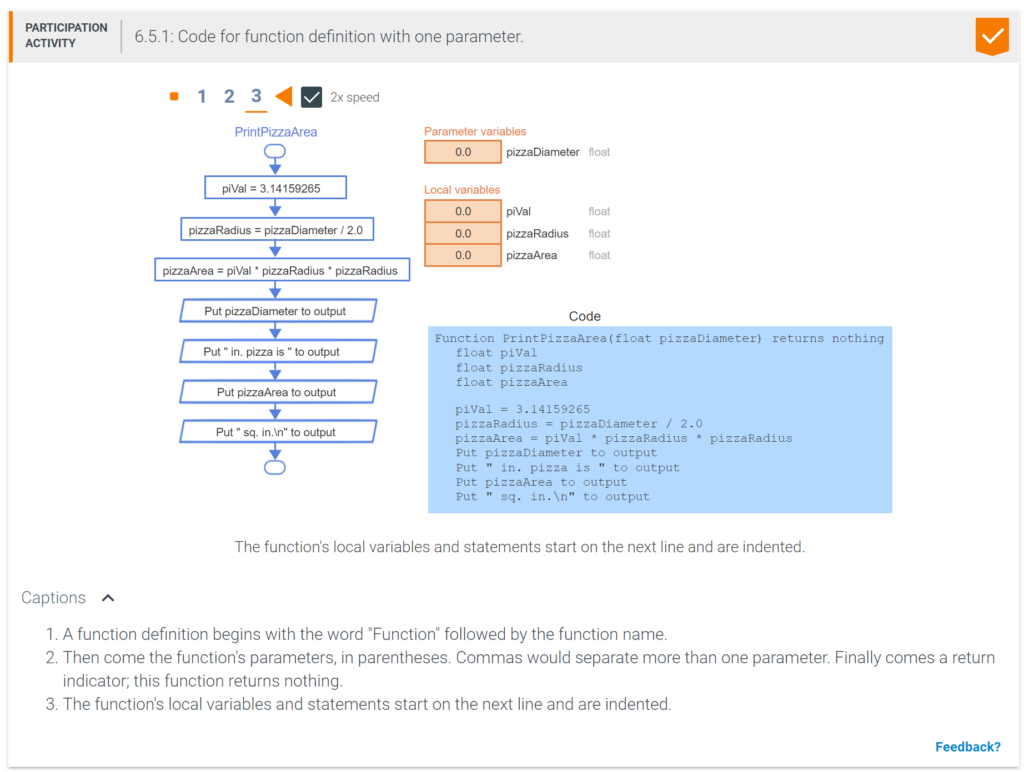
In Coral code, a function definition begins with the word Function, the function’s name, and a list of comma-separated parameters (if any) in parentheses, and a return indication. The parentheses are required even if no parameters exist. The function’s local variables and statements start on the next line and are indented.
Function calls
In code, a function call consists of the function name and parentheses, within which comma-separated arguments (if any) appear. A program’s execution starts by calling the Main() function, which may itself call other functions.
Main() functionIn earlier examples that had no function definitions other than Main(), only the statements within Main() were shown; the surrounding code to complete Main()’s definition was implicit.
Function PrintOp(integer num1, integer num2) returns nothing
integer result
Put num1 to output
Put “*” to output
Put num2 to output
Put “=” to output
result = num1 * num2
Put result to output
Function Main() returns nothing
integer evenNumber
integer oddNumber
evenNumber = 2
oddNumber = 7
PrintOp(evenNumber, oddNumber)
Another example:
Function OutputInfo(integer x, integer y) returns nothing
Put x to output
Put ” ” to output
Put y to output
Put “\n” to output
Function Main() returns nothing
OutputInfo(1, 3)
OutputInfo(6, 8)
another example
Function PrintStat(integer age, integer points) returns nothing
Put “Player is ” to output
Put age to output
Put ” and made ” to output
Put points to output
Put ” points\n” to output
Function Main() returns nothing
integer userAge
integer regularTimePoints
integer overtimePoints
userAge = 21
regularTimePoints = 31
overtimePoints = 4
PrintStat(userAge, regularTimePoints + overtimePoints)
Functions with a return value
If a function has a return value, the first line of the function definition defines the return variable’s type and name, as in: returns float heightCm. When the end of the function is reached, the value held in the return variable is returned.
If a function does not have a return value, the first line states: returns nothing.
Function HeightFtInToCm(integer heightFt, integer heightIn) returns float heightCm
   float cmPerInch
   integer inchesPerFeet
   integer totalInches

   cmPerInch = 2.54
   inchesPerFeet = 12

   // Total inches
   totalInches = (heightFt * inchesPerFeet) + heightIn
   // Convert inches to cm
   heightCm = totalInches * cmPerInch
Explicitly returning a value
In many programming languages, the return value is explicitly returned by a return statement, which returns the specified value and immediately exits the function.
Function CircleArea(float circleDiameter) returns float
   float circleRadius
   float piVal

   piVal = 3.14159265
   circleRadius = circleDiameter / 2.0
   circleArea = piVal * circleRadius * circleRadius

   return circleArea
6.6 Code: Functions with array parameters
Array parameters and arguments
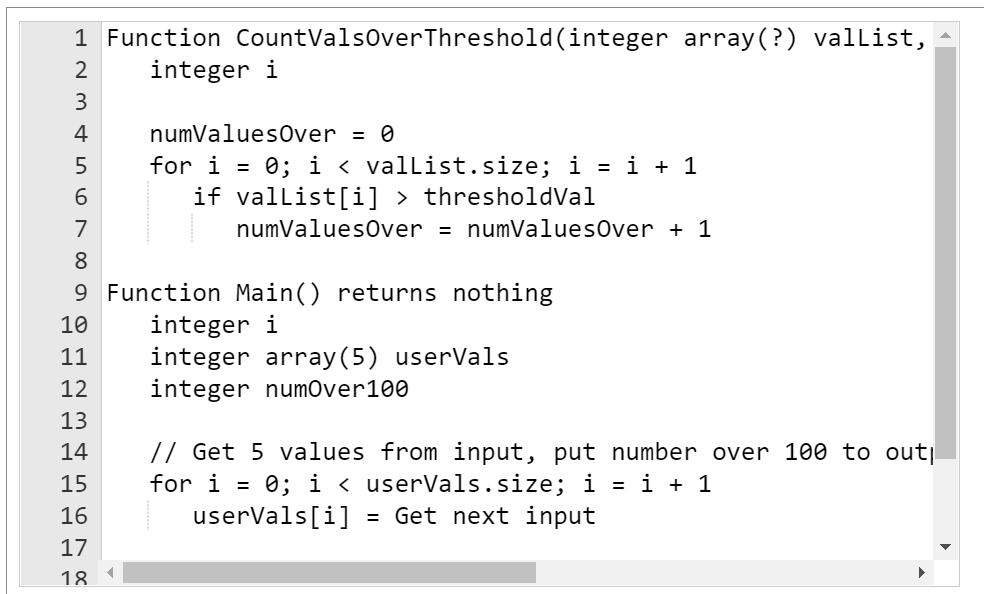
A function’s parameter may be defined as an array, by including the word array just as in a variable declaration. To call such a function, the function call’s argument passes only an array’s name. The function’s statements typically use the array.size value.
Function CountValsOverThreshold(integer array(?) valList, integer thresholdVal) returns integer numValuesOver
integer i
numValuesOver = 0
for i = 0; i < valList.size; i = i + 1 if valList[i] > thresholdVal
numValuesOver = numValuesOver + 1
Function Main() returns nothing
integer i
integer array(5) userVals
integer numOver100
// Get 5 values from input, put number over 100 to output
for i = 0; i < userVals.size; i = i + 1
userVals[i] = Get next input
numOver100 = CountValsOverThreshold(userVals, 100)
Put “Num over 100: ” to output
Put numOver100 to output

6.7 Functions summary
This chapter’s key points included:
- A function is a named list of statements.
- A function definition consists of the new function’s name and a block of statements. The function’s name can be any valid identifier.
- A function call is an invocation of a function’s name, causing the function’s statements to execute.
- A program’s execution begins with the Main function.
- A programmer can influence a function’s behavior via an input. A parameter is a function input specified in a function definition. An argument is a value provided to a function’s parameter during a function call.
- A parameter is like a variable declaration. Upon a call, the parameter’s memory location is allocated, and the parameter is assigned with the argument’s value.
- A function may return one value by assigning a return variable with the return value.
- A function call evaluates to the returned value. Thus, a function call often appears within an expression.
- Decomposing a program into functions can greatly aid program readability, helping yield an initially correct program, and easing future maintenance.
- Programmers commonly use functions to write programs modularly and incrementally.
- Modular development is the process of dividing a program into separate modules that can be developed and tested separately and then integrated into a single program.
- Incremental development is a process in which a programmer writes and tests a few statements, then writes and tests a small amount more (an incremental amount), and so on.
- A function can be defined once, then called from multiple places in a program, thus avoiding redundant statements.
- The skill of decomposing a program’s behavior into a good set of functions is a fundamental part of programming that helps characterize a good programmer.
- Each function should have easily-recognizable behavior, and the behavior of the Main function (and any function that calls other functions) should be easily understandable via the sequence of function calls.
- A function’s statements may include branches, loops, calls to other functions, and other statements.