Loop concept
People who have children may be familiar with looping around the block until a baby falls asleep.
- Parents may be familiar with this scenario: Driving home, baby is awake. Parents circle the block, hoping the baby will fall asleep.
- After first loop, baby is still awake, so parents loop again.
- After second loop, baby is asleep, so parents head home for a peaceful evening.
- The program computes an average of a list of numbers (a negative ends the list). The first input is 2, so the loop is entered. Sum becomes 2, and num is incremented to 1.
- The next input is 4. The loop is entered, so sum becomes 2 + 4 or 6, and num is incremented to 2.
- The next input is 9, so the loop is entered. Sum becomes 6 + 9 or 15, and num is incremented to 3.
- The next input is -1, so the loop is not entered. 15 / 3 or 5 is output.
4.2 Loop basics
Loop basics
A loop is a program construct that repeatedly executes a list of sub-statements (known as the loop body) while the loop’s decision expression evaluates to true. A loop starts with a decision statement with the loops expression. If the expression is true, the loop body’s statements are executed. At the loop body’s end, execution proceeds to the loop’s decision statement. Each execution of the loop body is called an iteration. Once entering the loop body, execution continues to the body’s end, even if the expression would become false midway through
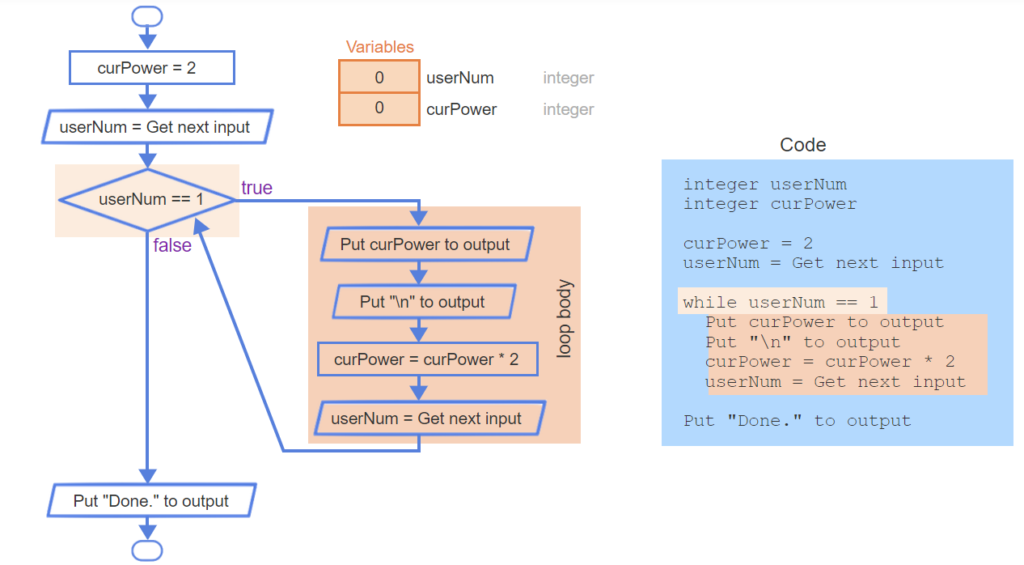
- A loop begins with a decision statement. The decision’s expression is evaluated. If true, the loop’s body is entered. Here, userNum is 1, so userNum == 1 is true.
- Thus, the loop body is executed, which outputs curPower’s current value of 2, doubles curPower, and gets the next input.
- Execution jumps back to the loop’s decision statement. userNum is 1 (the second input), so userNum == 1 is true, and the loop body executes (again), outputting 4.
- userNum is now 0, so userNum == 1 is false. Thus, execution jumps to after the loop, which outputs “Done”.
Getting input before a loop
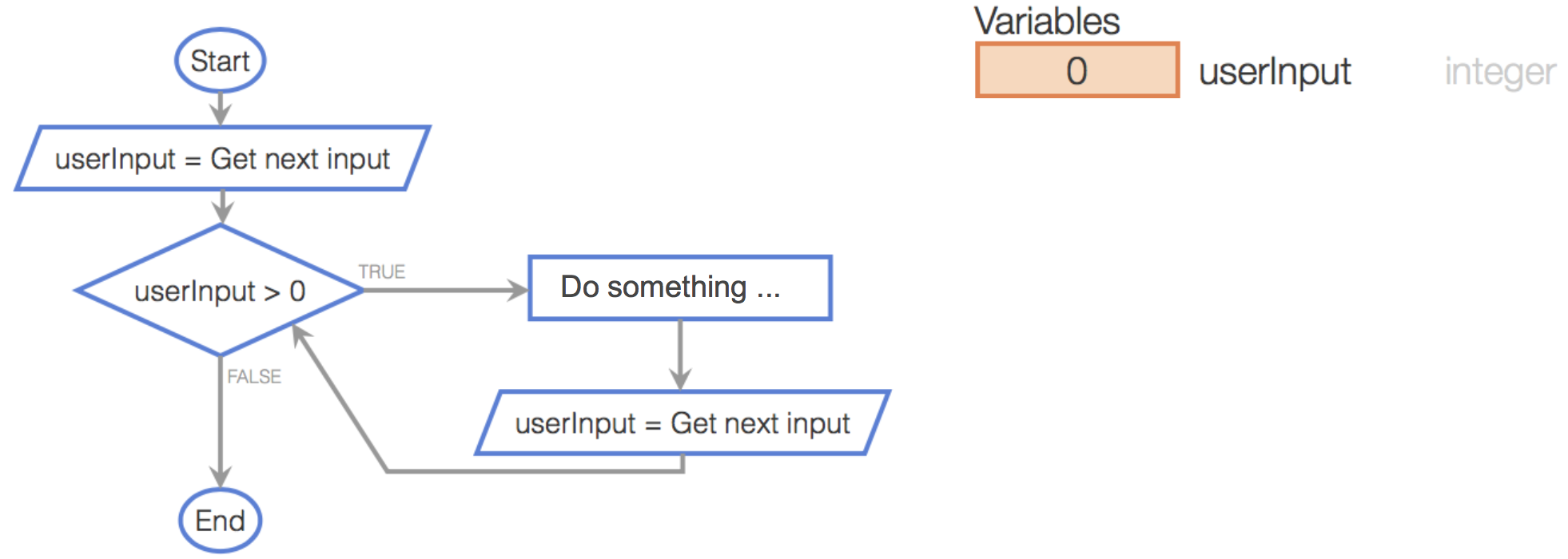
The above examples got user input into a variable only at the end of the loop body. The examples assigned that variable an initial value that always caused the loop body to execute the first time. Another common pattern gets that initial value from user input as well, thus getting input in two places: before the loop, and at the loop body’s end.Figure 4.2.1: Common pattern: Getting input before and at end of loop.
Common errors
A common error is to use the opposite loop expression than desired, like using x == 0 rather than x != 0. Programmers should remember that the expression describes when the loop should iterate, not when the loop should exit.
An infinite loop is a loop that never stops iterating. A common error is to accidentally create an infinite loop, often by forgetting to update a variable in the body, or by creating a loop expression whose evaluation to false isn’t always reachable.
- This loop gets userNum from input, iterating if userNum is 1. If the first input is 1, the loop body executes a first time.
- The loop body outputs numKids and updates numKids. But, the programmer forgot to get userNum from the input at the end of the loop body.
- Thus, userNum is still 1, and the loop body is executed again, and again, and again, with no way out. The loop is an “infinite loop”.
For the above example, a programmer must get in the habit of remembering to update needed variables at the loop body’s end.
A program with an infinite loop may print excessively, or just seem to stall. In the Coral simulator, the user can halt execution by selecting Pause or Exit Execution.
4.3 More loop examples
Example: GCD
The following is an example of using a loop to compute a mathematical quantity. The program computes the greatest common divisor (GCD) among two user-entered integers numA and numB, using Euclid’s algorithm: If numA > numB, set numA to numA – numB, else set numB to numB – numA. These steps are repeated until numA equals numB, at which point numA and numB each equal the GCD.
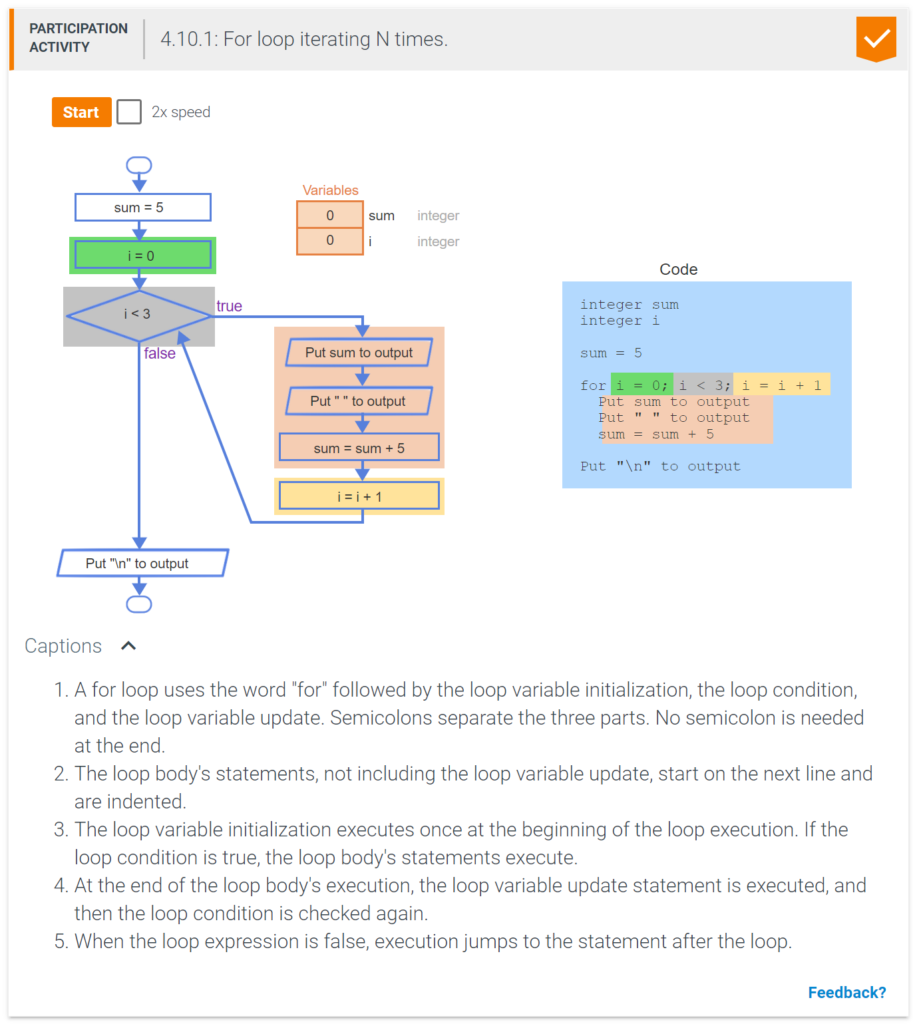
- A loop that iterates a specific number of times consists of three parts: a loop variable initialization, a loop expression, and a loop variable update.
- A loop that iterates 3 times, with i = 0, 1, and 2, initializes i with 0, uses the loop expression i < 3, and ends the loop body with i = i + 1.
- The loop iterates when i is 0, 1, and 2. After updating i to 3, the loop exits.
4.5 Loop examples iterating N times
Example: Finding the max
Analyzing data is a common programming task. A common data analysis task is to find the maximum value in a list of values. A loop can achieve that task by updating a max-seen-so-far variable on each iteration.
4.6 While and for loops
While and for loops
Because looping until done and looping N times are so common, most textual programming languages have specific constructs for these types of loops. A while loop is a loop that repeatedly executes the loop body while the loop’s expression evaluates to true. A for loop is a loop consisting of a loop variable initialization, a loop expression, and a loop variable update that typically describes iterating for a specific number of times.
Generally, a programmer uses a for loop when the number of iterations is known (like loop 5 times, or loop numItems times), and a while loop otherwise.Table 4.6.1: Choosing between while and for loops: General guidelines (not strict rules though).
| for | Number of iterations is computable before the loop, like iterating N times. |
| while | Number of iterations is not (easily) computable before the loop, like iterating until the input is ‘q’. |
4.7 Nested loops
A nested loop is a loop that appears in the body of another loop. The nested loops are commonly referred to as the inner loop and outer loop.
Nested loops have various uses. Below is a nested loop example that graphically depicts an integer’s magnitude by using asterisks, creating a bar chart. The inner loop is a for loop that handles the printing of the asterisks. The outer loop is a while loop that handles executing until a negative number is entered.
4.8 Code: While loops
while loops
In code, a loop can be written as a while loop: A while loop repeatedly executes the loop body while the loop’s expression evaluates to true.
- In code, a while loop uses the word “while” followed by the expression.
- The loop body’s statements start on the next line and are indented.
- If the expression is true, the loop body executes. After executing the loop body, execution jumps back to the while loop’s condition.
- When the loop expression is false, execution proceeds to the statement after the loop.
4.9 Do-while loop
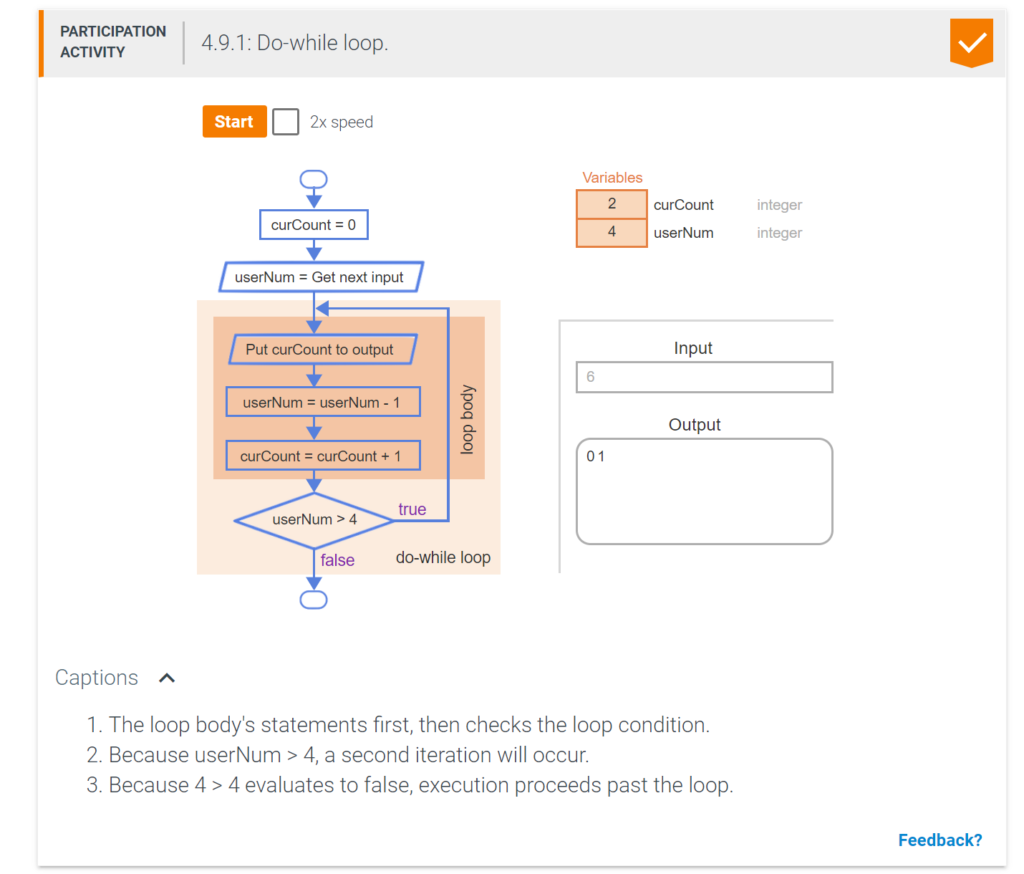
A do-while loop is a loop that first executes the loop body’s statements, then checks the loop condition. Compared to a while loop, a do-while loop is useful when the loop should iterate at least once.
4.10 Code: For loops
for loops
In code, a loop that iterates N times is typically described using a for loop. A for loop is a loop with three parts at the top: a loop variable initialization, a loop expression, and a loop variable update. A for loop describes iterating N times more naturally than a while loop.
for loops vs. while loops
Although for loops and while loops can achieve the same computations, to enhance program readability, programmers should use for loops when the number of iterations can be easily calculated beforehand, and while loops otherwise.
4.11 Loops summary
This chapter’s key points included:
- A loop is a program construct that repeatedly executes the loop’s statements (known as the loop body) while the loop’s expression is true; when false, execution proceeds past the loop. Each time through a loop’s statements is called an iteration.
- A common programming task is to use a loop to examine a list of values one value at a time and update variables along the way. Common tasks include computing an average, counting the number of negative items in a list, finding the maximum, etc..
- Programmers often use loops to execute a computation until a done condition is reached. That done condition is reached when the loop expression is false.
- An infinite loop is a loop that never stops iterating.
- A loop iterating a specific number of times commonly consists of three parts: a loop variable initialization before the loop, a decision statement for the loop expression, and a loop variable update at the end of the loop body.
- A while loop is a loop that repeatedly executes the loop body while the loop’s expression evaluates to true.
- A for loop is a loop that typically describes iterating for a specific number of times. A for loop consists of a loop variable initialization, a loop expression, and a loop variable update statement.
- A nested loop is a loop that appears in the body of another loop. The nested loops are commonly referred to as the inner loop and outer loop.
- A do-while loop is a loop that first executes the loop body’s statements, then checks the loop condition. Compared to a while loop, a do-while loop is useful when the loop should iterate at least once.