(13 Pages)
Computer program basics
Computer programs are abundant in many people’s lives today, carrying out applications on smartphones, tablets, and laptops, powering businesses like Amazon and Netflix, helping cars drive and planes fly, and much more.
A computer program consists of instructions executing one at a time. Basic instruction types are:
- Input: A program gets data, perhaps from a file, keyboard, touchscreen, network, etc.
- Process: A program performs computations on that data, such as adding two values like x + y.
- Output: A program puts that data somewhere, such as to a file, screen, network, etc.
Programs use variables to refer to data, like x, y, and z below. The name is due to a variable’s value “varying” as a program assigns a variable like x with new values.
- A basic computer program’s instructions get input, process, and put output. This program first assigns x with what is typed on the keyboard input, in this case 2.
- The program’s next instruction gets the next input, in this case 5.
- The program then does some processing, in this case assigning z with x + y (so 2 + 5 yields 7).
- Finally, the program puts z (7) to output, in this case to a screen.
A program is like a recipe
Some people think of a program as being like a cooking recipe. A recipe consists of instructions that a chef executes, like adding eggs or stirring ingredients. Likewise, a computer program consists of instructions that a computer executes, like multiplying numbers or outputting a number to a screen.
A first programming activity
Below is a simple tool that allows a user to rearrange some pre-written instructions (in no particular programming language). The tool illustrates how a computer executes each instruction one at a time, assigning variable m with new values throughout, and outputting (“printing”) values to the screen.
Mathematical thinking became increasingly important throughout the industrial age, to enable people to successfully live and work. In the information age, many people believe computational thinking, or creating a sequence of instructions to solve a problem, will become increasingly important for work and everyday life. A sequence of instructions that solves a problem is called an algorithm.
1.2 Programming basics
A first program
A flowchart is a graphical language for creating or viewing computer programs. Numerous flowchart languages exist. This material uses the Coral language: A language intended for learning to program. A simple Coral flowchart program is shown below.
A program is a list of statements, each statement carrying out some action and executing one at a time. In a Coral flowchart, each statement is in a graphical node, with different shapes for different types of statements.
- This program has two integer “variables” for holding values, named wage and salary.
- A program’s execution begins from the start node. The first statement assigns wage with 20.
- Execution proceeds to the next statement, which gets wage’s value, and multiplies by 40 and 52 to yield 41600. The statement assigns salary with that 41600.
- The next statement puts text “Salary is” to output. The last statement puts variable salary’s value, which is 41600, to output. Execution ends when “End” is reached.
For Coral, an interpreter runs a program’s statements. Run and execute are words for carrying out a program’s statements.
A program also has variables, each being a name that can hold a value, like a variable x holding the value 7.
One kind of statement assigns a variable with a value; x = 7 assigns x with 7. Variable x continues to hold 7 until x is assigned a different value.
Basic input
Programs commonly get input values, then perform some processing on that input and put output values to a screen or elsewhere. Input is commonly gotten from a keyboard, a file, fields on a web form or app, etc.
In a Coral flowchart, a parallelogram represents an input statement, written as: variable = Get next input. (A parallelogram also represents an output statement, described below). The input statement assigns the indicated variable with the next program input value.
Basic output: Text
In a Coral flowchart, a parallelogram represents an output statement, written as: Put item to output. (A parallelogram also represents an input statement, described above). The item may be a string literal or a variable. A string literal consists of text (characters) within double quotes, as in “Go #57!”. A character includes any letter (a-z, A-Z), digit (0-9), or symbol (~, !, @, etc.).
A cursor indicates where the next output item will be placed in the output. The system automatically moves the cursor after the previously-output item.
A newline is a special two-character sequence \n whose appearance in an output string literal causes the cursor to move to the next output line. The newline exists invisibly in the output.
- This program puts “Keep calm” at the current cursor location in output, which initially is the beginning of the output device. The cursor automatically goes to the text’s end.
- A \n in a string literal is a special two-character sequence that outputs a ‘newline’ character, which is invisible but moves the cursor to the start of the next line.
- The next output statement starts at the cursor’s current location, which is now the second line.
Outputting a variable’s value
Outputting a variable’s value is achieved via: Put x to output. No quotes surround variable x’s name.
The animation below replicates the first program example from earlier. The program combines outputting of both a string literal and a variable’s value; such combination is common. Note that the programmer put a space at the end of “Salary is “, causing the variable’s value to appear on the same line and separated from the text, as desired.
- This program has two integer “variables” for holding values, named wage and salary.
- A program’s execution begins from the start node. The first statement assigns wage with 20.
- Execution proceeds to the next statement, which gets wage’s value, and multiplies by 40 and 52 to yield 41600. The statement assigns salary with that 41600.
- The next statement puts text “Salary is ” to output. The last statement puts variable salary’s value, which is 41600, to output. Execution ends when “End” is reached.
Comments
A comment is text a programmer adds to a program, to be read by humans to better understand the code, but ignored by the program when executing. In Coral, a comment starts with // and includes all the subsequent text on that line. The comment must be on its own line.
- A comment begins with //. Programmers use comments to describe intent to another human reading the program.
- During execution, the comments are entirely ignored.
Whitespace
Whitespace refers to blank spaces (space and tab characters) between items within a statement, and to newlines. Whitespace helps improve readability for humans, but for execution purposes much whitespace is ignored. The following statements are equivalent, but the last one is most readable.
Figure 1.3.1: Much whitespace is ignored, so these statements perform the same computation, but the last statement is most readable.
w=x+y+z
w = x + y + z
w = x + y + z

A common practice is to use exactly one space before and after each operator, as in the last statement above.
Computing history
Computers originated from telephone switches in the early 1900’s. Engineers realized switches could be used for performing calculations, with a switch’s on position meaning 1 and the off position 0. The first computers, built in the 1940s, had thousands of switches and occupied entire rooms. Early computers were largely used for military purposes, like codebreaking in World War II, and calculating the paths of bombs.
Figure 1.4.1: 1940’s computers, with thousands of baseball-sized switches, occupied entire rooms. Shrinking switches led to single-chip computers. Today, that room-sized computer fits on a chip the size of a pinhead.
Engineers have reduced switch sizes by half about every 2 years, a trend known as Moore’s Law. Such halving is remarkable: Try repeatedly folding a sheet of paper in half and note how quickly the size shrinks (more than 7 paper folds isn’t even possible). By the 1970’s, an entire computer could fit on one coin-sized device known as a computer chip. Today, that 1940’s room-sized computer could fit on a chip smaller than a pinhead.
The information age
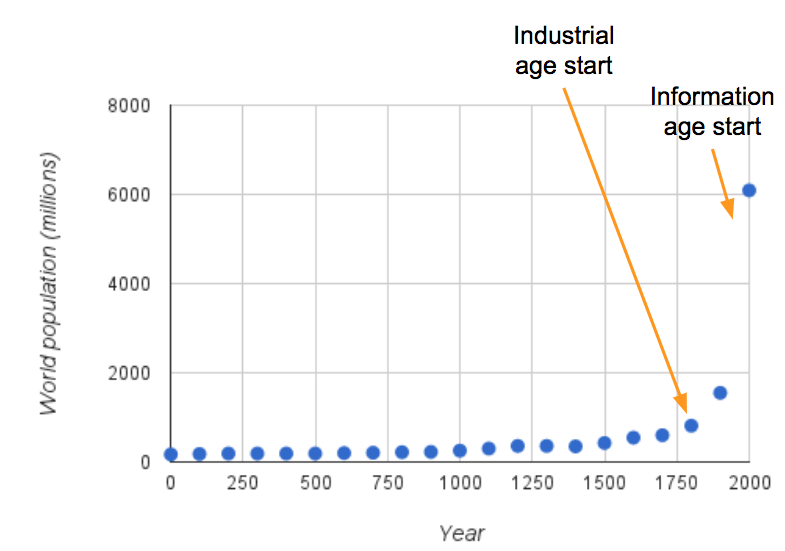
Computers are a recent phenomenon and yet are rapidly transforming human civilization. Civilization’s earlier agricultural age lasted many thousands of years. The industrial age starting in the late 1700’s transformed civilization towards manufacturing goods, leading to mass migration to cities, creation of strong nations, world wars, doubling of lifespans and thus dramatic world population growth (see figure below), and more. The information age just began in the 1990’s, with human activity shifting from traditional industry to creating/managing/using computerized information. In just those few years, how people work, learn, communicate, or entertain themselves has already changed dramatically, but the ultimate impact on civilization likely remains to be seen.Figure 1.4.2: The industrial age’s societal transformations include a population explosion. The information age has just begun transforming society again; its ultimate impact remains to be seen.
1.5 Computers all around us
Computer sales over time
Computers in the 1940s and 1950s were large expensive machines used for government and business purposes. Initially just a few existed worldwide, costing millions of dollars (in today’s dollar), weighing over a ton, and occupying entire rooms. Computer chips were invented in the 1950’s, and regularly improve to have more switches and lower costs. More businesses began purchasing computers in the 1960s and 1970s. In the 1980s, people began purchasing desktop and laptop computers for home use. In the 2000’s, computers began appearing in the form of electronic tablets, book readers, and smartphones too.
Embedded computers
An embedded computer is a computer inside another electrical device, like inside a TV, car, printer, thermostat, satellite, etc. Thus, beyond business and personal computing devices like PCs, tablets, and smartphones, computers exist invisibly in nearly anything electrical today too.
1.6 Representing information as bits
Bits
Computers are built from connected switches that, like light switches, are either on or off. On is called 1, and off is 0. A single 0 or 1 is called a bit. 1011 is four bits. Eight bits, like 11000101, are called a byte.
Humans represent information using characters and numbers like Z or 42. Computers need a way to represent characters and numbers using 0’s and 1’s. All data stored in a computer is represented using bits including numbers, letters, symbols, and multimedia (audio, images, video).
ASCII bit codes
A character is a letter (a, b, …, z, A, B, …, Z), symbol (!, @, #, …), or single-digit number (0, 1, …, 9). Basically, each item on a keyboard is a character (though more characters exist). Each character can be given a unique bit code. ASCII is a popular code for characters. Ex: Using ASCII, the letter Z would be stored in a computer as 1011010 (shown below as 101 1010; the space is just for readability in this material). Each bit code is sometimes written as an equivalent decimal number, discussed further below.
ASCII stands for American Standard Code for Information Interchange, and was developed in 1963. ASCII uses 7 bits per code, and has codes for 128 characters. Unicode is another character encoding standard, published in 1991, whose codes can have more bits than ASCII and thus can represent over 100,000 items, such as symbols and non-English characters.
Binary
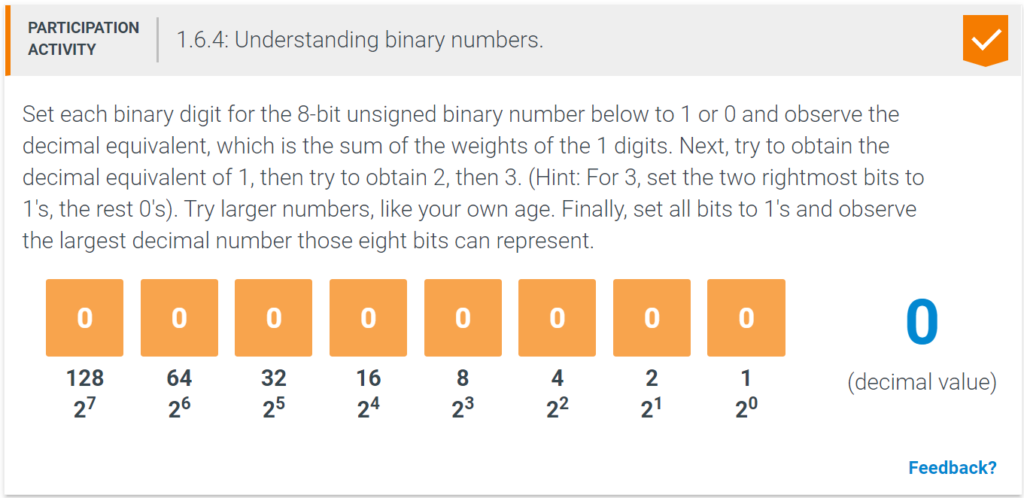
To perform many calculations, computers must represent numbers. Because early humans represented values using ten fingers, humans developed base ten numbers, known as decimal numbers (“dec” refers to ten). But computers can only represent two values (0 or 1), so base two numbers, known as binary numbers (“bi” refers to two) are used. Rather than each digit being a power of ten and holding 0-9, each digit is a power of two and holds 0 or 1. Experiment with the below tool to understand how 0’s and 1’s of an 8-bit binary number represent whole numbers from 0 to 255.
1.7 Problem solving
Programming languages vs. problem solving
A chef may write a new recipe in English, but creating a new recipe involves more than just knowing English. Similarly, creating a new program involves more than just knowing a programming language. Programming is largely about problem solving: Creating a methodical solution to a given task.
The following are real-life problem-solving situations encountered by one of this material’s authors.Example 1.7.1: Solving a (non-programming) problem: Matching socks.
A person stated a dislike for matching socks after doing laundry, indicating there were three kinds of socks. A friend suggested just putting the socks in a drawer, and finding a matching pair each morning. The person said that finding a matching pair could take forever: After pulling out a first sock, then pulling out a second, placing back, and repeating until the second sock matches the first, could go on for many times (5, 10, or more).
The friend provided a better solution approach: Pull out a first sock, then pull out a second, and repeat (without placing back) until a pair matches. In the worst case, if three kinds of socks exist, then the fourth sock will match one of the first three.
1.8 Why programming
Computing careers
While careers in law, medicine, and engineering have existed for hundreds of years, computers are relatively new so careers in computing are new too. Today, computing jobs are often ranked among the best jobs, in terms of opportunity, salary, work-life balance, job security, job satisfaction, work conditions, etc. Nearly all computing jobs require some training in programming; some jobs then focus on programming, while others instead focus on related aspects.
In a 2017 ranking (below), 2 of the top 15 jobs were computing jobs. In another ranking, 3 of the top 20 were computing jobs. Note: Rankings from different sources vary greatly; some have more engineers, human resources managers, data scientists, marketing, etc. Also, the specific ordering in a ranking is not usually substantial (like rank #2 vs. #5), and rankings change every year. However, note that most rankings consistently have several computing jobs in the top tier.
Table 1.8.1: Best jobs of 2017, per U.S. News and World Report.
| Ranking | Occupation | Description |
|---|---|---|
| 1-7 | Dentist, nurse practitioner, physician’s assistant, statistician, orthodontist, nurse anesthetist, pediatrician | |
| 8 | Computer systems analyst | Helps companies evaluate and improve computer systems: PCs, networking, servers, laptops, tablets, etc. |
| 9-12 | Obstetrician/gynecologist, oral surgeon, optometrist, occupational therapy assistant, | |
| 13 | Software developer | Designs computer programs, combining creativity and technical know-how, often working in teams. |
| 14,15 | Surgeon, nurse midwife |
Table 1.8.2: Computing jobs.
A wide variety of computing jobs exist.
| Occupation | Job Summary | Entry-level education | 2016 median pay |
|---|---|---|---|
| Computer and Information Research Scientists | Computer and information research scientists invent and design new approaches to computing technology and find innovative uses for existing technology. They study and solve complex problems in computing for business, medicine, science, and other fields. | Doctoral or professional degree | $111,840 |
| Computer Network Architects | Computer network architects design and build data communication networks, including local area networks (LANs), wide area networks (WANs), and intranets. These networks range from a small connection between two offices to a multinational series of globally distributed communications systems. | Bachelor’s degree | $101,210 |
| Computer Programmers | Computer programmers write code to create software programs. They turn the program designs created by software developers and engineers into instructions that a computer can follow. | Bachelor’s degree | $79,840 |
| Computer Support Specialists | Computer support specialists provide help and advice to people and organizations using computer software or equipment. Some, called computer network support specialists, support information technology (IT) employees within their organization. Others, called computer user support specialists, assist non-IT users who are having computer problems. | Varies: High-school degree and higher | $52,160 |
| Computer Systems Analysts | Computer systems analysts study an organization’s current computer systems and procedures and design information systems solutions to help the organization operate more efficiently and effectively. They bring business and information technology (IT) together by understanding the needs and limitations of both. | Bachelor’s degree | $87,220 |
| Database Administrators | Database administrators (DBAs) use specialized software to store and organize data, such as financial information and customer shipping records. They make sure that data are available to users and are secure from unauthorized access. | Bachelor’s degree | $84,950 |
| Information Security Analysts | Information security analysts plan and carry out security measures to protect an organization’s computer networks and systems. Their responsibilities are continually expanding as the number of cyberattacks increase. | Bachelor’s degree | $92,600 |
| Network and Computer Systems Administrators | Computer networks are critical parts of almost every organization. Network and computer systems administrators are responsible for the day-to-day operation of these networks. | Bachelor’s degree | $79,700 |
| Software Developers | Software developers are the creative minds behind computer programs. Some develop the applications that allow people to do specific tasks on a computer or other device. Others develop the underlying systems that run the devices or control networks. | Bachelor’s degree | $102,280 |
| Web Developers | Web developers design and create websites. They are responsible for the look of the site. They are also responsible for the site’s technical aspects, such as performance and capacity, which are measures of a website’s speed and how much traffic the site can handle. They also may create content for the site. | Associate’s degree | $66,130 |
For many non-computing jobs (dentist, attorney, nurse, business, etc.), computer usage is high, and thus knowledge of computing technology can yield strong advantages even for people not in a computing career.
Programming and non-computing jobs
Many people in non-computing jobs find that knowing some programming can benefit their careers. Some examples:
- Kelly majored in chemistry, and now works as a scientist in a pharmaceutical company. Kelly helps analyze clinical trials. Her company uses commercial statistical software, but she found that writing small custom programs yielded even better analyses. Her co-workers now come to her for help. She is glad she took a required programming class in college, though at the time she wasn’t as happy about it.
- Paul majored in civil engineering, and now authors technical content for a large company. Paul noticed that several authoring tasks done in Google Docs by the in-house 25-person authoring team could be automated. Building on the programming he learned in a required college course, Paul spent several hours online learning about Google Docs “add on” programming, and wrote two small add-ons. His add-on programs have become part of the standard authoring process for the entire team, who frequently thanks Paul for saving them time and relieving them of tedious tasks.
- Ethan majored in business, and got a job in sales operations of a Silicon Valley startup company. Building on the C++ programming he learned from a college course, he started tinkering with writing database query programs using “SQL”, and discovered he had a knack for it. His job duties have expanded to include running database reports, and he has automated dozens of reports via programming, helping people throughout the company be more productive.
- Eva (pictured above) majored in environmental science. She voluntarily took a programming course in college believing the knowledge/skills could be important to her. She took a job at a startup company doing various marketing tasks. She began to manage the company’s website, and realized that a few small programs could make the web pages dynamic and interactive. She wrote the code herself, which was reviewed and approved by the engineering team and became part of the company’s live website. She plans on getting a graduate degree in environmental science and expects programming will be useful in her research.
Precision, logic, and computational thinking
Many people find that programming encourages precise, logical thought that can lead to better writing and speaking, clearer processes, and more. The thought processes needed to build correct, precise, logical programs is sometimes called computational thinking and has benefits beyond programming.
- Common English usage may be vague. Are workers, painters, and contractors the same people or different? What exactly is white and brown?
- Programs use one word per item; no synonyms, no pronouns. In English, using “painters” consistently, and replacing “they” with “The IDs”, yields precise info.
- Policies and other documents often aren’t logical, with conflicting or missing info. How can a person 20 miles away take a taxi if they must drive? What about 100 miles?
- Programmers use precise structures like “If-else” statements. When used in English, the result is logical, unambiguous info. Some call this “computational thinking”.
New programmers often complain about how unforgiving programming is, but such attention to detail is one of the benefits of learning programming.
You’ve never done anything like this
Programming is different than nearly anything most students have done before. Most new programmers initially struggle. Just as a child learning to walk will stumble and fall, a student learning to program will stumble and fall many times as well.
Programs have literally transformed the world in the past few decades. But, correct programs are hard to create. Programs are among the most sophisticated of human creations. Even one wrong symbol in a program with thousands of characters can cause the program to entirely fail. And programs deal with doing long sequences of tasks over time. Such features are not common in other aspects of life.
Programming is a combination of concepts and skill. The skill part is not as common in other “academic” subjects. Learning to program thus requires practice. A student cannot watch a piano teacher play and then walk away playing piano. Writing correct expressions, properly formed if-else branches, correctly working loops, etc., requires repeated attempts, and, like the new piano player, lots of mistakes along the way.
Programming also requires a lot of mental energy. No easy steps exist for how to solve a given problem by writing a program. Many students are not accustomed to having to think so hard to solve a problem, instead looking to follow standard steps or just trying to “look up the answer”.
Students studying programming are about to embark on one of the most rewarding but also the most challenging of human endeavours. When stuck, students may wish to take solace that everyone struggles. Like the child learning to walk, each fall hurts, but know that each fall brings one closer to learning a powerful skill.
1.9 Why whitespace matters
Whitespace and precise formatting
For program output, whitespace is any blank space or newline. Most coding activities strictly require a student program’s output to exactly match the expected output, including whitespace. Students learning programming often complain:”My program is correct, but the system is complaining about output whitespace. “
However, correctness often includes output being formatted correctly.
- This program for online meetings not only does computations like scheduling and creating a unique meeting ID, but also outputs text formatted neatly for a calendar event.
- A calendar program may append more text after the meeting invitation text.
- The programmer of the invitation on the right wasn’t careful with whitespace. “Join meeting” is buried, the link is hard to see, and the “Phone” text is dangling at a line’s end.
- The programmer also didn’t end with a newline, causing subsequent text to appear at the end of a line, and even wrap to the next line. This output looks unprofessional.
Programming is all about precision
Programming is all about precision. Programs must be created precisely to run correctly. Ex:
- = and == have different meanings.
- Using i where j was meant can yield a hard-to-find bug.
- Declaring a variable as int when char was needed can cause confusing errors.
- Not considering that n could be 0 in sum/n can cause a program to fail entirely in rare but not insignificant cases.
- The difference between typing x/2 vs. x/2.0 can have huge impacts.
- Counting from i being 0 to i < 10 vs. i <= 10 can mean the difference between correct output and a program outputting garbage.
In programming, every little detail counts. Programmers must get in a mindset of paying extreme attention to detail.
Thus, another reason for caring about whitespace in program output is to help new programmers get into a “precision” mindset when programming. Paying careful attention to details like whitespace instructions, carefully examining feedback regarding whitespace differences, and then modifying a program to exactly match expected whitespace is an exercise in strengthening attention to detail. Such attention can lead programmers to make fewer mistakes when creating programs, thus spending less time debugging, and instead creating programs that work correctly.
1.10 Code and pseudocode
Basics
Pseudocode is text that resembles a program in a real programming language but is simplified to aid human understanding. “Code” is a term for a program written in text. “Pseudo” in this context means “similar to”. Commonly, each pseudocode text line corresponds to a program statement.
Compared to a real textual programming language like C, C++, Java, or Python, pseudocode may omit various details and/or use a more sentence-like notation to aid human understanding.
Compared to a graphical programming language, pseudocode’s text may be easier to create (just by typing) and to share than graphics. Also, pseudocode may be more compact, thus being easier to view and understand, especially for larger programs.
The Coral code language
This material introduces Coral: A simple language for learning to program. Coral has two versions: flowchart and code. Coral code looks like pseudocode, but follows rules that allow execution.
This material comes with a built-in Coral simulator. Below, a user can execute the code, and modify the code as well. The simulator automatically draws the corresponding flowchart
1.11 Introduction summary
This chapter’s key points included:
- A program consists of instructions (aka statements) that execute one at a time, to get input, process data, and put output.
- A program uses variables to hold data, which may change (“vary”).
- A flowchart depicts a program graphically, with a node for each statement.
- A program can output a variable’s value, or a string literal consisting of characters (including a newline character).
- A program can contain comments, which are for humans only and ignored when the program runs.
- Most whitespace (regular spaces or newlines) is ignored by a program, but good practice uses whitespace in a consistent way.
- The information age is quite new in human history. Changes are rapid.
- Computers surround us and computer numbers and usage continue to grow.
- Inside a computer, all data (characters, numbers, and more) is represented as bits: 0’s and 1’s.
- Programming is largely about problem solving, namely creating a methodical solution to a given task.
- Careers in computing are numerous, highly-rated, and growing. Non-computing jobs may benefit from programming.
- Pseudocode is an informal textual representation of a program intended for easy human understanding.